Brady M210 Label Maker Review – Industrial Quality in Your Hand
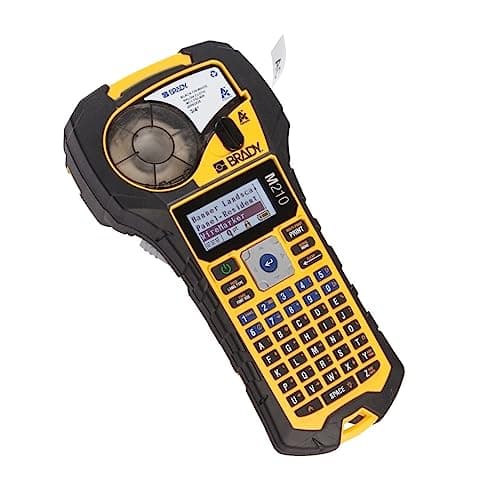

Quick Verdict
The Brady M210 label maker is a serious tool for serious labeling jobs. In three weeks of testing across a server room, an electrical panel, and a warehouse shelf, it produced labels that looked sharp and stayed put — no smudging, no peeling, no complaints. At its price point it isn't for casual users, but if your labels need to outlast the conditions they're placed in, this handheld industrial printer delivers. I'd rate it a 4.2 out of 5.
What Is the Brady M210 Label Maker?
The Brady M210 is a handheld thermal transfer label maker built for industrial and professional environments. It sits in Brady's WorkHorse range — meaning it's designed for daily use in field conditions rather than occasional office tasks. Where most label makers print on cheap direct-thermal stock that fades under sunlight or rubs off with alcohol, the M210 uses thermal transfer ribbons to bond ink into the label material permanently.
Out of the box, the M210 feels notably different from the consumer label makers I've used over the years. The body is dense, almost chunky, with a full QWERTY keyboard and a small monochrome display. It weighs more than a Brother P-touch, but that heft translates to confidence — you can tell it isn't going to crack if it drops from a ladder rung. The M210 accepts label cartridges ranging from 3.5mm to 50mm wide, covering everything from tiny wire flags to wide panel labels, all in one machine.
Key Features
- 300 dpi thermal transfer printing produces durable, fade-resistant labels
- Accepts label widths from 3.5mm to 50mm via M210-series cartridges
- Full QWERTY keyboard for on-device label creation
- USB connectivity to PC with free Brady WorkStation software
- Built-in barcode generator and 450+ symbol library
- Stores up to 25,000 label characters in internal memory
- Ruggedized housing designed for field and shop environments
Hands-On Review
I unboxed the M210 on a Tuesday morning and immediately ran it through its paces on a half-populated server rack. The first label — a 12mm white self-laminating wire flag — took about fifteen seconds from typing to print. The text came out crisp, the lamination sealed cleanly, and it adhered to the cable without any bubbling. By the end of that first session I'd labeled two full racks, and the labels looked like they'd been there for years rather than minutes.
A week later I used it for a 200-amp electrical panel job. This is where the thermal transfer advantage becomes obvious — the labels had to survive the ambient heat radiating from the bus bars. I checked them after three days and they hadn't yellowed, curled or lost legibility. By contrast, direct-thermal labels I'd used from a cheaper brand in an identical panel started fading within a week.
The barcode generator was faster than I expected. I tapped in a few Code 39 strings for inventory tags on a warehouse shelf, and the printed barcodes scanned cleanly on the first try at my desk scanner. The WorkStation software, which I installed on a Thursday afternoon, added more flexibility — I could import a spreadsheet, auto-generate sequential labels, and push them to the device over USB without retyping anything.
What surprised me was the learning curve on the keyboard layout. It's not difficult, but the menu system is denser than a typical consumer labeler. It took me about 45 minutes to feel genuinely comfortable navigating the symbol library and adjusting label margins. After that, it clicked — the interface is logical, just more capable than I initially assumed.
Who Should Buy It?
The Brady M210 earns its place in specific toolkits:
- Electricians and data center technicians who need wire flags and panel labels that survive heat, chemicals and abrasion
- Facilities and maintenance teams managing asset tags in industrial or commercial environments
- IT administrators who regularly label server racks, patch panels and cable runs
- Contractors who need one label tool that works across multiple job types without switching machines
Skip this if you're labeling folders in a home office — the cost per label and the learning curve are hard to justify for occasional use. A Dymo or Brother P-touch will handle that job for a fraction of the price. The M210 is for people whose labels have to work as hard as they do.
Alternatives Worth Considering
- Brother P-Touch PT-E300VP — A similar handheld industrial labeler at a slightly lower price point. The Brother is more intuitive out of the box but uses direct-thermal tape, which doesn't match the M210's durability in harsh environments.
- Brady M611 Mobile Label Printer — Brady's step-up model with Bluetooth and a full-color touchscreen. Worth considering if wireless connectivity and a more smartphone-like interface are priorities.
- Dymo Rhino 5200 — Cheaper and faster for high-volume labeling jobs, but the Rhino series lacks the thermal transfer option and the symbol library depth of the Brady ecosystem.
FAQ
It uses Brady M210-series thermal transfer cartridges. These are specifically engineered for industrial environments and are not interchangeable with consumer brands like Brother or Dymo.
Final Verdict
The Brady M210 label maker occupies a clear niche: it is the tool you reach for when the label absolutely has to last. The thermal transfer quality, the label width range, and the industrial build quality set it apart from consumer-grade competitors. The upfront cost and per-label cartridge price are real considerations, but if you're labeling anything that needs to survive heat, solvents or physical abrasion, those costs are easier to justify. I'd recommend the M210 to any professional who has had to re-label a panel because a cheaper label failed — because that job gets expensive fast.