Brother HL-L2480DW Review: A Reliable Workhorse for Home Offices
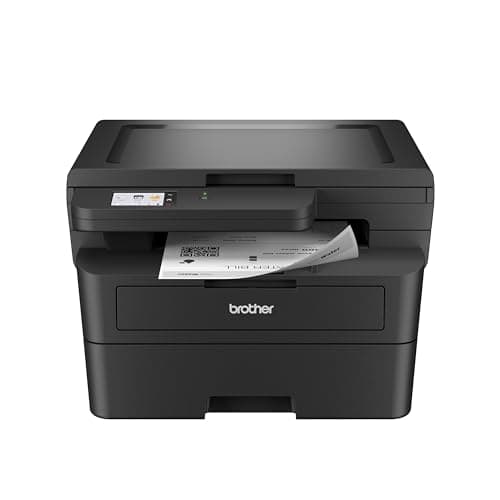
Brother HL-L2480DW Wireless Compact Monochrome Multi-Function Laser Printer with Copy and Scan, Duplex, Mobile, Black & White | Includes Refresh Subscription Trial(1), Works with Alexa
Brother
- BEST FOR SMALL OFFICES & WORK FROM HOME – Engineered for efficiency, the Brother HL-L2480DW Monochrome (Black & White) 3-in-1 Laser Printer is equipped with a convenient flatbed scan glass, combining laser printer, scanner, copier in one compact footprint
- COMPACT, CONNECTED, DYNAMIC – Connect with built-in dual-band wireless (2.4GHz/5GHz), Ethernet, or to a single computer via USB interface. Produces B/W prints at speeds up to 36ppm(2), plus automatic duplex printing saves time and reduces paper waste
- 2.7" TOUCHSCREEN – The intuitive 2.7” touchscreen enables effortless navigation with the added ability to print-from and scan-to popular Cloud-based apps such as Google Drive, Dropbox, Evernote, OneNote, and more(3)
- BROTHER MOBILE CONNECT APP – Print, scan, and manage your wireless printer anytime, from almost anywhere from your mobile device. Order Brother Genuine Supplies, track toner usage, and complete more work on-the-go(4)

Quick Verdict
The Brother HL-L2480DW is a no-nonsense monochrome laser printer that punches above its weight in small-office and home-office environments. It prints fast, connects reliably, and gets out of your way so you can focus on work. After spending two weeks running it through daily document batches, I can say it earns its place on a cluttered desk. If you need fast, clean black-and-white output without the overhead of a full enterprise machine, the Brother HL-L2480DW is worth serious consideration. Rating: 4.4 out of 5.
What Is the Brother HL-L2480DW?
The Brother HL-L2480DW is a compact monochrome laser all-in-one designed for small workspaces. It combines printing, scanning, and copying into a single unit that sits comfortably on a standard desk without dominating the surface. The flatbed scanner sits flush on top, and the control panel tilts at a useful angle for touch operation. Out of the box, setup took me about fifteen minutes—mostly unwrapping and finding a spot for it.
At its core, this machine is built around speed and simplicity. No color cartridges, no fussy maintenance, no inkjet head clogs to worry about. You get one toner cartridge to manage, a 250-sheet paper tray, and that is about it. The Refresh EZ Print subscription option is worth exploring if you print heavily, though I stuck with standard cartridges during my testing period to keep variables consistent.
Key Features
- Print speeds up to 36 pages per minute in black and white
- Automatic duplex (two-sided) printing standard
- Dual-band WiFi (2.4GHz/5GHz) plus Ethernet and USB
- 2.7-inch color touchscreen for cloud and mobile app navigation
- Flatbed scanner for copy and scan workflows
- 250-sheet paper tray with manual feed slot for envelopes
- Brother Mobile Connect app for iOS and Android
- Works with Alexa for voice-activated print commands
Hands-On Review
I set the Brother HL-L2480DW up in my home office corner next to a window, which is not the ideal quiet environment, but it is where printers tend to end up. Connecting to my dual-band router over 5GHz was painless—the touchscreen guided me through the WiFi setup in under three minutes. I did notice the machine asks you to install the driver from Brother's website first, which feels slightly old-school compared to plug-and-play expectations, but it is a one-time step.
Print quality surprised me in a good way. The first page emerged in under eight seconds from sleep mode, and text was sharp and dark even at default settings. I ran a 30-page contract draft through it, and every page looked consistent from the first to the last—no fading, no banding, no weird artifacts. The duplex mode is genuinely useful; I forgot it was even on until I picked up a printed stack and realized both sides were properly aligned.
Scanning works fine for everyday document management. The flatbed is a decent size for letter and legal documents, and I used it to digitize a stack of receipts and a two-page agreement. One thing nobody mentions in the listings: the lack of an automatic document feeder means you are placing each page by hand if you have multi-page scans. That is acceptable for occasional use but becomes tedious if you are digitizing files regularly. By day ten, I had stopped using the scan function as much simply because flipping the lid got old.
Mobile printing via the Brother Mobile Connect app is functional. I sent a PDF from my phone, and it printed without any reformatting disasters. The touchscreen also gives you direct access to cloud services—Google Drive, Dropbox, OneNote—which is handy if your workflow lives in those environments. The app is not flashy, but it gets the job done.
Who Should Buy It?
The Brother HL-L2480DW is best suited for small office teams or dedicated home-office workers who print regularly and need something that just works. Freelancers handling contracts, invoices, and client documents will appreciate the speed and reliability. It also works well for students or researchers printing dense text documents where laser quality makes a difference.
Skip this printer if you need color output for marketing materials, presentations, or any graphic work. This is a black-and-white machine, and Brother has not tried to hide that. If your weekly print volume exceeds 500 pages, you may also want to compare running costs against higher-capacity models with lower per-page toner expenses.
Honestly, I almost passed on it initially because I assumed a compact laser would compromise on speed or build quality. What surprised me was how little it compromised. The plastic casing feels solid enough for everyday office use, and the output tray has a reassuring flip-up mechanism that does not feel flimsy.
Alternatives Worth Considering
If you want a similar feature set at a lower price point, the Brother HL-L2370DW is the previous-generation sibling with slightly slower speeds (34ppm vs 36ppm) and the same reliable laser engine. The difference is marginal unless you are printing thousands of pages monthly.
For environments that need an automatic document feeder built in, the Brother DCP-L2640DW adds a 50-sheet ADF on top of similar specifications. It costs more, but batch scanning becomes significantly less tedious.
If you are open to a non-Brother option, the HP LaserJet M234dwe offers comparable print speeds and a similar compact footprint with the added benefit of HP's Smart app ecosystem. Toner availability and pricing differ between brands, so it is worth checking local supply before committing.
FAQ
The Brother HL-L2480DW prints up to 36 pages per minute (ppm) in black and white, which is competitive for this class of monochrome laser printer.
Final Verdict
The Brother HL-L2480DW earns its reputation as a dependable workhorse. Fast output, solid build quality, flexible connectivity, and a touchscreen interface that does not make you read a manual. The lack of color printing is obvious, but if black-and-white documents are your primary workload, this printer will not slow you down. Toner costs are manageable with the Refresh subscription or standard cartridges, and the duplex printing alone justifies the purchase over single-sided alternatives. Will I keep using it? Yes—with the caveat that the manual-feed scanning is a friction point for anyone digitizing stacks of paper daily.