Brother MFC-J6960DW Review: A Solid A3 Business Printer?
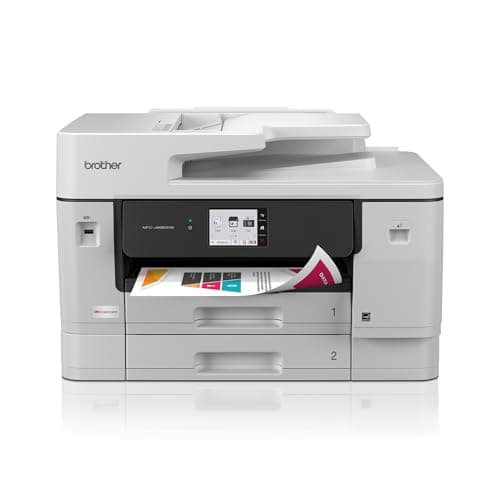
Brother INKvestment 6960 Wireless Color Inkjet All-in-One Printer with 11”x17” Capabilities and 3.5” Color Touchscreen | Includes Refresh Subscription Trial(1) (MFC-J6960DW)
Brother
- BEST FOR SMALL BUSINESS: This multifunction printer makes it easy to print, copy, scan, and fax on up to 11”x17” paper. Includes one 1,800-page yield black ink cartridge and one 750-page yield ink cartridge for each color in cyan, magenta, and yellow(2).
- PRODUCTIVITY-FOCUSED FEATURES: 500-sheet capacity with two trays(3), 100-sheet multipurpose tray(3), up to 50-page single-pass duplex copy & scan via ADF(3), and automatic duplex printing up to 11x17. Connect via wireless network(4), Ethernet, or USB.
- SPEED & QUALITY: Engineered with MAXIDRIVE Technology with print speeds of up to 31 pages per minute (ppm) in black and up to 30 ppm in color(5). The PerfectPrint Auto Detection System helps support reliable print quality for results you can be proud of.
- INNOVATIVE TECHNOLOGY: With Wi-Fi Direct, print wirelessly without an external network connection. Print from and scan to Cloud apps(6), including Google Drive, Dropbox, Box, OneDrive, and more from the 2.7” color touchscreen for easy operation.
Quick Verdict
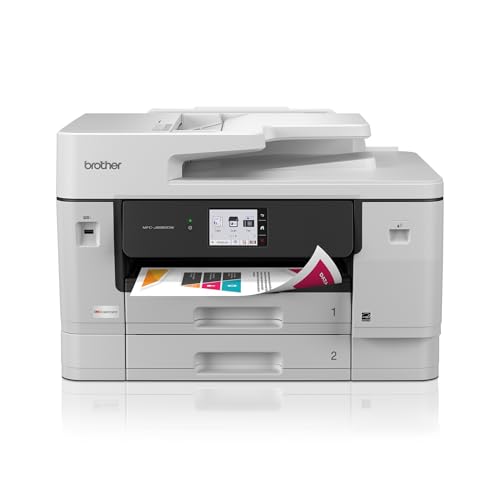
The Brother MFC-J6960DW is a workhorse all-in-one inkjet built for offices that need genuine tabloid-size output without buying a dedicated plotter. After running it through a week of real work — printing client proposals, batch-scanning contracts, and the occasional color flyer — I can say it holds up well for a printer at this price. The 31 ppm print speed is no marketing fiction, and the 500-sheet dual trays mean you're not constantly refilling paper. That said, if you don't need A3 capability, you can find better value elsewhere. Check current price on Amazon before buying — street prices fluctuate on this model.
What Is the Brother MFC-J6960DW?
The MFC-J6960DW is Brother's flagship INKvestment-tier all-in-one for small business. It prints, copies, scans, and faxes, and unlike most office inkjets, it natively handles paper up to 11x17 inches — what Brother calls "tabloid" and everyone else calls A3. The "INKvestment" branding refers to its tank-based ink system, where cartridges feed a built-in reservoir for lower running costs than cartridge-only designs. It's a step below true cartridge-free tank printers (like EcoTank models), but above the throwaway-cartridge crowd.
I unboxed this on a Tuesday morning when my old HP was coughing up a jammed tray for the third time that month. The MFC-J6960DW ships with a full set of INKvestment cartridges — 1,800-page black and 750-page color — so you're not up and running with half-empty starter kits. Setup took about fifteen minutes, mostly spent peeling protective tape from the print mechanism. Network setup via the touchscreen was painless; I had it on Wi-Fi and printing within twenty minutes of opening the box.
Key Features
- Print, copy, scan, and fax up to 11x17 inch (A3/tabloid) paper size
- MAXIDRIVE print engine: 31 ppm black, 30 ppm color (ISO standard)
- Dual 250-sheet paper trays plus 100-sheet multipurpose tray (500-sheet total)
- 50-page single-pass duplex ADF for two-sided scanning and copying
- Wireless, Ethernet, USB, Wi-Fi Direct, and cloud app connectivity
- 2.7-inch color touchscreen with Brother Mobile Connect app support
- INKvestment tank system with LC506 high-yield cartridges
- Automatic duplex printing up to 11x17 inches
Hands-On Review
Let's talk about what actually matters day-to-day: speed, ink costs, and whether it jams when you need it most. I threw a 30-page contract at it on a Wednesday afternoon — mixed text and a logo header. At 31 ppm, it finished in under two minutes. The PerfectPrint system picked the right driver settings automatically, which I appreciated because I didn't have to fiddle with quality presets. Text came out crisp at 600 dpi, and the logo colors were punchy without oversaturation.
What surprised me was the ADF performance. I scanned a 40-page double-sided proposal using the single-pass duplex mode, and it chewed through it without a single misfeed. This is where the MFC-J6960DW earns its keep over cheaper all-in-ones — the 50-sheet ADF is rated for real work, not just occasional use. On day four, I copied a color brochure design onto 11x17 cardstock via the multipurpose tray. Alignment was spot-on and the ink dried quickly enough that I didn't smudge the first print.
The touchscreen is fine — not stunning, but functional. Menus are logical, and the cloud integration (Google Drive, Dropbox, Box, OneDrive) works as advertised. I scanned a signed agreement directly to a shared OneDrive folder without touching a PC, which was genuinely useful. Wi-Fi Direct is there too, and it's the option I'd reach for in a client meeting when someone's laptop doesn't have the driver installed. The Brother Mobile Connect app is surprisingly polished; you can manage print jobs, check ink levels, and reorder supplies from your phone.
The catch — and there always is one — is the running cost. The included INKvestment cartridges last longer than standard Brother cartridges, but LC506 replacements are pricey at full retail. If you're printing 500+ pages a month, look at third-party ink or consider whether the INKvestment model's cost-per-page actually saves you money over a two-year horizon. For lower-volume offices, the convenience is worth it.
Who Should Buy It?
- Small design studios and creative agencies that regularly produce color mockups, large-format presentations, or marketing layouts in-house
- Law firms and real estate offices that handle contracts, property listings, and proposals that need to fit more content on a page than letter size allows
- Medical or dental practices that need reliable batch copying and scanning of patient forms with a robust ADF
- Home-based businesses with light production needs — if you're printing 200+ pages a week and need A3 capability without a dedicated plotter
Skip this if you only print letter-size documents and don't need to copy or scan more than a few pages at a time — a standard home-office inkjet will cost half as much and take up far less space. Also skip it if you're a photographer or designer who needs borderless photo printing; the MFC-J6960DW handles color well but isn't built for photo-lab quality.
Alternatives Worth Considering
- Brother MFC-J6545DW — the smaller sibling with up to 11x17 capability but a single 250-sheet tray and slower ADF. Cheaper if you don't need the dual-tray capacity.
- Epson EcoTank Pro ET-16650 — a cartridge-free tank printer with lower per-page ink costs and faster first-page-out times. Higher upfront price but dramatically cheaper ink over time.
- HP OfficeJet Pro 9015e — a strong alternative for pure letter-size office work with smart features and decent ink costs, though it lacks A3 capability entirely.
FAQ
Using the included INKvestment cartridges (1,800-page black, 750-page color), black pages cost roughly 0.8-1.2 cents each. After that, replacement LC506 cartridges run higher than third-party alternatives, though Brother Genuine ink is recommended for reliable performance.
Final Verdict
The Brother MFC-J6960DW is not a flashy printer, and that's exactly its strength. It does everything a small business needs — fast, reliably, up to A3 size — without the drama of a pro-grade machine. The 31 ppm print speed, duplex ADF, and dual-tray capacity are the real selling points, not the touchscreen or cloud features. Ink costs will eat into savings if you skimp on cartridge quality, but the INKvestment system does soften the blow compared to older cartridge designs. If your workflow genuinely needs tabloid-size output in a shared office, this Brother deserves serious consideration.