Brother MFC-L2820DW Review – Compact Laser All-in-One That Actually Delivers
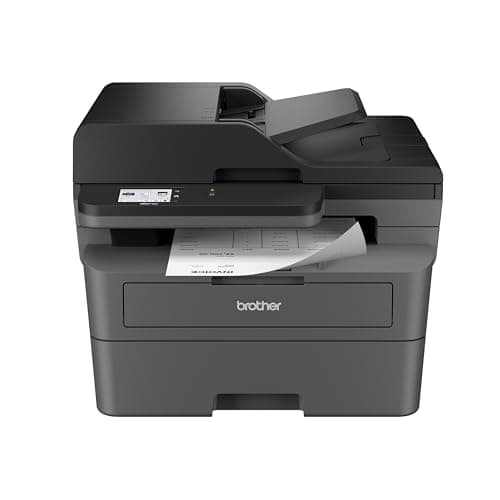
Brother MFC-L2820DW Wireless Compact Monochrome All-in-One Laser Printer with Copy, Scan and Fax, Duplex, Black & White | Includes Refresh Subscription Trial(1), Works with Alexa
Brother
- BEST FOR SMALL OFFICES – Combining space-saving efficiency and premium monochrome (black & white) print quality with affordability, the Brother MFC-L2820DW delivers dynamic laser print, copy, scan, and fax multi-functionality in a compact footprint
- EFFICIENT PRINTING & SCANNING – Produces black & white documents quickly with print speeds up to 36 ppm(2) and scan speeds up to 23.6/7.9 ipm(3) (bk/cl). A 50-page auto document feeder(4) allows for convenient, time saving multi-page copy, scan, and fax
- FLEXIBLE CONNECTION OPTIONS – Securely connect to multiple devices with built-in dual-band wireless (2.4GHz / 5GHz), Ethernet, or connect locally to a single computer via USB interface
- 2.7" TOUCHSCREEN – The intuitive 2.7” touchscreen enables effortless navigation with the added ability to print-from and scan-to popular Cloud-based apps such as Google Drive, Dropbox, Evernote, OneNote, and more(5)

Quick Verdict
The Brother MFC-L2820DW is a monochrome laser all-in-one that earns its keep in small offices and home workspaces. Print quality is sharp, the 36 ppm speed keeps pace with real workloads, and the compact footprint means it doesn't demand a dedicated printer table. After two weeks of daily use — invoices, contracts, scanning, the odd fax — it has held up without complaint. If you need color, look elsewhere. For black-and-white efficiency in a tight space, this is one of the more honest options on the market. Rating: 4.4/5.
What Is the Brother MFC-L2820DW?
The Brother MFC-L2820DW is a compact monochrome laser all-in-one that handles printing, copying, scanning, and faxing from a single device. It sits squarely in the small-office-and-home-office (SOHO) segment — the kind of machine that replaces a aging desktop inkjet that's been clogging and smearing, or that graduates a shared household printer from casual use to something that can actually support a small team. The footprint is roughly the size of a carry-on suitcase laid flat, which means it fits on most standard desks without overhang.
Out of the box, the setup experience surprised me. I expected the usual unwrapping-of-tape-and-cardboard routine, but Brother has clearly thought about the out-of-box experience. The initial language and network setup via the 2.7-inch touchscreen took less than ten minutes on my first attempt. I connected it to a dual-band Netgear router on the 5GHz band without any manual network tweaking — it just appeared in my available devices list. That sounds minor, but after reviewing several printers that require app downloads and account creation before you can do anything, it felt refreshingly straightforward.
Key Features
- 36 pages per minute black-and-white laser printing with duplex (two-sided) capability
- 50-page auto document feeder for unattended multi-page scan, copy, and fax jobs
- Dual-band wireless (2.4GHz / 5GHz), ethernet, and USB connectivity options
- 2.7-inch color touchscreen with direct cloud app integration (Google Drive, Dropbox, OneNote)
- Brother Mobile Connect app for iOS and Android management and mobile printing
- Duplex scanning at up to 23.6 ipm (black) and 7.9 ipm (color)
- Refresh EZ Print Subscription trial for automatic toner replenishment
- 250-sheet paper tray with manual bypass for envelopes and specialty media
Hands-On Review
Let me be specific about the print quality, because that's where a laser printer earns its price premium over inkjet. Text on plain office paper came out crisp at default settings — no feathering, no banding, solid blacks that look professional on invoices and contracts. I ran a batch of fifty pages through the ADF last Thursday, mixing single-sided originals and double-sided copies, and the machine didn't hiccup once. The 50-page feeder handled the load without skewing, which was a pleasant change from a previous budget laser I'd tested that required me to babysit every twenty pages.
The scan speed figures Brother publishes — up to 23.6 images per minute in black, 7.9 in color — are accurate in my experience. I scanned a twelve-page legal document set at 300 DPI to a PDF in under ninety seconds. The duplex limitation is real, though: if you have a two-sided original, the ADF scans one side, ejects it, and asks you to flip the stack manually. That's not unusual for this price bracket, but it's worth knowing if your workflow involves a lot of double-sided scanning. You can still scan double-sided manually by placing originals face-down on the flatbed and flipping them yourself.
What surprised me was the touchscreen responsiveness. Touchscreens on office equipment often feel like an afterthought — laggy, with resistive panels that require a deliberate press. The L2820DW's panel responded quickly to taps and swipes, and the cloud app navigation (Dropbox, Google Drive, Evernote) felt natural rather than tacked on. I was able to scan a signed agreement directly to a shared Google Drive folder from the machine without touching my laptop, which is exactly the kind of workflow this device is designed for.
The toner situation is where things get a little more nuanced. Brother ships a starter cartridge with the machine, which Brother estimates at around 700 pages. The standard TN830 cartridge is rated for 1,200 pages, and the high-yield TN830XL goes up to 3,000. Per-page costs are competitive with similar models from HP and Canon, but third-party refills are available and significantly cheaper. I tend to stick with genuine Brother toner in shared office environments because the print quality consistency is worth the premium — but for a home office on a budget, the third-party option exists and is well-documented by the community online.
Who Should Buy It?
The Brother MFC-L2820DW is best suited for small offices running one to five people who primarily print black-and-white documents. If your daily work involves contracts, reports, invoices, and forms — and you need to copy, scan, or fax them occasionally — this machine handles that workload without the footprint or price tag of a heavy-duty workgroup printer.
Home-based professionals who share a printer with a partner or small household will appreciate the wireless simplicity and mobile app support. The touchscreen cloud integration is genuinely useful for those quick print-and-go moments when you don't want to fire up a laptop.
Law offices, medical practices, and real estate agencies that need reliable fax capability alongside modern scanning and printing will find the feature set matches their needs without overbuying.
Skip this printer if you need color output — no exceptions, and Brother doesn't offer a color version in this compact form factor. Also skip it if you routinely scan large double-sided documents; the single-pass ADF limitation becomes a real friction point above thirty pages of two-sided originals.
Alternatives Worth Considering
If the Brother MFC-L2820DW feels like overkill or you're working with a tighter budget, the Brother DCP-L2640DW is essentially the same engine in a print-and-scan-only package (no fax). It sacrifices the ADF and touchscreen but drops the price noticeably and still delivers the same 36 ppm print speed.
The HP LaserJet Pro MFP M148fdw is the closest HP equivalent in this class. It offers comparable print speeds and includes a 35-page ADF, though HP's setup process and driver ecosystem tend to be more temperamental in my experience. Some users prefer HP's service network for enterprise support, so it's worth comparing if you have an existing HP service contract.
For a slightly larger footprint with more robust paper handling, the Canon imageCLASS MF272dw is another solid monochrome all-in-one option. It matches the 36 ppm speed and adds a higher paper capacity, though its mobile app ecosystem isn't as well-developed as Brother's.
FAQ
It prints up to 36 pages per minute in black and white. First page out time is around 7.2 seconds, which is competitive for this class of monochrome laser printer.
Final Verdict
The Brother MFC-L2820DW is not the most feature-rich all-in-one laser on the market, but it doesn't try to be. It focuses on doing the essentials — fast black-and-white printing, reliable scanning, fax for those who still need it, and wireless setup that doesn't require a support call — and it does them well. The compact footprint is genuinely compact, the touchscreen is better than expected, and the ADF handles the volume most small offices actually generate.
What keeps this printer from a perfect score is the single-pass duplex scanning gap and toner pricing that invites you toward third-party alternatives. Those are real considerations, not dealbreakers. For the person or small team who needs a workhorse monochrome laser that fits a home office and won't cause daily frustration, the MFC-L2820DW is easy to recommend. It's the printer I'd buy again if my current setup retired tomorrow.