Brother P-Touch PTD220 Review 2025: Is It Worth It?
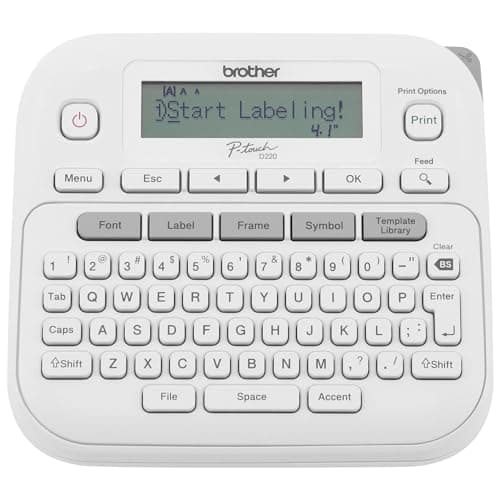
Brother P-Touch PTD220 Home/Office Everyday Label Maker | Prints TZe Label Tapes up to ~1/2 inch White
Brother
- Ideal For Small Office, Home Office, and Home Organization: a mobile label maker to keep homes, small offices, and workspaces tidy and organized. Powered by 6 AAA batteries or optional AC adapter (each sold separately)
- Prints on Brother Genuine TZe Label Tapes: Create labels that are approximately 1/2 inch (12mm) wide. Easy to peel, durable and laminated labels are ideal for a variety of applications in multiple finishes and colors and can print 1 or 2 lines of text on labels
- Personalize Your Labels: Choose from 14 different fonts, 11 font styles, 99 designer frames, and over 600 symbols and use the familiar QWERTY style keyboard for ease of use
- Built-in Memory: Save up to 30 frequently used labels Create them, save them, find them, and reprint them as many times as needed

Quick Verdict
The Brother P-Touch PTD220 is a no-frills label maker that gets the job done when you need clear, durable labels fast. It's compact, easy to use, and the QWERTY keyboard means you'll be printing labels within minutes of opening the box. The tape width is limiting for bigger projects, and you'll want to factor in the cost of TZe refills, but for everyday home and small office organizing, it's a solid workhorse. I'd give it a 4.5 out of 5 — especially at its typical price point.
What Is the Brother P-Touch PTD220?
The PTD220 is Brother's entry-level dedicated label maker in the P-Touch consumer line. It prints on 12mm TZe tape at up to 2 lines of text per label, stores up to 30 of your most-used labels in memory, and draws on a library of 14 fonts, 99 decorative frames, and over 600 symbols. It runs on 6 AAA batteries or an optional AC adapter.
That description covers the specs, but here's what it actually feels like in daily use: I pulled it out of the box on a Sunday morning, slotted in the starter tape cartridge, fed in 6 AAA batteries I happened to have in a kitchen drawer, and printed my first label about seven minutes later. No app to download, no account to create, no firmware update. That's the appeal — it just works.
Key Features
- Prints on 12mm TZe tape — laminated, easy to peel, available in dozens of colors and finishes
- 14 fonts and 11 font styles for customizing label text
- 99 decorative frames and over 600 symbols for visual organization aids
- Built-in memory for up to 30 saved labels — reprint without retyping
- 25 pre-set label templates covering common home and office tasks
- QWERTY-style keyboard for fast, familiar typing
- Powers via 6 AAA batteries or optional Brother AD-24 AC adapter
Hands-On Review
I used the PTD220 across three environments over three weeks: my home office, the garage, and my kid's school supplies bin. Each context showed a different strength.
In the office, the 14-font library surprised me. I expected a toy-like selection, but the available fonts include several clean sans-serifs that look professional on file folder labels. The 99 frames are mostly ornamental — I gravitated toward a simple border frame for supply closet tags and ignored the rest. The memory function saved me serious time when I needed 40 identical cable labels for a server room audit. I typed it once, saved it, and just hit print 39 more times while sorting cables.
The garage test was less glamorous but equally telling. Dusty shelves, unlabeled bins, and a tangle of power tool cords. The PTD220 handled it fine — the TZe tape holds up to light moisture and temperature variation better than generic paper labels I've used in the past. What I noticed by the end of week two was the slight mushiness of the print button. It's not broken, but the tactile feedback isn't as crisp as, say, a well-made mechanical keyboard. Minor, but noticeable.
What surprised me was how often I reached for it. Labeling a child's snack container for school, marking seasonal storage boxes, tagging the back of a phone case with an ID number — none of these were planned uses, but the PTD220 fits those small organizing moments better than a full desktop label printer would. The trade-off is tape width. At 12mm, you're not making big warning labels or readable-from-across-the-room signage. For anything beyond drawer-level identification, you'll want a wider-format model.
Who Should Buy It?
The PTD220 earns its place in a few specific scenarios:
- Home organizers — If you're tackling a junk drawer, closet, or pantry project, this label maker handles the job without an overwhelming feature set.
- Small office workers — Labeling folders, desks, and equipment at a desk or on the go suits it well.
- Teachers and crafters — The symbol library and frames add a playful element for classroom organization or hobby labeling.
- Anyone who hates retyping the same label — The 30-label memory is genuinely useful if you print recurring labels for recurring tasks.
Skip this if you need wide labels (more than 12mm), color printing, or computer connectivity. Also skip it if you're buying for a high-volume production environment — a desktop label printer with a continuous tape roll would be more efficient.
Alternatives Worth Considering
If the PTD220's limitations give you pause, here are two alternatives worth evaluating:
- Brother P-Touch PTD210 — The PTD210 is nearly identical in features but adds a graphical display so you can preview labels before printing. Slightly more money, noticeably less guesswork.
- Epson LabelWorks LW-300S — Epson's competing model offers a 6mm tape option and a wider variety of tape types. Worth a look if you need narrower labels for electronics or jewelry.
FAQ
No. The PTD220 is a standalone device. All label creation happens on the unit using its built-in keyboard and templates. There is no USB cable or Bluetooth connection.
Final Verdict
The Brother P-Touch PTD220 isn't the most capable label maker in Brother's catalog, but for its price tier, it strikes a smart balance between simplicity and functionality. The QWERTY keyboard, generous font library, and label memory make it genuinely useful for recurring organizing tasks, and the compact body means it won't dominate your desk. Tape width is the main constraint — 12mm is fine for drawers and folders, inadequate for signage. If that limitation doesn't bother you, the PTD220 will serve you well.