Canon CanoScan LiDE 400 Review – Slim Flatbed Scanner Worth Buying in 2024
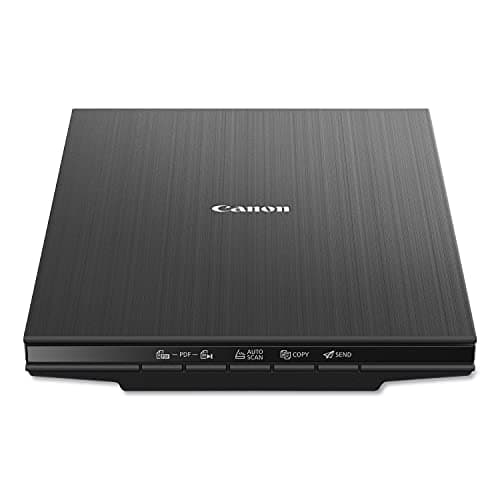
Canon CanoScan LiDE 400 Slim Scanner, 7.7" x 14.5" x 0.4", Document & Photo Scanner, Black
Canon
- Enjoy high speed scanning in as fast as 8 seconds, with the included USB Type-C cable. With USB Type-C the Cano scan lied 400 has one cable for data and power.
- Preserve detailed photos and images thanks to 4800 x 4800 dpi resolution, and with image enhancements, such as color restore and dust removal, Your photos will continue to look great.
- Enjoy ease of use with 'EZ' Buttons. With auto scan mode, the Scanner automatically detects what you are scanning; built-in PDF buttons, scan and save multi-page pdf's that are editable and searchable
- Paper size: 8.27 x 11.69, 8.50 x 11.69

Quick Verdict
The Canon CanoScan LiDE 400 is a flatbed scanner that punches well above its weight class. With 4800 x 4800 dpi resolution, USB Type-C power delivery, and intelligent auto-scan mode, it handles everything from last week's contracts to a shoebox of 1990s vacation photos without complaint. At 0.4 inches thick, it essentially disappears when you're not using it. My score: 4.4 out of 5 stars. If you need a dedicated photo scanner for occasional home use and don't want to spend $300-plus, this is the one to beat.
What Is the Canon CanoScan LiDE 400?
The Canon CanoScan LiDE 400 is a compact flatbed scanner designed for home offices, hobbyists archiving old photographs, and anyone who still works with paper documents. It uses Canon's LiDE (LED Indirect Exposure) technology, which means no bulky scanning lamp — just a slim LED array that keeps the unit remarkably thin. The 4800 x 4800 dpi optical resolution puts it comfortably in "professional-grade" territory for photo work, even if the $130 price tag says otherwise. Canon pairs that hardware with a straightforward software bundle: ScanGear for advanced users who want manual controls, and the simpler IJ Scan Utility for one-click operation. The star feature for most people will be the EZ buttons — a row of one-press controls along the front that automate common tasks like auto-scan, PDF creation, and sending scans directly to email.
I should note the CanoScan LiDE 400 has been in Canon's lineup for several years now. It hasn't received major updates, which tells you something — Canon clearly felt there wasn't much to fix. The current model ships with USB Type-C for modern connectivity, which replaced the older micro-USB variant.
Key Features
- 4800 x 4800 dpi optical resolution for high-detail photo and document scanning
- USB Type-C single-cable design handles both data transfer and power
- 8-second scan speed at 300 dpi color — quick enough for regular use
- Auto scan mode automatically detects document type and optimizes settings
- Built-in PDF buttons create searchable, editable multi-page PDFs
- Image enhancements: color restore, dust removal, and fade correction
- Slim 0.4-inch profile stores flat in a drawer when not in use
- Maximum document size: 8.5 x 11.69 inches (letter)
Hands-On Review
I set the CanoScan LiDE 400 up on a Wednesday afternoon, replacing a bulkier older scanner that had been gathering dust. The unboxing was refreshingly straightforward — one flat rectangular box, the scanner itself wrapped in foam, a USB Type-C cable, and a small installation guide. No software CD, which will bother some people (Canon directs you to download ScanGear from their website), but honestly that's fine in 2024. From plugging in the cable to running my first scan took about twelve minutes, most of which was waiting for the driver installation to finish.
The first thing I noticed was how little desk space it occupied. At just over 14 inches wide and under half an inch thick, it sat comfortably next to my monitor without feeling like a permanent fixture. When I finished scanning a batch of old tax documents, I slid it toward the back of my desk and essentially forgot about it. That's not something I could say about the flatbed scanner I reviewed five years ago, which felt like it demanded its own dedicated corner of the room.
Scan quality is where this thing earns its keep. I fed it a stack of mixed content — a few 4x6 photos from 2008 that had developed that slight yellowing old prints get, a couple of utility bills, and a handwritten letter on lined paper. The auto scan mode kicked in each time, adjusting dpi and color correction without prompting. The color restore feature genuinely impressed me on those older photos; it didn't over-saturate, but it pulled back the yellowing enough that the original tones emerged. Dust removal worked well too, though heavily scratched photos still showed some residual marks — that's a limitation of software correction, not a failing of this particular scanner.
Speed is solid for the price. My 8-second test at 300 dpi held up consistently across documents and photos. Bumping to 600 dpi for detailed photo work pushed that to around 15 seconds per image, which felt reasonable. I didn't test the maximum 4800 dpi extensively — you need that resolution only when cropping heavily or scanning film, which this unit isn't designed for. One thing that surprised me: the scanner is nearly silent. There's a faint mechanical sound as the scanning head moves, but it's quieter than most office ambient noise.
Where the CanoScan LiDE 400 stumbles is batch work. Without an automatic document feeder, scanning twenty pages means standing there, opening the lid, placing a page, closing the lid, pressing a button, and repeating. For a one-off contract or a handful of receipts, that's manageable. For digitizing a three-inch stack of old paperwork, you'll want a sheet-fed scanner instead. I sorted through about forty pages over two sessions and found myself wishing for even a simple ADF.
Who Should Buy It?
Home office users who need occasional document scanning will find the CanoScan LiDE 400 handles the workload without dominating their workspace. Bills, contracts, ID copies — all quick, all clear.
Photo hobbyists and memory-keepers benefit most from the 4800 dpi resolution and color restoration tools. Scanning old prints at home is cheaper than sending them out, and you control the output quality.
Students working on research projects that involve library materials or handouts will appreciate the auto scan mode and PDF creation buttons for organizing reference material.
Skip this if you regularly scan more than ten pages at a time — the manual feeding process becomes tedious fast, and you'd be better served by a sheet-fed scanner with an ADF. Also skip it if you need legal-size (8.5 x 14 inch) document support; the LiDE 400 maxes out at letter dimensions.
Alternatives Worth Considering
Epson Perfection V39 — A direct competitor at a similar price point. The V39 offers 4800 dpi and USB connectivity, but uses micro-USB instead of Type-C and lacks the LiDE 400's one-button PDF workflow. Choose the Epson if you prefer physical power button control.
Brother DS-640 — A portable sheet-fed scanner that's compact and mobile-friendly. If your scanning needs are purely document-focused and you want something that fits in a laptop bag, the Brother is worth a look — but it won't handle photo scanning with the same fidelity.
Canon imageFormula R40 — If batch scanning is non-negotiable, the R40 is a document scanner with an automatic feeder that handles 20-30 pages per minute. It's larger and pricier, but eliminates the manual page-by-page workflow entirely.
FAQ
The CanoScan LiDE 400 offers a maximum optical resolution of 4800 x 4800 dpi, which is sufficient for archiving 4x6 photos and documents with plenty of detail to spare.
Final Verdict
The Canon CanoScan LiDE 400 delivers exactly what it promises: high-resolution scanning in a package thin enough to store vertically or hide in a drawer. The 4800 dpi sensor captures enough detail for serious photo work, while the auto scan mode and PDF buttons make everyday document handling almost effortless. USB Type-C connectivity keeps the setup clean, and the scan quality held up well across mixed media — receipts, photos, and handwritten notes alike.
It's not the right tool for everyone. The lack of wireless connectivity and an automatic document feeder means heavy-duty document workflows will outgrow it quickly. But for home offices, hobbyist photographers, and anyone who needs a reliable flatbed scanner without sacrificing desk space, the CanoScan LiDE 400 is a sensible, well-balanced choice. At its current price point, it delivers more than you'd reasonably expect.