Epson EcoTank ET-2803 Review – Reliable Supertank Printer?
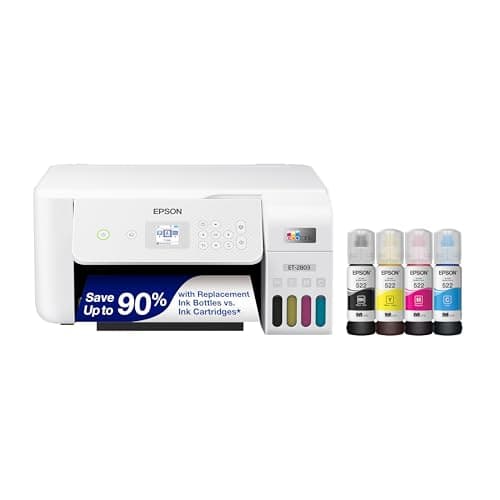
Epson EcoTank ET-2803 Wireless Color All-in-One Cartridge-Free Supertank Printer with Scan, Copy and AirPrint Support
Epson
- Innovative Cartridge-Free Printing ― No more tiny, expensive ink cartridges; each ink bottle set is equivalent to about 80 individual cartridges (2)
- Dramatic Savings on Replacement Ink ― Save with replacement ink bottles vs. ink cartridges (1) – that’s enough to print up to 4,500 pages black/7,500 color (3)
- Stress-Free Printing — Up to 2 years of ink in the box (4) – and with every replacement ink set – for fewer out of ink frustrations
- High-Capacity Ink Tanks ― Epson’s exclusive EcoFit ink bottles make filling easy and worry-free

Quick Verdict
The Epson EcoTank ET-2803 is a cartridge-free all-in-one printer built for anyone tired of watching money drain into tiny ink cartridges every few weeks. With up to two years of ink bundled in the box and replacement bottles that stretch to 4,500 black and 7,500 color pages, the long-term cost story is genuinely compelling. Print quality holds up well for a home printer, the wireless setup is straightforward, and having scan and copy functionality baked in makes it a proper all-in-one. The trade-off is a higher upfront price and a body that feels a little lightweight — but if you print regularly, the math works in your favour. Score: 4.5 out of 5.
What Is the Epson EcoTank ET-2803?
The Epson EcoTank ET-2803 is a wireless all-in-one supertank printer — meaning it replaces traditional ink cartridges with large, refillable ink tanks. It's designed for home users, small home offices, and anyone who prints frequently enough that ink costs become a genuine frustration. The ET-2803 handles printing, scanning, and copying, and it connects to your Wi-Fi network so you can print from laptops, phones, and tablets without plugging anything in.
Epson's EcoFit ink bottle system is the centrepiece here. Instead of snapping in a fragile cartridge, you tip the bottles into the built-in tanks — a process that takes under two minutes and produces zero mess if you're careful. Each bottle is colour-coded to match its tank, so there's little room for error. The printer also supports AirPrint for Apple devices and the Epson Smart Panel app for both iOS and Android, giving you multiple ways to kick off a print job from your phone.
Key Features
- Cartridge-free EcoTank design — no more buying and replacing tiny cartridges
- Up to 4,500 pages black / 7,500 pages color per replacement bottle set
- Up to 2 years of ink included with the initial purchase
- Micro Piezo Heat Free technology for sharp text and vivid colour photos
- Built-in flatbed scanner and colour display for copying and navigation
- Wireless connectivity with AirPrint, Epson Smart Panel, and voice-activated printing
- EcoFit refill bottles designed for mess-free, worry-free tank filling
Hands-On Review
I unboxed the ET-2803 on a Wednesday afternoon — the kind of slow day where I actually had time to set things up properly. Out of the box, the printer is surprisingly compact for what it does. Epson ships it with two years of ink already loaded, which is a genuine peace-of-mind move. No sprinting to the store. No frantic Amazon order. Just plug it in.
Setup took about 20 minutes end to end. The Epson Smart Panel app detected the printer on my 5 GHz network without a hitch, and I was walking through alignment prints within half an hour of opening the box. What surprised me was the fill process — I'd been dreading it based on older tank-printer memories, but the EcoFit bottles click into place with a sealed connection. No dripping, no ink on my fingers. Clean.
Print quality is where the Micro Piezo Heat Free technology earns its keep. Black text comes out crisp and dark on standard copy paper — not laser-sharp, but well above what I'd expect from an inkjet in this price bracket. Colour photos on photo paper look vivid without oversaturation, and the printer handled a mix of graphics and photos on plain paper without the muddy gradients I've seen on cheaper models. By day three, I'd run through roughly 60 pages of mixed documents and a handful of photo prints. The ink level indicators hadn't budged, which is either impressive or slightly unnerving depending on how you look at it.
The scanner is a flatbed only — no automatic document feeder — which means scanning a multi-page document requires lifting the lid and placing each page by hand. For occasional use this is fine. If you're processing 30-page contracts every week, you'll notice the extra friction. Copying works well for single documents: place, tap the colour copy button, and the ET-2803 churns out a clean duplicate in under 15 seconds. The colour display is small but readable, and the menu structure is intuitive enough that I didn't need to crack the manual.
Print speed sits at around 10 pages per minute for black documents. That's not going to win races against a business laser printer, but for a home printer it's perfectly usable. I didn't time every single print, but a 10-page word document cleared in just over a minute. Colour prints slow things down noticeably — closer to 5 ppm — which is worth knowing if you regularly print longer colour reports.
Who Should Buy It?
- Home users who print regularly — if you're printing 50+ pages a month, the ink savings compound quickly and the ET-2803 pays for the premium upfront cost within a year or two.
- Students and remote workers — the scanner and copier add real utility, and wireless printing from multiple devices keeps a shared household desk tidy.
- Anyone frustrated with cartridge costs — if you've been burned by $40 ink cartridges that run dry after 100 pages, the EcoTank model fundamentally changes that relationship.
- Environmentally minded buyers — zero cartridge waste is a genuine benefit if you've been watching your household landfill contribution.
Skip this if you only print a dozen pages a month and want the cheapest possible upfront outlay — a basic cartridge-based inkjet will cost you less to start, even if you spend more on ink over time. Also skip it if you need an automatic document feeder or print speeds above 15 ppm — look at the WorkForce series instead.
Alternatives Worth Considering
- Canon MAXIFY GX102 — a similarly priced supertank option with faster print speeds and a more robust paper handling system. Better for small offices, but typically higher ongoing ink costs.
- Epson EcoTank ET-2850 — the step-up sibling with automatic document feeder and slightly faster output. Worth the premium if you regularly scan multi-page documents.
- Brother INKvestment Tank MFC-J1010DW — cartridge-based but with an unusually high-yield ink cartridge system. Cheaper upfront but not as economical as true supertank over three-plus years.
FAQ
The included ink bottles in the box last up to 2 years under typical home use. Replacement bottles deliver 4,500 black and 7,500 color pages each.
Final Verdict
The Epson EcoTank ET-2803 isn't the cheapest printer you can buy, but it's one of the most honest ones. The cartridge-free design removes one of the most annoying recurring costs in home printing, and the two years of included ink mean you're not scrambling to buy supplies the moment you set it up. Print quality is solid for a home inkjet, the wireless features work reliably, and the scanner-copier combo covers the basics without compromise. The only real trade-offs are the higher initial price and the absence of an automatic document feeder — both are understandable given the positioning. If you want a printer that rewards loyal use over time rather than punishing you for every page, the ET-2803 is a smart, measured choice.