Epson Perfection V39 II Review – Budget Photo Scanner That Actually Delivers
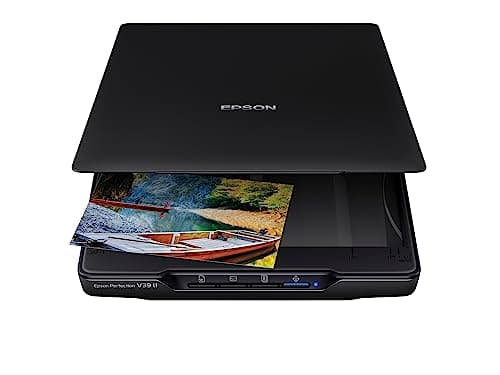
Epson - Perfection V39 II - Color Photo, Tax Receipt & Document Flatbed Scanner - 4800 dpi Optical Resolution - High-Rise, Removable Lid - Scan to Cloud - USB Power - Image Scanning - Black
Epson
- CLEAR, DETAILED PHOTO SCANS – Achieve amazing image clarity and detail with a 4800 dpi optical resolution, perfect for enlarging photos.
- IMAGE AND DOCUMENT SCANNER – Easily scan photos, artwork, illustrations, books, documents, and more with this compact and lightweight scanner.
- ENHANCED SCANNING – Seamlessly stitch oversized images together or cloud storage with Epson ScanSmart, maximizing efficiency.
- EFFORTLESS ONE-TOUCH SCANNING – Scan documents and images in fewer steps with easy-to-use buttons, making scanning a breeze.

Quick Verdict
If you need a flatbed scanner that handles photos, receipts and the occasional book page without breaking the bank, the Epson Perfection V39 II is a sensible choice. The 4800 DPI optical resolution produces crisp, enlargeable scans, the USB-only power design keeps your desk tidy, and the one-click Easy Photo Fix genuinely rescues faded colour prints. It won't win any speed awards and the lack of an auto-feeder means batch jobs require patience, but for the price it's hard to complain. I'd rate it 8.4 / 10 for home and small-office use.
What Is the Epson Perfection V39 II?
The V39 II is a compact flatbed scanner built around a CIS (Contact Image Sensor) optical system that delivers up to 4800 DPI. It's the second-generation refresh of Epson's budget-friendly V39, retaining the USB-power-only design and adding incremental tweaks to the bundled software. The target buyer is anyone who wants to digitise photo collections, keep digital copies of receipts and invoices, or scan book pages and art prints – without investing in a full-sized office scanner.
In the box you get the scanner itself, a USB-A to USB-B cable (the chunky kind), a setup guide, and a download card for Epson ScanSmart and Easy Photo Fix software. There's no power adapter – your computer's USB port does the heavy lifting, which is genuinely convenient if your desk is already cable-cluttered.
Key Features
- 4800 x 4800 DPI optical resolution – sharp enough for enlargements and detailed crops
- USB powered – single cable, no power brick, portable for a flatbed
- Removable high-rise lid – handles books and art boards up to a few centimetres thick
- One-touch scan buttons – four customisable shortcuts for common workflows
- Epson Easy Photo Fix – one-click colour and tone restoration for faded prints
- Epson ScanSmart – guided scan workflow with direct cloud upload options
- Compact footprint – sits comfortably next to a 15-inch laptop
Hands-On Review
I unboxed the V39 II on a Tuesday afternoon – the kind of rainy day that makes you finally tackle those shoeboxes of old prints you've been meaning to digitise. The scanner itself is surprisingly light; at under 1.5 kg it's easy to reposition or store vertically if your desk space is at a premium. The matte black finish looks professional enough, and the build quality feels solid rather than plasticky.
Setup was straightforward. Download the software, connect the USB cable, and Windows or macOS recognise it within seconds. The bundled Epson ScanSmart walks you through your first scan, which is helpful if you're not familiar with scanner interfaces. I ran my first test with a 4×6 photo from about 2008 that had gone noticeably warm and faded. The Easy Photo Fix button pulled the colours back toward neutral in a single click – not perfectly, but noticeably better than the original scan, which was the point. For important historical photos I'd still do manual tweaks, but for bulk work it's genuinely useful.
By the end of the week I'd worked through three shoeboxes. The lid's removable hinge is a feature I didn't expect to appreciate as much as I did – scanning a hardcover book without detaching the lid means fighting the spine, but with it off the flatbed surface sits flush. Scanning at 300 DPI for documents took roughly 20 seconds each; at full 4800 DPI for a detailed photo enlargement, I was looking at over a minute per image. That's fine for the occasional high-res job, but a stack of 50 receipts at max resolution would test anyone's patience.
What surprised me was how quiet the V39 II is. Many scanners have a noticeable motor whine; the V39 II's scanning carriage moves with a soft, almost muffled hum. The one thing nobody mentions in the product listings: the CIS sensor sits very close to the glass, so pressing down on a curled photo can create contact marks. Place a sheet of clear acetate over warped prints before scanning and you'll avoid that issue entirely.
Who Should Buy It?
- Home archivists – anyone with a decade of family photos in shoeboxes who wants to preserve them digitally without spending a fortune.
- Freelancers and small-office workers – scanning invoices, receipts, and contracts without needing a full multifunction printer.
- Artists and illustrators – capturing flat artwork and reference photos at high resolution for digital editing.
- Students and researchers – scanning book pages, handouts, and handwritten notes without a copiers-sized machine.
Skip this scanner if you regularly process more than 20 pages a day – an auto-document feeder model will save you significant frustration. Also skip it if you need to scan film negatives or slides; the V39 II is strictly reflective-only scanning.
Alternatives Worth Considering
- Epson Perfection V600 – adds a built-in Transparency Unit for scanning 35mm film and slides. Costs roughly $150 more, but removes the need for a separate film scanner if that's in your workflow.
- Canon CanoScan Lide 300 – similar compact USB-powered design, slightly cheaper, but limited to 2400 DPI and no dedicated photo restoration software.
- Brother ADS-1700W – sheet-fed desktop scanner with auto-document feeder and wireless connectivity. Better for heavy document processing, but cannot scan bound books or photos larger than a single sheet.
FAQ
The V39 II delivers 4800 x 4800 DPI optical resolution. For most photo prints up to 4×6 inches, 300 DPI is plenty; the higher resolution comes into play when you want to crop and enlarge sections of an original.
Final Verdict
The Epson Perfection V39 II occupies a comfortable niche: affordable enough for home use, capable enough for photo-quality work, and compact enough to not dominate your desk. The 4800 DPI resolution is real and useful, the USB-power design is genuinely practical, and Easy Photo Fix does enough that you won't immediately reach for Photoshop on every faded print. Speed and batch-scanning convenience are its obvious weaknesses – if either matters critically to you, look up the page at a feeder-equipped alternative. But for what it is, at what it costs, the V39 II earns its recommendation.