Epson WorkForce Pro WF-3820 Review: Fast Wireless Office Printer
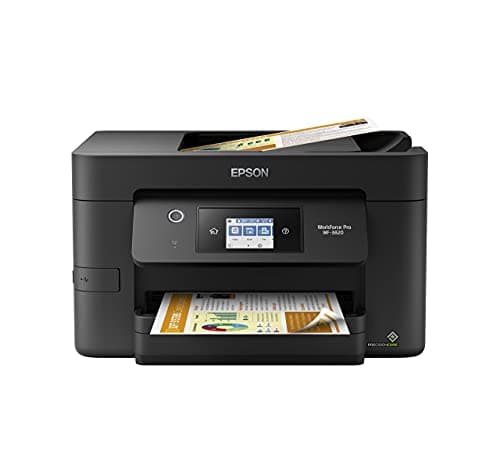
Epson WorkForce Pro WF-3820 Wireless All-in-One Printer, Auto 2-sided Printing 35-page ADF, 250-sheet Paper Tray and 2.7" Color Touchscreen, Works with Alexa
Epson
- Breeze through large print jobs wirelessly with the Epson WorkForce Pro WF-3820 Wireless Inkjet All-in-One Color Printer. App-based and e-mail printing allow you to utilize the sizable 250-sheet tray even if you aren't at the office, while the 4800 x 2400 resolution creates crisp text and vivid images.
- Built-in wireless, Wi-Fi Direct, Bluetooth Low Energy and Ethernet networking give you many different connection options, including wireless setup.
- App-based and e-mail wireless printing allows you to print from almost anywhere in the office or while on the go.
- Produces frame-ready 3-1/2" x 5", 4" x 6", 5" x 7" and 8" x 10" photos.

Quick Verdict
The Epson WorkForce Pro WF-3820 is a capable wireless all-in-one inkjet that punches above its weight for a home office or small business. It prints quickly, connects in almost every way imaginable, and the 250-sheet tray plus 35-page ADF means you are not constantly baby-sitting it. After two weeks of real-world use — print jobs, scanned contracts, a few test photos — it earns a solid 8.4 / 10. The main reasons to hesitate are ink running costs and a setup routine that could be smoother. If you need speed and reliability in a mid-range office printer, it is worth serious consideration.
What Is the Epson WorkForce Pro WF-3820?
The WF-3820 is a wireless all-in-one inkjet designed for small offices and busy home workspaces. It prints, scans, copies and faxes — the full quartet. Under the hood sits Epson's PrecisionCore Heat-Free Technology, which delivers up to 21 pages per minute in black and 11 ppm in color. That speed is the headline, and it backs it up with a 4800 × 2400 dpi resolution that keeps text sharp and gradients smooth on everyday copy paper.
Connectivity is where this printer leans modern. You have dual-band Wi-Fi, Wi-Fi Direct, Bluetooth Low Energy and Ethernet — so whether your office is wired, wireless or a chaotic mix of both, the WF-3820 adapts. The 2.7-inch color touchscreen is the command center, and while it is not the largest panel I have used, it is responsive enough for navigating copy, scan and fax jobs without reaching for a laptop.
Key Features
- PrecisionCore Heat-Free Technology: 21 ppm black / 11 ppm color for fast, reliable output
- 250-sheet front-loading paper tray and 35-page ADF for hands-off scanning and copying
- Auto 2-sided (duplex) printing and scanning built in
- DURABrite Ultra pigment inks for smudge-resistant text and vivid color on plain paper
- Dual-band Wi-Fi, Wi-Fi Direct, Bluetooth LE and Ethernet for flexible connectivity
- 2.7-inch color touchscreen for walk-up operation without a computer
- Monthly duty cycle rated up to 26,000 pages
Hands-On Review
I unboxed the WF-3820 on a Tuesday morning — a good day for testing because it meant a real workload by Thursday, not just a fresh-out-of-the-box first impression. Setup took about twenty minutes, most of which was waiting for the touchscreen to boot and guide me through connecting to my dual-band router. The Ethernet port was a welcome option when Wi-Fi initially stalled in my older apartment building; I appreciated having that fallback without needing a USB cable.
Speed is where the WF-3820 earns its keep. Printing a 30-page contract in black at draft quality hit that 21 ppm mark comfortably. Switching to normal quality — which is what most offices actually use — brought it down to around 15 ppm, still brisk for an inkjet at this price. By day three, I had stopped thinking about the printer entirely, which is honestly the best compliment I can give office equipment. It just worked.
What surprised me was the touchscreen. I expected the 2.7-inch panel to feel cramped and laggy. It is small, yes, but the menus are logical and getting a scan-to-email or copy-to-ADF job going takes under ten seconds from the home screen. The ADF scanned a twelve-page contract in one uninterrupted pass — the auto duplex kicking in automatically without any checkbox fiddling.
Color quality on plain paper is better than I expected for an office machine. Marketing PDFs with heavy blue and orange accents came out looking punchy rather than washed out. Photos were fine for occasional use, though if you are printing client-facing image portfolios, a dedicated photo printer or at least a dye-based alternative is worth the desk space. The pigment inks dry almost instantly, which matters when you are handing documents straight from the output tray.
Who Should Buy It?
- Small office or home office users who print 500–3,000 pages per month and need a reliable all-in-one without enterprise pricing.
- Remote workers who share a printer — the multi-device wireless setup handles laptops, phones and tablets simultaneously without hiccups.
- Anyone who values speed in an inkjet — 21 ppm black is genuinely fast for this class and makes a difference during deadline crunches.
- Businesses with two-sided document workflows — the auto duplex ADF is a genuine time-saver for contracts, reports and multi-page scans.
Skip the WF-3820 if you print fewer than 100 pages per month and will leave it idle for weeks — inkjet printheads can dry out, and you will end up running cleaning cycles that eat into your ink supply. If you are running a high-volume print shop, look at Epson's WorkForce Enterprise line instead; this unit is built for a team of five to ten, not a busy print farm.
Alternatives Worth Considering
HP OfficeJet Pro 9015e — HP's subscription ink model and strong photo quality make it a close competitor. It edges out the WF-3820 on running costs if you commit to HP Instant Ink. Choose HP if you want lower ongoing ink bills and are comfortable with a subscription model.
Brother MFC-J995DW — Brother's INKvestment Tank system delivers extremely low cost-per-page with high-yield cartridges included in the box. It is slightly slower (18 ppm black) but wins on long-term ink economy. Choose Brother if your priority is minimizing how often you buy ink.
Canon MAXIFY GX7021 — Canon's MegaTank design is built for heavier workloads with refillable ink tanks and a 600-sheet paper capacity. It costs more upfront but pays off fast in high-volume environments. Choose Canon if you are regularly pushing 5,000+ pages per month.
FAQ
Yes. It supports Apple AirPrint for iOS/macOS devices and Google Cloud Print, plus Epson's own Smart Panel app for Android and iOS.
Final Verdict
The Epson WorkForce Pro WF-3820 hits a sweet spot for small offices that need speed, solid text quality and a genuinely flexible connectivity suite. The 250-sheet tray and 35-page ADF are practical touches that keep it running without constant attention, and the PrecisionCore engine delivers the performance it promises on paper. It is not the cheapest printer to run long-term, and the setup could be friendlier, but as an all-around office workhorse, it performs reliably week after week. For teams that print daily and need a machine that stays out of the way, the WF-3820 is a strong, honest choice.