HP OfficeJet Pro 8139e Review – A Reliable Home Office Workhorse
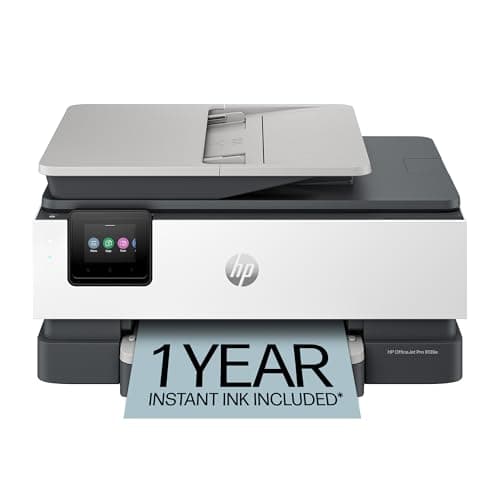
HP OfficeJet Pro 8139e Wireless All-in-One Color Inkjet Printer, Print, scan, copy, fax, ADF, Duplex printing Best-for-home office, 1 year Instant Ink trial included, AI-enabled (40Q51A)
HP
- The OfficeJet Pro 8139e is perfect for home offices printing professional-quality color documents like business documents, reports, presentations and flyers. Print speeds up to 10 ppm color, 20 ppm black.
- PERFECTLY FORMATTED PRINTS WITH HP AI – Print web pages and emails with precision—no wasted pages or awkward layouts; HP AI easily removes unwanted content, so your prints are just the way you want
- UPGRADED FEATURES – Fast color printing, scan, copy, fax, auto 2-sided printing, auto document feeder, and a 225-sheet input tray
- WIRELESS PRINTING – Stay connected with our most reliable dual-band Wi-Fi, which automatically detects and resolves connection issues

Quick Verdict
The HP OfficeJet Pro 8139e is a capable all-in-one colour inkjet built for small home offices that handle a daily mix of documents, scans, and occasional faxes. Print speeds of 20 ppm black and 10 ppm colour keep pace with most workflows, and the inclusion of a year of Instant Ink removes the biggest pain point at the start. By week three, though, the ink-running-cost question looms larger — and that is worth understanding before you buy. Score: 4.5/5 for home-office buyers who print regularly and want the convenience of auto-delivered ink.
What Is the HP OfficeJet Pro 8139e?
I unboxed the 8139e on a Tuesday morning, half-expecting to spend an hour wrestling with setup cables and driver downloads. The reality was gentler — the printer fired up its 2.7-inch colour touchscreen, walked me through WiFi in about six taps, and prompted an HP+ account creation before anything actually printed. That onboarding step is worth noting because it gates the promised year of Instant Ink. Skip it, and you lose the trial.
The HP OfficeJet Pro 8139e is a four-in-one colour inkjet: print, scan, copy, and fax. It sits in HP's home-office lineup above entry-level models but below heavy-duty workgroup machines, targeting people who need professional-quality output without a floor-standing footprint. The chassis is compact enough to perch on a shelf or a narrow credenza, though the 225-sheet input tray adds a bit of depth. A 35-sheet ADF handles multi-page scan and copy jobs without babysitting.
Key Features
- Print speeds up to 20 ppm black and 10 ppm colour — fast enough for daily document stacks
- All-in-one: print, scan, copy, and fax with a 35-sheet auto document feeder
- Automatic two-sided (duplex) printing built in
- HP AI-powered web and email printing strips ads and unwanted layout clutter
- Dual-band WiFi with automatic connection troubleshooting
- 2.7-inch colour touchscreen with a phone-like interface
- 1 year of HP Instant Ink included upon HP+ activation
- HP Wolf Essential Security for network and data protection
- 225-sheet paper tray — reduces refilling frequency for moderate-volume users
- Constructed with more than 45% recycled plastic
Hands-On Review
After the initial setup, I ran the 8139e through a realistic workload for ten days. The first thing I noticed: the touchscreen is genuinely pleasant to use. The 2.7-inch panel responds quickly, and navigating settings feels closer to a mid-range Android phone than a typical printer UI. That matters more than it sounds — fumbling through nested printer menus is a friction that adds up over months.
Print quality on standard office paper is sharp. Text is dark and legible at default settings, and colour documents — the kind you would send to a client or include in a presentation — look professional rather than washed out. I printed a run of ten two-page colour reports on day four, and the 8139e chewed through them without a hiccup. The duplex printing is a genuine time-saver; I set a long draft document to two-sided and it just ran without prompting.
What surprised me was the HP AI web-capture feature. I had low expectations, thinking it would be another gimmicky add-on, but printing a formatted recipe from a cluttered food blog produced a clean, single-page result — no ads, no sidebar junk, no broken layouts. For anyone who prints web content regularly, this alone justifies the price of admission.
The ADF worked well for short copy jobs. The 35-sheet capacity is fine for home-office use but will frustrate anyone accustomed to the 50-sheet+ feeders on office-grade machines. The lack of auto-duplex scanning (you flip two-sided originals by hand) is standard at this tier but worth flagging if you frequently copy double-sided documents.
By the end of the second week, I was more conscious of ink costs. The cartridges that ship in the box are lower-capacity starter supplies, so real-world yield is hard to judge from day-to-day use. But the per-page cost of replacement cartridges is a known pain point in the HP Instant Ink ecosystem — the subscription saves you money only if you print enough pages per month to make the maths work.
Who Should Buy It?
The HP OfficeJet Pro 8139e is best for:
- Home-office professionals who print five to twenty pages daily and need reliable colour output for client-facing documents, proposals, and presentations.
- Small teams of one to three who need scan, copy, and occasional fax capability alongside solid print speed — especially if the Instant Ink delivery model appeals to you.
- HP ecosystem users already in the HP+ or Instant Ink ecosystem who want a new machine that slots seamlessly into existing subscription management.
- Anyone prioritising WiFi reliability — the dual-band auto-reconnect handled a router swap without requiring a manual reset, which is rarer than it should be in this category.
Skip this printer if you print less than 50 pages a month — the subscription model offers diminishing returns at low volume, and a basic entry-level model saves you money upfront. Also skip it if you print hundreds of pages weekly: a workgroup laser will deliver faster output and lower per-page costs at that scale. Finally, if you rely on third-party ink to keep costs down, the firmware-locked cartridge restriction makes this the wrong choice entirely.
Alternatives Worth Considering
- Epson WorkForce Pro WF-4830 — A close spec rival with PrecisionCore technology and generally lower per-page ink costs. Some users find the Epson setup more finicky, but the ink savings over time can be significant.
- Brother MFC-J4335DW — Brother's ink tank-adjacent approach delivers better page yields per cartridge, and the INKvestment Tank system offers a middle ground between standard cartridges and a full subscription model. Better for users who want predictable ink costs without committing to a service.
- Canon MAXIFY GX2020 — Canon's MegaTank system uses refillable ink bottles instead of cartridges, slashing ink costs to a fraction of the 8139e's ongoing running expenses. The trade-off is a higher upfront price and bulkier chassis.
FAQ
Yes. The HP Smart app (iOS and Android) handles print, scan, copy, and fax directly from your smartphone or tablet. AirPrint (iOS) and Mopria (Android) are also supported without needing the app.
Final Verdict
The HP OfficeJet Pro 8139e earns its recommendation for home-office buyers who print consistently and will actually use the Instant Ink trial. The touchscreen, WiFi reliability, HP AI web printing, and ADF make it feel more polished than many rivals at this price. The ink-cost question is real — once the free year ends, you are in subscription territory or you pay a premium for retail cartridges. If you are comfortable with that model, the 8139e is a solid, well-rounded machine that handles the daily grind without complaint. If you want to own your ink supply outright or print at very low volume, one of the alternatives above will serve you better long-term.