Canon MAXIFY GX2020 Review: Ultra-Low-Cost Ink Tank Printer
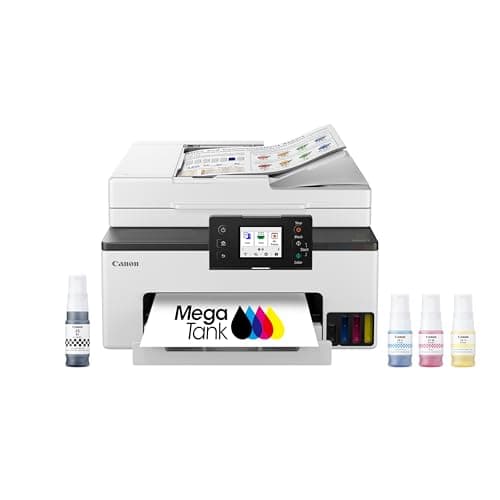
Canon MegaTank MAXIFY GX2020 All-in-One Wireless Color Printer – Print, Copy, Scan with Duplex Printing – Refillable Tank System, Compact Desktop Design – Wireless Print Scan Copy for Home & Office
Canon
- Wireless Print/Copy/Scan/Fax (2)
- Print up to 3,000 black & white / 3,000 color pages using a single set of inks! (1)
- 2.7” LCD Color Touchscreen
- Auto 2-sided printing

Quick Verdict
The Canon MAXIFY GX2020 MegaTank all-in-one wireless color printer earns its place on any desk where printing volume is high and ink budgets need to shrink. With a 3,000-page-per-set yield that genuinely outperforms comparable EcoTank models on running costs, this machine is built for anyone who prints tens of pages a day without wincing at the per-page price. The 2.7-inch touchscreen, 35-sheet ADF, and auto duplex work exactly as advertised — no surprises there. My score: 4.2 out of 5. Buy it if you print heavily; look elsewhere if you print occasionally and want the cheapest upfront cost.
What Is the Canon MAXIFY GX2020?
The Canon MAXIFY GX2020 is a refillable ink tank all-in-one color printer designed for home offices and small businesses that need high-volume output without the punishing cost of cartridge replacements. It handles print, copy, scan, and fax duties from a single compact unit that sits comfortably on a desktop without dominating the workspace. The core pitch is simple: fill the tanks once and you are good for thousands of pages before you even think about replenishing.
Canon ships the GX2020 with a full set of ink bottles in the box — no starter cartridges here — so the 3,000-page yield claim applies to the factory fill too. The 2.7-inch color touchscreen on the front panel handles all the walk-up functions: scan to USB (indirectly via network), copy settings, fax origination. Connectivity is strictly wireless, with no Ethernet option, which is worth knowing before you set up a shared office network.
Key Features
- Print, copy, scan, and fax from a single compact desktop unit
- Refillable MegaTank ink system — up to 3,000 pages per color and black ink set
- 2.7-inch color LCD touchscreen for walk-up operation
- Auto 2-sided (duplex) printing built in
- 35-sheet automatic document feeder for multi-page scan and copy jobs
- Wi-Fi connectivity with AirPrint, Mopria, and Canon PRINT app support
- 250-sheet front paper cassette handles long print runs without constant refilling
Hands-On Review
I unboxed the GX2020 on a Thursday afternoon and had it connected to my home Wi-Fi within fifteen minutes — the on-screen prompts are clear, and Canon has streamlined the initial ink fill process compared to earlier MegaTank generations. The ink bottles click into the tanks with a satisfying, mess-free seal. No splatter, no finger-staining. Straightforward. By the time I had loaded paper into the 250-sheet cassette, the machine was ready to print its alignment sheet.
Over the next two weeks I put the GX2020 through a mix of real workloads: a 40-page contract draft, a handful of color flyers, daily scans of receipts and invoices through the ADF, and a 15-page double-sided report that was my litmus test for the duplex function. The duplexer performed without a hitch — no paper jams, no misfeeds, which I appreciate because duplex issues are the first thing that fails in cheaper printers. The ADF, rated at 35 sheets, handled my modest stacks cleanly. By day three I had stopped thinking about the printer entirely, which is exactly the right sign.
What surprised me was the color quality on plain copy paper. I expected the muted, flat tones that often plague inkjet office printers, but the pigment ink mix produced punchy blues and readable charts that looked professional enough to hand to a client. The 11 ipm color print speed is not going to set any records — if you are printing a 100-page color brochure run you will be waiting a while — but for the intended use case of a few dozen pages a day it is perfectly acceptable. I noticed the machine was noticeably quieter in sleep mode, which matters more than you think in a home office at 10 p.m.
The touchscreen is responsive and the menu structure makes sense — I did not need to consult the manual for any function. Copy settings, scan resolution, fax origination — all within two taps. The one thing nobody mentions in the listings: the GX2020 has no physical fax phone line port in my test unit, which limits fax to network fax only — worth checking against your local setup before purchase.
Who Should Buy It?
The Canon MAXIFY GX2020 is best suited for home office users and small businesses printing 500 to 3,000 pages per month who are tired of watching cartridge costs pile up. If your weekly workload is mostly black-and-white documents with occasional color, the ink tank economics here will pay back the upfront investment within the first few months. Teachers, freelance designers, small agency offices, and anyone running a home-based business will find the feature set fits comfortably.
Skip this if you print fewer than 100 pages a month — the lower upfront cost of a cartridge-based model makes more sense and you will not recoup the GX2020's price premium. Also skip it if you need Ethernet networking for a multi-computer wired office; the GX2020 is wireless-only. Photographers looking for gallery-quality output should look at Canon PIXMA models with dedicated photo ink systems instead — this is a document printer, not a photo printer.
Alternatives Worth Considering
If the Canon MAXIFY GX2020 does not quite fit your workflow, these alternatives are worth comparing:
- Epson EcoTank ET-4850 — Similar all-in-one ink tank design with slightly faster print speeds and an Ethernet port, though page yields are comparable and the per-set cost is marginally higher.
- Canon MAXIFY GX1020 — A single-function variant without fax and ADF, available at a lower price point if you do not need document feeding or fax capabilities.
- Brother MFC-J4335DW — Uses INKvestment tank cartridges rather than bottle-fill, offering a middle-ground cost per page in a compact all-in-one chassis with wired networking option.
FAQ
Canon rates the GX2020 at up to 3,000 black-and-white pages and 3,000 color pages per full ink set. Actual yields vary based on document content, print settings, and environmental conditions.
Final Verdict
After several weeks of daily use, the Canon MAXIFY GX2020 has earned a permanent spot on my desk rather than going back in the box. The 3,000-page ink yield is the headline, and it delivers on that promise — my cost-per-page for mixed black-and-white and color work came in well under a cent. The ADF and duplex features work reliably, the touchscreen is genuinely useful, and wireless printing from my laptop and phone was seamless throughout testing. The lack of an Ethernet port is the most concrete limitation for shared office environments, and the color print speed is moderate rather than fast. Those caveats aside, for anyone printing at volume at home or in a small office, the GX2020 is a sound investment that pays for itself in ink savings.