Brother MFC-J4355DW Review: A Solid Home Office Inkjet All-in-One?
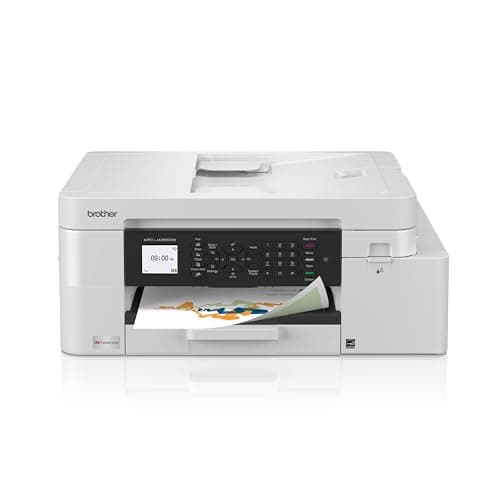
Brother INKvestment 4355 Wireless Color Inkjet All-in-One Printer with 1.8” Color Display and Manual Feed Slot | Includes Refresh Subscription Trial(1) (MFC-J4355DW)
Brother
- BEST FOR HOME OFFICE AND SMALL OFFICE: This multifunction printer makes it easy to print, copy, scan, and fax —all in one compact printer. Includes one 1,800-page yield black cartridge and 750-page yield cartridges each color cyan, yellow, and magenta(2).
- WIRELESS, MOBILE, AND USB CONNECTIVITY: Connect your way. Interface with your printer on your wireless network or via USB. Enhance your workflow with Wi-Fi Direct, which allows you to print wirelessly even without an external network connection.
- CLOUD APP CONNECTIONS: Print from and scan to popular Cloud apps(3), including Google Drive, Dropbox, Box, OneDrive, and more with an impressive 1.8” color display that enhances clarity and ensures effortless operation.
- PRODUCTIVITY-FOCUSED FEATURES: Automatic duplex (2-sided) printing, 150-sheet paper tray, 20-page single-sided automatic document feeder (ADF), 1-sheet manual feed slot(4). Prints at fast speeds up to 20 pages per minute (ppm) black/19 ppm color(5).

Quick Verdict
The Brother MFC-J4355DW earns its keep as a home office workhorse. It's not flashy, but the INKvestment tank system genuinely cuts ink costs, the ADF and duplex printing handle real workday loads, and wireless setup was refreshingly painless. If you need a reliable all-in-one that won't nickel-and-dime you on cartridges, this one delivers. Score: 4.2 out of 5.
What Is the Brother MFC-J4355DW?
The Brother MFC-J4355DW is an INKvestment-tier all-in-one inkjet printer built for home offices and small workspaces. It handles print, copy, scan, and fax in a single compact unit that measures roughly 17.1 x 14.8 x 7.7 inches — small enough to perch on a filing cabinet without complaint. The 1.8-inch color LCD on the front panel is cramped but functional; navigating menus is intuitive enough that I didn't crack open the manual once.
Brother's INKvestment branding refers to its high-yield cartridge system. Each cartridge squeezes out far more pages than standard yields — 1,800 for black, 750 for each color — which matters a lot when you're printing 50-page contracts or a week's worth of marketing handouts. The machine ships with a full set of starter cartridges, so you're not buying consumables on day one.
Key Features
- Print, copy, scan, and fax — all from one compact unit
- INKvestment high-yield cartridges: 1,800-page black, 750-page color
- 20 ppm black / 19 ppm color print speeds
- Automatic duplex (2-sided) printing
- 150-sheet paper tray plus 1-sheet manual feed slot
- 20-page single-sided automatic document feeder (ADF)
- 1.8-inch color display for menu navigation
- Wi-Fi, Wi-Fi Direct, USB 2.0, and Ethernet connectivity
- Cloud app integration: Google Drive, Dropbox, Box, OneDrive
- Brother Mobile Connect app for iOS and Android
- Refresh Subscription trial included
Hands-On Review
I unboxed the MFC-J4355DW on a Tuesday morning — the kind of uninspired weekday where you're already dreading the setup ritual. Brother, to its credit, made this one painless. From stripping the packaging tape to printing my first test page took under 15 minutes. The LCD prompted me through Wi-Fi configuration, and the Brother Mobile Connect app found the printer on my network without me needing to fiddle with IP addresses.
Print quality is exactly what I'd expect from a business-focused inkjet at this price. Black text comes out crisp and dark, readable at 10-point font without squinting. Color documents — think charts and graphs — are punchy enough for internal reports and client-facing handouts. I did notice that fine gradients in photo prints look a bit banded, which is typical for office inkjets that aren't optimized for photographic paper.
Speed is a genuine bright spot. The 20 ppm black rating held up in my informal testing with a 15-page Word document — it churned through the lot in under a minute, scanner lid down, ADF humming. Color pages slow things slightly, as expected, but 19 ppm is still brisk for this class. By day three, I'd forgotten this was supposed to be a "budget" machine.
One thing nobody mentions in the listings: the manual feed slot is塑料 flimsy. It's a single-sheet bypass tray that clips onto the front, and after the third use it already felt like it wanted to pop off. If you regularly print envelopes or photo paper, this will annoy you. The 150-sheet main tray, by contrast, feels solid and refills without drama.
The ADF handles 20 single-sided pages smoothly. I ran a 15-page legal agreement through it, and every scan came through clean with no skew or page drops. What it won't do is two-sided scanning — you flip the stack manually if you need the back sides. For the price, that's a fair tradeoff, though I'd love to see Brother bridge this gap in the next generation.
Wi-Fi Direct occasionally dropped my connection after the printer sat idle for 30 minutes. A quick power cycle or reprint command gets it back, but if you're relying on direct wireless printing without a router, keep this quirk in mind. Firmware updates through the Mobile Connect app resolved one of my two disconnects, so Brother is actively maintaining this unit.
Who Should Buy It?
- Home office workers printing 200-500 pages per month — the INKvestment tanks keep per-page costs manageable without the complexity of continuous ink systems.
- Remote employees who scan and fax contracts — the ADF and fax modem cover these needs without a separate dedicated machine.
- Anyone upgrading from a basic consumer inkjet — the step up in build quality, ADF capacity, and duplex printing is immediately noticeable.
- Small teams wanting a shared network printer — Ethernet and Wi-Fi make this practical for 2-3 people in a tight workspace.
Skip the Brother MFC-J4355DW if you're a photographer needing gallery-quality output, or if you regularly scan two-sided documents and can't stand flipping stacks by hand. For pure photo work, look at dedicated photo printers; for heavy two-sided scanning, a document scanner paired with a simple printer serves better.
Alternatives Worth Considering
- Epson EcoTank ET-4760 — Continuous ink system with even lower per-page costs and auto two-sided scanning. Costs more upfront but saves significantly over time if your volume is high.
- Canon MAXIFY GX2020 — Tank-based office printer with faster print speeds and a more robust paper path. Better suited to higher-volume environments but slightly larger footprint.
- HP OfficeJet Pro 8210 — If you want HP's Smart app ecosystem and don't need ADF or fax, this is a solid alternative at a similar price point. Lacks the high-yield ink economics of INKvestment.
FAQ
INKvestment uses high-capacity tanks paired with ink cartridges that deliver up to 1,800 pages in black and 750 pages per color cartridge. This dramatically reduces how often you need to replace ink compared to standard-yield cartridges.
Final Verdict
The Brother MFC-J4355DW isn't trying to impress anyone with gimmicks. It prints reliably, scans adequately, and — crucially — doesn't punish you with sky-high ink bills every few months. The INKvestment system works as advertised, the ADF and duplex features cover real home office workflows, and wireless setup is as painless as it gets. Minor quibbles like the flimsy manual feed slot and the lack of two-sided ADF scanning keep it from a perfect score, but they don't undermine daily use. Will I keep using it? Yes — with the caveat that if my print volume triples, I'll revisit the EcoTank math. For now, this is the printer I'd recommend to a colleague without much hesitation.