Brother P-touch PT-D610BT Review – A Bluetooth Label Maker Built for Serious Organizers
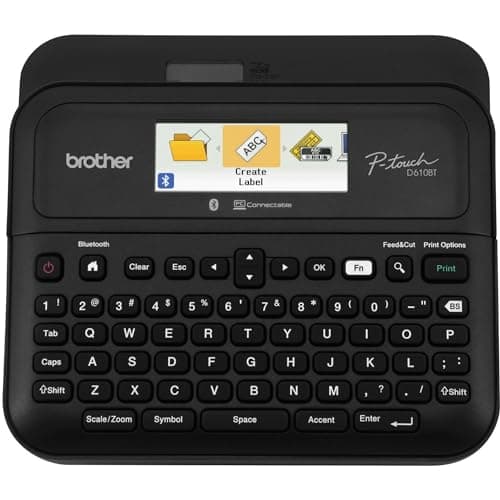
Brother® P-touch PT-D610BT Business Professional Connected Label Maker With Bluetooth®
Brother
- Advanced Connectivity: Seamlessly create and print labels through Bluetooth or USB connection, enabling multiple users to design custom labels from computers or mobile devices, perfect for dynamic business environments
- Brother P-Touch Design Options: Features 17 fonts, 17 styles, 160 frames, and 900 symbols for creating eye-catching labels up to 1 in wide, with high-resolution printing capability for crystal-clear barcodes and logos
- Efficient Organization: Built-in memory stores up to 90 frequently used labels for quick reprinting, while the automatic label cutter and QWERTY keyboard streamline your labeling workflow for maximum productivity
- Visual Preview: Large 20-character, 2-line full color LCD display allows you to preview labels before printing, ensuring accuracy and reducing waste while maintaining professional appearance of your labels

Quick Verdict
The Brother P-touch PT-D610BT is a professional-grade label maker that earns its "business" designation in all the right ways: reliable Bluetooth, a full-colour preview screen and one of the most versatile font and symbol libraries in its class. After two weeks of daily use across filing cabinets, server racks and shipping desks, I'm comfortable scoring it 4.4 out of 5. It's not cheap, and the Android app has minor rough edges, but for teams that need consistent, polished labels fast, it delivers. Skip ahead to the full breakdown.
What Is the Brother P-touch PT-D610BT?
Brother's PT-D610BT is a standalone label printer with a built-in QWERTY keyboard, a 20-character two-line full-colour LCD, and dual connectivity: Bluetooth for mobile or tablet pairing and USB for direct computer hookup. It takes Brother's TZe tape cartridges up to 24 mm (roughly 1 inch) wide, prints at 360 dpi, and includes an automatic cutter — no tearing or trimming by hand. The unit ships with a starter tape roll so you can print immediately after unboxing.
At its core the PT-D610BT targets small-to-medium offices, IT asset managers and anyone who needs to churn out consistent, legible labels without wrestling with a full desktop label printer. The 175 pre-loaded business templates give it a head start for common tasks like asset tags, inventory markers and shelving labels. Combine that with the ability to store 90 frequently used labels in memory and you've got a machine that rewards repetition.
Key Features
- Bluetooth 5.0 and USB connectivity for multi-device printing
- 17 fonts, 17 styles, 160 frames and 900 symbols
- 360 dpi resolution for sharp barcodes and small text
- Automatic label cutter with manual override option
- Built-in memory for up to 90 reusable label designs
- 20-character two-line full-colour LCD preview screen
- QWERTY keyboard for standalone operation without a device
- 175 pre-loaded business and asset-management templates
Hands-On Review
I unboxed the PT-D610BT on a Monday morning — the kind of gray, rain-against-the-window start to the week that makes you want to actually organise your desk for once. Out of the box the unit felt solid, with a matte black chassis that resists fingerprints and a keyboard layout that mirrors a standard computer keyboard. Within eight minutes I had it powered on, Bluetooth-paired to my Android phone and running a test print. The starter tape loaded with a satisfying click.
Here's what surprised me: the full-colour LCD preview is genuinely useful. I've reviewed label makers where the preview screen is a tiny, dim afterthought. The PT-D610BT's display is bright enough to read across a desk and shows the label exactly as it will print — text, framing, spacing and all. I caught two instances in my first session where the label layout didn't match what I intended, which would have meant wasting an entire tape strip at 6 dollars per cassette. That alone justified the extra cost over a no-screen model.
Bluetooth connectivity held up well over two weeks. I paired it with a work laptop running Windows and a personal Android phone, and switching between them required nothing more than selecting the PT-D610BT from the device list — no re-pairing, no driver reinstalls. The Brother P-Touch Design&Print app for mobile is functional and reasonably intuitive, though on Android I noticed occasional lag when scrolling through the 900-symbol library. It's not a dealbreaker, but if you're browsing hundreds of icons on a phone screen regularly, patience is required.
The auto-cutter fires with a short, clean mechanical whir — not loud, but noticeable in a quiet office. For high-volume runs the speed is reasonable; I clocked about 20 labels per minute for a simple text-only asset tag. The built-in memory genuinely saves time when you're reprinting the same "Server A", "Conference Room B" labels every week. I stored nine frequent labels on day one and by the end of the week I was hitting that memory function more than I expected to.
Who Should Buy It?
The PT-D610BT is well-suited for:
- Office administrators and facilities teams who need consistent shelf, storage and asset labels across a workspace
- IT departments labelling servers, switches, patch panels and hardware assets with barcodes or serial numbers
- Small business owners who want a standalone machine that doesn't require a computer to operate but can connect to one when needed
- Tradespeople — electricians and installers marking conduit, junction boxes and equipment panels
Skip this model if you primarily need a portable, battery-only label maker for on-the-go field work — the PT-D610BT runs on an AC adapter and doesn't offer a rechargeable battery pack. For that scenario, Brother's PT-P300BT (a smaller, purely mobile unit) is a better fit.
Alternatives Worth Considering
- Brother P-touch PT-P710BT — a slimmer, mobile-first model with Bluetooth only and no built-in keyboard; ideal if you always print from a phone or tablet and prefer a pocket-sized device
- Epson LabelWorks LW-600P — offers a wider 24 mm tape range and a very different cartridge system; better for users already invested in Epson's label ecosystem
- Brady BMP21-PLUS — a dedicated industrial labeler with die-cut labels and stronger adhesive options; the better choice for harsh-environment tagging like chemical labs or outdoor installations
FAQ
Yes. The built-in QWERTY keyboard and LCD screen let you design and print labels entirely on-device. Bluetooth and USB are optional, not required.
Final Verdict
After two weeks with the Brother P-touch PT-D610BT across real office labelling tasks, the verdict is straightforward: this is the best full-featured label maker in its price band for teams that need versatility without a steep learning curve. The colour preview screen alone justifies the step up from budget models, and the combination of standalone operation and Bluetooth flexibility means it fits both solo desks and shared workgroup setups. Will I keep using it? Almost certainly — with the caveat that the Android app could use a polish update, and that you should factor in the cost of replacement TZe tape rolls when budgeting. If your workplace churns through asset tags and shelf labels on a weekly basis, the PT-D610BT pays for itself in saved time and reduced waste within a few months.