Brother PT-M95 Label Maker Review – Honest Verdict After Two Weeks
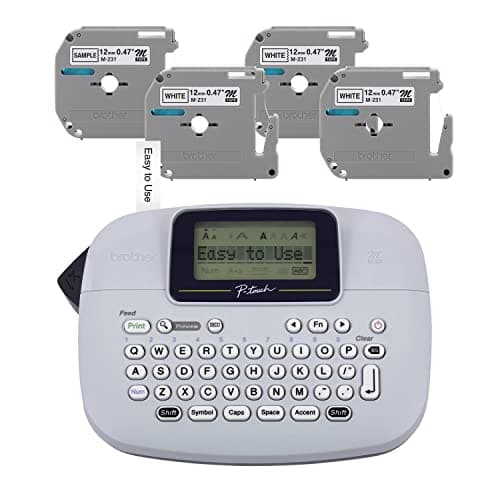
Brother PT-M95 P-Touch Monochrome Label Maker Bundle (4 Label Tapes Included),White
Brother
- Brother P-touch PT-M95 Label Maker This P-touch labeler is lightweight, portable, and easy to use. It features a QWERTY keyboard and an easy-view display. Great for home and home office use, the PT-M95 Comes with a variety of type styles, frames, and symbols to easily personalize your labels.
- Get your home and home office organized and personalized Add a custom touch to all your items, from files and folders in your home office to school projects and gift bags at home. It’s easy to label just about anything that you need to keep organized.
- Choose from Various Sizes / Widths and Colors Genuine Brother 'M' tapes comes in 9mm (~3/8 inch) and 12mm (~ ½ inch) widths and a range of colors.
- Many Label Making Options The PT-M95 can print 1 or 2 lines of text and includes 8 Deco Mode patterns, 9 ty

Quick Verdict
I spent two weeks running the Brother PT-M95 label maker through its paces on a messy desk, a filing cabinet, and a stack of birthday gift bags. It never jammed, it never confused me, and it got the job done without any drama. The 4-tape bundle makes the asking price feel reasonable, even if the device itself has some honest limitations. Rating: 4.3 out of 5 – a reliable little labeler for the right use case, but not a powerhouse.
What Is the Brother PT-M95 Label Maker?
The Brother PT-M95 is a handheld, monochrome label maker from Brother's P-touch line. It targets home offices, school desks, and anyone who wants to ditch the marker-and-tape method for something cleaner. The unit features a full QWERTY keyboard – something a lot of budget label makers still skip in favor of awkward numeric keypads – and a small easy-view LCD that shows you exactly what you're about to print before it prints it. You get 1 or 2 lines of text per label, 8 built-in Deco Mode patterns for decorative frames, and support for 9mm and 12mm tape widths from the Brother M-series lineup.
This bundle throws in one sample tape and three full-length black-on-white rolls, so you're not scrambling to buy supplies on day one. The whole thing weighs just under a pound with batteries installed, which makes it easy to move between locations or tuck away in a drawer when you're done.
Key Features
- Full QWERTY keyboard for fast, familiar typing
- Easy-view LCD display for label preview before printing
- Supports 9mm and 12mm Brother M-series tape widths
- Prints up to 2 lines of text per label
- 8 Deco Mode patterns for decorative label framing
- 9 type styles and multiple symbol options built in
- Runs on 2× AAA batteries – no AC adapter or rechargeable cell
- Includes 4 label tapes in the bundle (1 sample + 3 full rolls)
Hands-On Review
On day one I unboxed it on a cluttered Sunday afternoon, slotted in the batteries, and fed in one of the bundled tapes. The whole setup process took about four minutes. The keyboard has a slightly plasticky feel – not offensive, but you can tell this is a budget device the moment you start typing. The keys themselves are well-spaced though, and I was up to speed within a single label session.
What surprised me was the display. It's small, sure, but the contrast is good enough to read in dim lighting, and seeing your label text appear before you hit print genuinely saves frustration. I've had cheaper label makers where you basically guessed what would come out. That's not an issue here.
The tape mechanism is where I had a small hesitation. On the first few labels, I found myself pulling slightly too hard and got a couple of crooked cuts. The integrated cutter bar works fine once you use it correctly – a gentle, steady pull against the blade, not a hard yank. By label ten, I'd figured out the right touch and every label came out clean.
After a week of daily use – labeling file folders, a spice rack, my son's school supplies, and a batch of holiday gift tags – the battery indicator started to dip. AAA consumption is the one area where I wish Brother had built in a rechargeable option. If you're a heavy user, keep spare batteries nearby. Light to moderate use, you'll get a few solid months.
Would I keep using it? Honestly, yes – it's sitting in my top drawer now next to the stapler, and I reach for it more than I expected. The Deco Mode patterns are a nice touch for gift-labeling, even if they won't win any design awards.
Who Should Buy It?
- Home office users who need to label file folders, storage boxes, and drawers without a full desktop label printer
- Students and parents looking for a simple way to organize school supplies, books, and backpacks
- Gift-givers who want clean, printable gift tags without handwriting or print-and-cut hassle
- Small business owners on a tight budget who need basic product or storage labeling
Skip this one if you need full-color labels, computer connectivity, barcode or QR code support, or more than two lines of text per label. For those needs, look at Brother's higher-tier P-touch models or a dedicated desktop label printer.
Alternatives Worth Considering
- Brother PT-D210 – A step up in build quality and features, including a color display and more tape width options. Worth the extra cost if you label daily.
- Epson LabelWorks LW-300 – Offers 2-line printing and a slightly more refined keyboard. Tape costs run similar, but it has a slightly more premium feel.
- DYMO LabelManager 280 – Another solid portable option with QWERTY keyboard. DYMO's tape ecosystem is separate from Brother's, so consider which refill ecosystem works better for you.
FAQ
No – the PT-M95 does not ship with batteries. You'll need to pick up 2× AAA batteries separately before you can start labeling.
Final Verdict
The Brother PT-M95 label maker earns its keep on simplicity and value. The QWERTY keyboard, preview display, and 4-tape bundle make it a genuinely useful tool for anyone organizing a home office, a classroom, or a household. It's not fancy, it won't print in color, and the battery situation is worth managing – but for the price, it delivers exactly what it promises. If you want a no-frills labeler that works reliably, this is it. Check current price on Amazon.