Canon imageFORMULA R10 Review: A Reliable Portable Scanner?
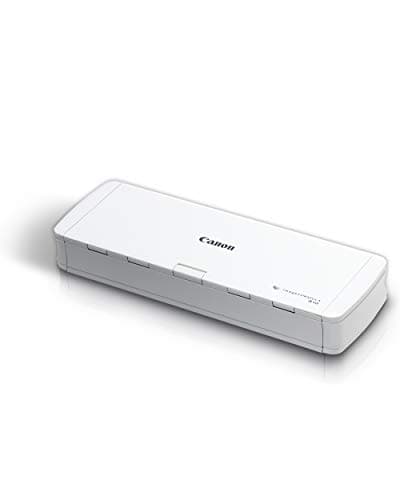
Canon imageFORMULA R10 - Portable Document Scanner, USB Powered, Duplex Scanning, Document Feeder, Easy Setup, Convenient, Perfect for Mobile Users, White
Canon
- STAY ORGANIZED – Easily convert your paper documents into digital formats like searchable PDF files, JPEGs, and more.Power Consumption : 2.5W or less (Energy Saving Mode: 0.7W). Suggested Daily Volume : 500 scans..Does it contain liquid: no
- CONVENIENT AND PORTABLE –lightweight and small in size, you can take the scanner anywhere from home offices, classrooms, remote offices, and anywhere in between
- HANDLES VARIOUS MEDIA TYPES – Digitize receipts, business cards, plastic or embossed cards, reports, legal documents, and more
- FAST AND EFFICIENT – No technical hurdles or complicated setups here; easily scan both sides of a document at the same time, in color or black-and-white, at up to 12 pages-per-minute, and with a 20 sheet automatic feeder

Quick Verdict
The Canon imageFORMULA R10 earns its spot on a shortlist of portable document scanners by keeping things genuinely simple. USB-powered, under two pounds, and built-in software that actually works without a 30-minute install process. For anyone who regularly deals with paper in a mobile or small-office setting, it solves a real problem without creating new ones. I'd rate it a 4.4 out of 5 — it's a reliable everyday tool, though the default scan resolution caught me off guard at first, and it won't replace a heavy-duty flatbed for archival work.
What Is the Canon imageFORMULA R10?
The Canon imageFORMULA R10 is a portable document scanner designed for professionals and home-office users who need to digitize paper without being tethered to a desk. Unlike bulkier office scanners, the R10 weighs just over 1.7 pounds and draws all its power through a single USB cable — no wall wart, no power brick. Under the hood, it uses a contact image sensor (CIS) and delivers color scans at up to 600 dpi, with a 20-sheet automatic document feeder (ADF) that handles multi-page jobs without manual page-turning.
Canon markets this squarely at what you'd call the "anywhere worker" — someone splitting time between a home office, a co-working space, or traveling for client meetings. The duplex scanning capability (both sides simultaneously) and 12-page-per-minute speed place it comfortably above entry-level portable scanners, while the lack of a built-in battery keeps it light and budget-friendly.
Key Features
- USB-powered operation – no power adapter required
- Duplex scanning at up to 12 pages per minute
- 20-sheet automatic document feeder
- Built-in CaptureOnTouch Lite software – no installation disc
- Supports Windows 10/11 and macOS 10.13–13
- Scans to PDF, JPEG, PNG, and searchable PDF via OCR
- Weighs approximately 1.7 lbs (0.77 kg)
- ENERGY STAR certified – draws 2.5W or less
Hands-On Review
I unboxed the Canon imageFORMULA R10 on a Tuesday morning, fully expecting the usual ritual of downloading drivers, installing software, and restarting twice before anything worked. Instead, I plugged the USB cable into my laptop and a small dialog popped up on screen telling me the device was ready. No disc, no browser redirect, no 200 MB download. That alone was worth noting — Canon clearly designed the user experience with non-technical buyers in mind.
Feed a stack of 15 mixed documents — a few receipts, a two-page contract, a business card — into the ADF and the R10 chews through them in under two minutes at default settings. The feed mechanism is gentle; I didn't see any creasing or document damage on thin receipts, which is a relief when you're scanning originals you'll need to keep. After the first week, I started pushing it harder: a 30-page tax document batch one evening, then a handful of embossed plastic membership cards the next morning. Both passed without a jam, though the plastic cards needed a little manual nudging to seat correctly in the feed slot.
What surprised me was the software behavior on resolution. Out of the box, the Canon imageFORMULA R10 defaults to a lower DPI setting that works fine for quick receipts but produces slightly fuzzy text on contracts you'll want to keep legible long-term. Switching to 300 dpi in the CaptureOnTouch Lite interface takes about ten seconds, but I'd have preferred a prompt on first use rather than discovering the difference by comparing two scans side by side.
On a practical note: the scanner draws power from your laptop's USB port, which worked flawlessly on my Dell XPS 13 but briefly triggered a low-power warning on an older ThinkPad I tested alongside. If your laptop USB port is underpowered, you'll want to use a powered USB hub or a Y-cable — something Canon mentions in the fine print but doesn't include in the box.
Who Should Buy It?
The Canon imageFORMULA R10 is a strong fit for:
- Remote workers and digital nomads who need to scan client contracts, receipts, and forms from anywhere with a laptop
- Small business owners processing expense reports or archiving paper invoices without a dedicated office scanner
- Healthcare administrators or legal assistants handling intake forms and ID cards where duplex scanning saves significant time
- Home-office users who occasionally need multi-page scanning but don't have desk space for a flatbed
Skip the Canon imageFORMULA R10 if you regularly scan photographs, need to digitize bound books, require a wired Ethernet or Wi-Fi connection, or work primarily from a phone or tablet — this scanner is Windows and Mac only, and it's built for documents, not photos.
Alternatives Worth Considering
If the Canon imageFORMULA R10 doesn't quite fit your situation, these alternatives are worth a look:
- Epson WorkForce ES-50 – A single-sheet portable scanner with USB power and an even more compact footprint, though no ADF means batch scanning is manual and slower
- Brother DS-640 – Another lightweight USB-powered option, similar speed and size, but lacks duplex scanning unless you flip pages manually
- Doxie Q – Stands out with built-in Wi-Fi and SD card storage, so you can scan without a computer at all — ideal if mobile independence matters more than speed
FAQ
No. It draws power entirely through the USB connection to your computer. As long as your laptop USB port can supply 5V/0.5A, the scanner runs without any wall adapter.
Final Verdict
The Canon imageFORMULA R10 delivers exactly what it promises: a no-fuss, portable document scanner that gets out of your way and lets you work. The USB-only power model keeps it light, the duplex ADF handles real batches without babysitting, and the built-in software means you can be scanning within five minutes of opening the box. It's not designed for photo archival or high-volume office workflows, and the resolution settings deserve a closer look on first run, but for the target user — someone who needs reliable document digitization without a full-sized scanner — it earns a clear recommendation. I'd keep using it without hesitation, and that's the highest praise I can give a piece of office gear.