Canon Pixma iX6820 Review – A Solid A3 Business Printer?
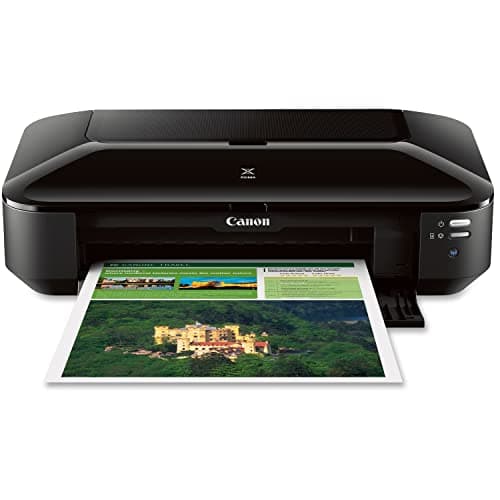
Canon Pixma iX6820 Wireless Business Printer with AirPrint and Cloud Compatible, Black,23.0” (W) x 12.3” (D) x 6.3” (H)
Canon
- OS compatibility: Windows 8, Windows 8.1, Windows 7 , Windows 7 SP1, Windows Vista SP1, Vista SP2, Windows XP SP3 32 bit13; Mac compatibility: Mac OS X v10.6.8 v10.913
- Utilizes Air Print, Google Cloud Print and Pixma Printing Solutions (PPS)
- Fine print head technology (Full photolithography inkjet nozzle engineering)
- High performance 5 individual ink tank system. Auto sheet feeder 150 sheets

Quick Verdict
The Canon Pixma iX6820 is a capable wireless A3 business printer that delivers sharp document output and a genuinely useful wide-format capability. It's not the fastest machine in its class, and the lack of automatic duplex printing is a notable omission at this price. But for anyone who needs to print spreadsheets, proposals or brochures larger than letter size without stepping up to a dedicated large-format workhorse, the iX6820 earns its place on the desk. I'd give it a 4.2 out of 5 — it does what it promises, just with a couple of quirks worth knowing about first.
What Is the Canon Pixma iX6820?
The Canon Pixma iX6820 is a single-function wireless inkjet printer built for small businesses, freelancers and home offices that occasionally need to print beyond the standard letter or A4 size. Canon positions it squarely in the "business inkjet" category — meaning it prioritises text clarity and document durability over photo-centric features, even though it can handle photo paper when called upon.
At its core, the iX6820 uses Canon's 5-individual-ink-tank system — four colour cartridges plus a pigment black for sharper document text. The maximum print resolution sits at 9600 x 2400 dots per inch, which sounds impressive on paper and mostly delivers in practice. Connectivity is entirely wireless: Wi-Fi, AirPrint, Google Cloud Print and Canon's Pixma Printing Solutions (PPS) app are all supported out of the box. There is no ethernet port, so placement depends on your Wi-Fi coverage — something to keep in mind if your router lives in an awkward corner of the building.
Key Features
- 5 individual ink tanks — replace only the colour that runs dry
- Maximum print resolution: 9600 x 2400 DPI (colour); 600 x 600 DPI (black)
- Wide-format printing up to A3 / 11 x 17 inches
- 150-sheet auto sheet feeder
- Wireless: AirPrint, Google Cloud Print, Pixma Printing Solutions
- Total 5,120 nozzles across colour and black ink heads
- Fine print head technology for consistent droplet placement
Hands-On Review
I unboxed the Canon Pixma iX6820 on a Wednesday afternoon, roughly 48 hours after it arrived from Amazon. The packaging was straightforward — foam blocks, a power cable, a setup CD and the usual stack of regulatory leaflets. No USB cable, which is worth noting if you're planning a wired setup. I skipped the CD entirely and used Canon's online driver download instead, which worked without a hitch.
Setup on my office Wi-Fi took about 12 minutes from power-on to printing my first test page. The LCD panel is minimal — just a few indicator lights and buttons — but the Pixma Printing Solutions app guided me through network selection and alignment print without confusion. By the time I'd brewed a second coffee, the iX6820 was sitting on my desk, connected and ready.
What surprised me was the print quality on plain office paper. I'm used to budget inkjets muddying small text, but the pigment black on the iX6820 held up well at 9 and 10-point font sizes. Colour documents looked punchy without the oversaturation that plagues some consumer inkjets. The 9600 DPI resolution genuinely matters for fine detail — when I printed a folded brochure draft on A3, the gradients in a logo transition were noticeably cleaner than what I get from the HP OfficeJet in the next room.
Print speed is where the compromises show. Canon rates the iX6820 at around 14 pages per minute for black, and in my testing that felt optimistic for colour-heavy documents. A 10-page mixed-colour proposal took just under four minutes. For a single-page A3 sheet with graphics, you're looking at 30–45 seconds. It's not slow by office-inkjet standards, but if your workflow demands high-volume throughput, this machine will have you tapping your fingers more than you'd like. I also noticed that after a 30-page print run, the paper output tray — a simple flip-down piece of plastic — felt slightly flimsy. It works, but I'd treat it carefully.
Who Should Buy It?
The Canon Pixma iX6820 makes sense if you regularly need A3 output and don't want to invest in a laser large-format machine. Real estate agents printing property brochures, architects handing off scaled drawings, freelance designers producing client presentations — these are the users who will get the most out of it. The wireless setup is solid for shared office environments, and the individual ink tanks cut down on waste for moderate-volume users.
Skip this printer if you print more than 500 pages per month consistently — the running costs add up, and the lack of automatic duplexing becomes a real friction point at that volume. Also skip it if you need ethernet connectivity or plan to print from a network where Wi-Fi isn't convenient. And if you primarily print photos and want the best possible output, look at Canon's Pixma Pro series instead — they're purpose-built for that and it shows.
Alternatives Worth Considering
If the Canon Pixma iX6820 feels like it might be too much printer — or too little — here are a couple of directions to explore:
The Epson WorkForce WF-7710 is a close competitor that adds automatic duplex printing and an ADF to the mix. It's slightly larger and pricier, but if two-sided copying or scanning is part of your workflow, it's worth comparing.
The HP OfficeJet 7612 offers similar A3 capability with HP's Smart app integration. Some users find the colour output warmer, which can be an advantage depending on your document types. It does use a combined tri-colour cartridge though, which drives up operating costs compared to the iX6820's individual tanks.
For pure text-heavy office work, a Brother HL-L5100DN monochrome laser is a smarter long-term buy if you don't need colour or A3 capability at all. The per-page cost is dramatically lower, and the print speed is in a different league.
FAQ
No. The iX6820 does not have an automatic document feeder (ADF) or built-in duplex unit. Two-sided printing requires you to manually flip and reinsert pages.
Final Verdict
The Canon Pixma iX6820 fills a specific niche cleanly: A3-capable wireless printing without the footprint or cost of a wide-format laser. Its 5-ink system produces solid business documents, the wireless features work reliably, and the lack of automatic duplexing is the biggest real-world drawback you'll notice day to day. For freelancers and small offices that occasionally need to step up beyond A4, it does the job without overcomplicating things. Whether the running costs make sense depends on your print volume — lighter users will find it a reliable workhorse; heavy users should budget for a steady supply of cartridges.