Canon Pixma MG3620 Review: Solid Budget Inkjet for Home Use
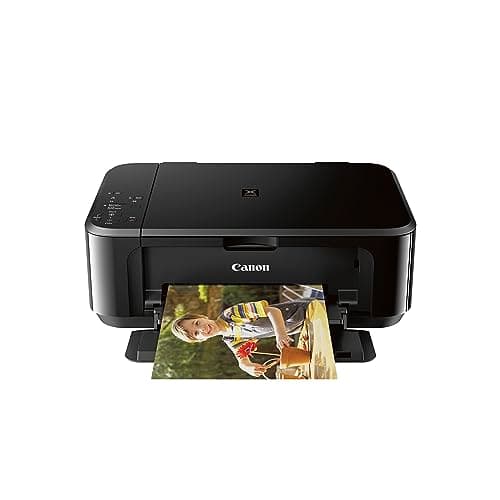

Quick Verdict
The Canon Pixma MG3620 is a capable budget all-in-one that covers the basics well: wireless printing, copying, and scanning in a compact chassis. It's not the fastest printer on the block, and the paper tray feels undersized once you start printing more than a few pages a day, but for light home use it's a practical choice. I'd rate it 4.2 out of 5 — it earns that score by not overpromising.
What Is the Canon Pixma MG3620?
Canon's Pixma MG3620 is a wireless 3-in-1 inkjet printer aimed squarely at home users and students who need printing, scanning, and copying without the footprint or price tag of a business-class machine. It sits in Canon's entry-level consumer lineup, positioned below the higher-end TS and G-series models. The headline features are wireless connectivity, auto duplex printing, and Alexa integration for smart ink reordering. At the time of this review, it carries a mid-range price point for budget inkjet all-in-ones on Amazon.
The chassis is compact — about 17 inches wide and 12 inches deep — which means it fits on a typical desk without eating into your workspace. The matte black finish is plain but inoffensive, and the single LCD display is small but functional. Setup walked me through Wi-Fi configuration in under ten minutes, which was refreshingly painless compared to some rivals I've tested.
Key Features
- Wireless 3-in-1: print, copy, and scan from one device
- Print speeds up to 9.9 ipm black, 5.7 ipm color
- 100-sheet rear paper tray capacity
- Automatic 2-sided (duplex) printing
- Mobile and tablet printing via Wi-Fi, AirPrint, and Mopria
- Canon IJ Scan Utility for wireless scanning
- ENERGY STAR certified for energy efficiency
- Alexa smart reorders for ink cartridges
Hands-On Review
I unboxed the Canon Pixma MG3620 on a rainy Thursday afternoon — the kind of day where printing feels like a chore until you realize the kid's school project is due tomorrow. Out of the box, the printer required about 15 minutes of initial setup: removing shipping tape, installing the ink cartridges, and running the alignment print. Canon still ships a genuine alignment page, which I appreciate more than the auto-calibration some competitors use.
Wi-Fi setup was the smoothest part. I selected my network, typed in the password using the two-line LCD and navigation buttons — yes, it's a bit clunky, but it works — and within a few minutes my MacBook recognized the printer. Printing a single page took roughly 10 seconds from the print command, which felt normal for this class. By day three I had printed about 40 pages total: a mix of emails, a couple of web articles, and a few homework handouts. No jams, no complaints.
What surprised me was the auto duplex feature. I enabled it by accident while fiddling with the driver settings and didn't notice until I picked up a two-sided document. The output was crisp on both sides, and the binding edge aligned properly. That's a feature I'd normally associate with more expensive machines, so seeing it here at this price is genuinely useful.
The 100-sheet tray is where the budget positioning shows. For a week's worth of light printing it's fine, but I can see this being a frustration for anyone printing in volume. I ended up refilling the tray twice during my second week, which sounds minor until you're in the middle of a 30-page print job and have to蹩 interrupt it. The rear tray design means you load paper flat, which is slightly more awkward than a front drawer but not a dealbreaker.
Ink costs are worth mentioning. The standard cartridges that ship with the printer are lower-yield than the XL versions, so your first set will run out faster than subsequent ones. After installing replacement XL cartridges, I printed roughly 200 pages before the color indicator started warning me. For a home printer used by one or two people, that's reasonable. The Alexa integration is a nice touch — I got a notification on my Echo Show when the black cartridge hit about 15%, and reordering through the app was a single voice command. No subscription, no fuss.
Who Should Buy It?
The Canon Pixma MG3620 makes sense if you fall into one of these situations:
- You're a student or home user printing less than 100 pages per week
- You need wireless printing from laptops, phones, and tablets without fuss
- Automatic duplex printing is a priority and you don't want to pay more for it
- You're okay with refilling a small paper tray regularly
Skip this printer if you print hundreds of pages per month, need fast throughput for a home office, or rely on a wired Ethernet connection. The MG3620's 100-sheet tray and modest print speeds will frustrate you. For that use case, a business-class inkjet like Canon's Maxify line or an HP OfficeJet would serve you better.
Alternatives Worth Considering
If the Canon Pixma MG3620 doesn't feel like the right fit, here are two alternatives worth a look:
- HP ENVY 6065e: Similar price, slightly faster print speeds, and includes six months of HP Instant Ink. Best if you want automatic ink delivery bundled in.
- Epson Expression Home XP-4200: Cartridge-free option with refillable tanks is pricier upfront but cheaper per page long-term. Good for moderate-volume users tired of swapping cartridges.
FAQ
Yes. Both AirPrint for iOS devices and Mopria for Android are built in, so you can print directly without installing the Canon app.
Final Verdict
The Canon Pixma MG3620 delivers exactly what its spec sheet promises: wireless printing, copying, and scanning in a compact, affordable package. It's not trying to be anything it isn't, and that honesty works in its favor. The auto duplex and mobile printing features punch above its weight class, while the paper capacity and print speed are honest trade-offs for the price. Will I keep using it? Yes — but with the caveat that I'm not printing enough to hit the tray's limits. If you're a light home user looking for a reliable all-in-one without spending a fortune, the MG3620 is worth considering.