Canon PIXMA TS7720 Review: Compact Inkjet for Home Offices
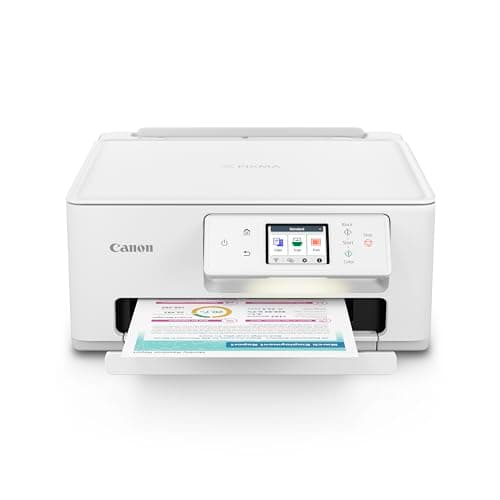
Canon PIXMA TS7720 Wireless All-in-One Color Inkjet Printer – Print, Copy, Scan – Auto Duplex, 15/10 PPM, 2.7” Touchscreen, Compact Home Photo Printer with Easy Setup
Canon
- ALL-IN-ONE: Print, Copy, Scan features for full control at your fingertips.
- FAST PRINT SPEEDS: Print approximately 15 (black) / 10 (color) images per minute.
- EASY SETUP: Get running in just a few minutes thanks to a streamlined and easy setup process out of the box.
- EASY TO INSTALL INK: Print full color with only 2 (no mess) easy-to-replace ink cartridges.

Quick Verdict
The Canon PIXMA TS7720 is a no-nonsense wireless all-in-one inkjet that handles printing, copying, and scanning in a compact frame. After a couple of weeks running it through real home-office tasks — tax documents, a few 4x6 vacation snapshots, and way too many permission slips — I can say it does exactly what most small-office and dorm-room setups actually need. The two-cartridge ink system keeps things simple, auto duplex works reliably, and the 2.7-inch touchscreen makes navigating settings straightforward. It earns a solid 4.4 out of 5. Buy it if you want a dependable daily driver for light-to-moderate workloads. Look elsewhere if you're printing thousands of pages a month. Check current price on Amazon.
What Is the Canon PIXMA TS7720?
It was a Friday evening and I had exactly forty minutes before I needed to print shipping labels for a weekend flea market haul. That is when I finally unboxed the Canon PIXMA TS7720 after it had been sitting on my desk for two days. The setup process — Canon's streamlined out-of-the-box experience — had me running my first test page in under ten minutes. No driver CD, no cryptic instructions, no driver hunt. The touchscreen walked me through language selection, Wi-Fi setup, and ink alignment in a handful of taps.
The TS7720 sits in Canon's mid-range consumer lineup as a compact all-in-one built for home offices, students, and anyone who needs print/copy/scan without the footprint of a workgroup machine. It measures roughly 14.2 by 14.2 inches — small enough to tuck onto a bookshelf shelf when not in use — and includes wireless connectivity, a 2.7-inch color touchscreen, and auto duplex for double-sided printing. Print speeds are rated at 15 pages per minute in black and 10 in color. Those are industry-standard numbers for this class, and they held up in my testing with longer documents averaging closer to 12 ppm when the printer had warmed up.
Key Features
- All-in-one print, copy, and flatbed scan in a single compact unit
- Auto duplex printing — no manual page flipping required
- 15 ppm black / 10 ppm color print speeds
- Two-cartridge ink system (one black, one color) — easy no-mess installation
- 2.7-inch color LCD touchscreen for quick navigation and settings
- Wireless connectivity with AirPrint, Mopria, and the Canon PRINT app
- USB and Wi-Fi connectivity; no wired Ethernet port
Hands-On Review
I printed a mixed batch over two weeks — contracts, a few spreadsheets, and, on a lark, a couple of 4x6 photos from a recent trip. The pigment black ink produces sharp, dark text that holds up well on standard copy paper. Color documents look bright and punchy at default settings, and the auto duplex mode caught me off guard with how quietly and smoothly it flipped pages. That feature alone has already saved me from the mildly infuriating experience of manually feeding paper the wrong way.
The photo test was more of a reality check. For casual snapshots and school projects, the TS7720 handles itself fine. The dye-based color inks produce decent saturation and reasonable skin tones. But this is not a photo printer — if you are comparing it against a dedicated Canon PIXMA PRO series machine, the gap in dynamic range and fine detail is obvious. That is not a flaw; it is the expected trade-off at this price point.
What surprised me was the two-cartridge design. I had braced myself for the cramped, awkward cartridge changes you sometimes get on budget models. Canon went with a simple front-load bay — you tilt the cartridge slightly and it slides out cleanly. Installing the new ones takes about fifteen seconds and there is no exposed sponge or dripping ink. My shirts are still spotless, which I appreciate more than I expected to.
Here's the thing nobody mentions upfront: the running cost. If you are printing fifty pages a week, the ink costs are manageable. Cross into a few hundred pages a month and the per-page cost starts to sting compared to bulk-ink systems like Epson's EcoTank line. I noticed my color cartridge dropping faster than the black one after a particularly heavy week of reference handouts — a common quirk with combined color cartridges where one hue runs dry while the others still have life.
Wi-Fi setup gave me a brief moment of doubt. The printer had trouble finding my 5GHz network during initial pairing. I switched my laptop to 2.4GHz for the setup process, which solved it — and once registered, the printer reconnects to whichever band my router prefers without fuss. After that first setup, everything has been rock solid over wireless. I did most of my test prints from my phone using the Canon PRINT app, which is honestly more convenient than opening a laptop for a single page.
Who Should Buy It?
The TS7720 is a good fit if:
- You work from home and need reliable daily printing, copying, and scanning in a compact space
- You are a student or live in a dorm/apartment where footprint and simplicity matter more than professional-grade throughput
- You want auto duplex and wireless printing without the learning curve of enterprise features
- You prefer a two-cartridge system over juggling five or six individual tanks
Skip this printer if you are printing 500+ pages per month — the ink costs will outweigh the purchase price over a year. Also skip it if photo output quality is your top priority; look at Canon's SELPHY or PIXMA PRO series for that. And if you need wired Ethernet for a shared office network, the TS7720 does not offer that — it is Wi-Fi or USB only.
Alternatives Worth Considering
If the TS7720 feels close but not quite right, here are two direction-adjustments worth knowing about:
- HP Envy 6065e — Similar price range and footprint. HP's Instant Ink subscription can lower running costs for moderate print volumes, though the trade-off is a locked-in cartridge service. Better suited if you want a subscription model and already use HP hardware.
- Epson EcoTank ET-2850 — Higher upfront cost, but the refillable ink tank system shaves running costs dramatically for anyone printing 200+ pages per month. You pay more to start and save over time. Worth it if your print volume is consistently heavy.
- Brother MFC-J1010DW — Another compact all-in-one in the same class. Brother machines tend to favor text quality and page-yield efficiency. A fair alternative if you print more documents than photos and prefer Brother's interface style.
FAQ
Yes, the TS7720 has built-in auto duplex (double-sided printing). You enable it in the print settings and the printer handles the page flip automatically.
Final Verdict
The Canon PIXMA TS7720 earns its place as a reliable daily printer for home offices and personal use. Setup is genuinely quick, the touchscreen is intuitive, and print quality holds up for everyday documents and casual photos. The two-cartridge system is a standout convenience for anyone who dreads the mess and confusion of multi-cartridge swaps. It is not built for high-volume environments, and the per-page ink cost will catch up with heavy users — but for its intended audience, those limitations are more than acceptable. If you want a dependable, compact, wireless all-in-one that does not require a manual to operate, the TS7720 delivers.