DYMO Embossing Label Maker Review – Hands-On Test 2024
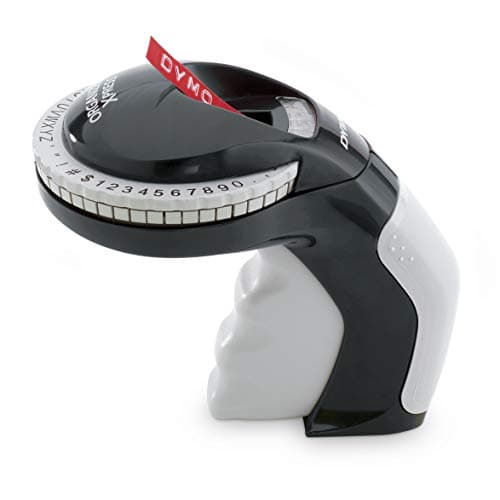
DYMO Embossing Label Maker, Includes 3 DYMO Label Tapes, Organizer Xpress Pro Starter Kit - Ergonomic Design, For Home DIY & Crafting
DYMO
- SIMPLISTIC DESIGN: Lightweight, portable, handheld embossing label maker
- INTUITIVE: Embossing label marker with turn-and-click system makes labeling simple
- CUSTOMIZABLE TEXT: 49 character wheel includes text, numbers, and symbols
- VARIETY OF COLORS: Embossing labels available in several fun colors
Quick Verdict
The DYMO embossing label maker is a refreshingly simple tool in a world of app-connected, battery-hungry label printers. I spent an afternoon with it organizing cable labels behind my desk, and honestly, I was surprised by how satisfying the process felt. The raised lettering is genuinely legible and has a tactile quality that thermal prints just cannot match. At this price point, it earns a solid score for anyone who wants physical, durable labels without the fuss of technology.
What Is the DYMO Embossing Label Maker?
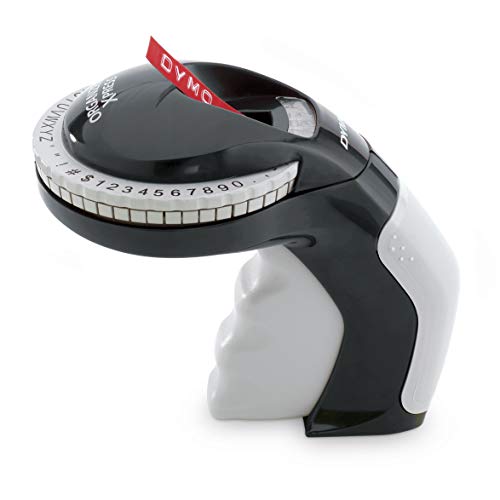
The DYMO Organizer Xpress Pro is a lightweight, handheld embossing label maker built for home and craft use. Unlike modern label printers that connect to phones or computers, this device works entirely on mechanical power – you turn a character wheel to select your text, then press down to emboss letters onto a plastic tape. The result is a raised, indented label that looks and feels noticeably different from flat printed tape. It arrives as a starter kit with two black label cartridges and one red, so you can begin labeling immediately without making a separate purchase.
The design skews toward function over fashion. The housing is durable molded plastic with a comfortable grip zone on the handle. It fits naturally in the palm, and the character selection dial sits within easy thumb reach. There's no screen, no menu system, and no learning curve beyond turning the wheel to the letter you want.
Key Features
- Turn-and-click character wheel with 49 available characters including letters, numbers, and symbols
- Lightweight handheld body weighing under 200 grams – easy to hold for extended periods
- Mechanical operation requires no batteries, no charging, and no app pairing
- Embossed labels produce raised, tactile lettering that holds up in garages, workshops, and closets
- Compatible with authentic DYMO Embossing Label tapes available in six colors
- Ergonomic handle design reduces hand strain during repeated use
- Starter kit includes three label cartridges: two black, one red
Hands-On Review
I unboxed the DYMO embossing label maker on a quiet Saturday morning with a stack of storage boxes waiting to be labeled. The packaging was straightforward – the tool, three cartridges, and a quick-start card. No batteries required. No QR code to scan. I appreciated that immediately.
The first thing I noticed was the weight – or rather, the lack of it. It sits in your hand like a comfortable pair of scissors, and the grip texture on the handle is effective without feeling cheap. Loading the first cartridge took about thirty seconds. The second one, faster.
By the third label, I had settled into a rhythm. Turn the wheel to the letter, click it into place, press down firmly. The embossing action requires a deliberate push – this is not a light tap. My thumb was noticeably working harder than it would on a thermal printer button. After labeling fifteen boxes, I could feel it. That's worth knowing if you plan to do a large batch.
The character wheel itself is smooth to turn, and the letters are easy to read in low light. I was labeling in a dim corner of my basement, and I had no trouble selecting the right character. Symbols are included – useful for labeling electrical circuits, inventory counts, or just adding a little flair to craft projects.
What surprised me was the legibility of the finished labels. The raised text casts tiny shadows under overhead light, which actually makes it easier to read at a glance compared to flat thermal labels. I stuck one on a cardboard box in my garage and came back two weeks later – no peeling, no fading. The embossed plastic held up fine against humidity that would have smudged a printed label.
Who Should Buy It?
Home organizers and DIYers who want a no-technology solution for labeling storage bins, garage shelves, and craft supplies will find this fits their workflow well.
Crafters and scrapbookers will appreciate the dimensional effect of embossed labels. They add a tactile, handmade quality that thermal prints simply cannot replicate.
Teachers and parents working with children can use this for classroom labels or reward charts. The mechanical operation is simple enough for older kids to handle with supervision.
Skip this if you need to print labels at any meaningful volume. Fifteen labels in a row made my thumb remind me that this is a physical process. For a hundred labels, you'd want a thermal printer. Also skip it if you need small font sizes or barcode data – the character wheel cannot provide that level of precision.
Alternatives Worth Considering
Brother P-Touch PT-D210 – A thermal label printer that connects to a keyboard or phone. It prints faster and produces smaller labels, but the output is flat and lacks the raised texture of embossing.
Zebra Z-Select 400T – A direct thermal printer aimed at professionals who need high-volume, durable labels for shipping or inventory. Significantly more expensive and less suited to craft or home use.
Letion Handheld Label Maker – A budget alternative with similar mechanical embossing mechanics. The build quality and label tape availability do not match DYMO's ecosystem, but the price is lower.
FAQ
No, it operates entirely on mechanical power. There are no batteries, no apps, and no syncing – you just turn the character wheel and press down.
Final Verdict
The DYMO embossing label maker fills a specific niche that larger label printer manufacturers have largely abandoned. It is reliable, portable, and produces labels that genuinely last. The mechanical simplicity means it will still work years from now when the battery in your thermal printer has swollen and leaked. I would have liked a slightly wider tape option and a smoother embossing action, but those are minor gripes in an otherwise well-executed design. For anyone who values tactile, durable labeling over speed, this tool delivers exactly what it promises.