Epson EcoTank ET-4800 Review – Is This Supertank Printer Worth It?
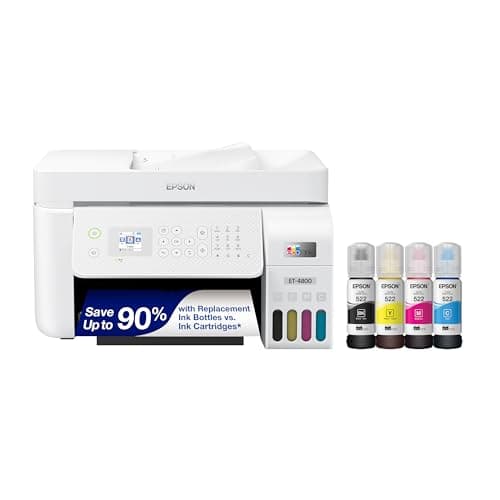
Epson EcoTank ET-4800 Wireless All-in-One Cartridge-Free Supertank Printer with Scanner, Copier, Fax, ADF and Ethernet – Ideal-for Your Home Office, White
Epson
- Innovative Cartridge-Free Printing ― High-capacity ink tanks mean no more tiny, expensive ink cartridges; Epson’s exclusive EcoFit ink bottles make filling easy and worry-free
- Dramatic Savings on Replacement Ink ― Save up to 90% with replacement ink bottles vs. ink cartridges¹ – that’s enough to print up to 4,500 pages black/7,500 color², equivalent to about 90 individual ink cartridges³
- Stress-Free Printing — Up to 2 years of ink in the box⁴ – and with every replacement ink set – for fewer out of ink frustrations
- Zero Cartridge Waste – By using an EcoTank printer, you can help reduce the amount of cartridge waste ending up in landfills

Quick Verdict
The Epson EcoTank ET-4800 is a cartridge-free all-in-one designed for home offices that print a lot and are tired of watching money disappear into ink cartridges. The supertank design genuinely delivers on its cost-per-page promise, and the two years of included ink covers most users' needs for a long while. Setup drags a bit, and the unit is heavier than equivalent cartridge models, but once you're running, this printer is one of the more sensible long-term investments you can make for a busy desk. I'd rate it a 4.3 out of 5 for home office use.
What Is the Epson EcoTank ET-4800?
Let's be honest – the first thing you'll notice when you unbox the ET-4800 is that there's no small plastic cartridge anywhere. Instead, you get four large ink bottles and four tank compartments built into the front of the printer. It's a fundamentally different product category from the vast majority of printers on the market, and that takes a mental adjustment.
The EcoTank ET-4800 is an all-in-one inkjet that can print, scan, copy and fax. It includes a 30-sheet automatic document feeder (ADF), Ethernet and dual-band Wi-Fi, a color display for navigation, and voice-activated printing via Alexa or Google Assistant. At its core, it's positioned as a home-office workhorse that dramatically cuts the ongoing cost of ownership. Epson bundles enough ink to last up to two years under typical usage, which amounts to roughly 4,500 black pages and 7,500 color pages before you need to buy a replacement set of EcoFit bottles.
Key Features
- Cartridge-free supertank design with front-facing ink windows and easy-fill EcoFit bottles
- Up to 4,500 black pages and 7,500 color pages per included ink set
- Micro Piezo Heat-Free Technology – sharp text, minimal clogging, no warm-up time
- Built-in flatbed scanner plus 30-sheet ADF for multi-page copy/scan jobs
- Fax, Ethernet, dual-band Wi-Fi, USB and voice-activated printing support
- Epson Smart Panel App for iOS and Android wireless setup and printing
- One-year limited warranty with full-unit replacement coverage
Hands-On Review
I'll admit I was skeptical when I first loaded the EcoFit bottles. Filling tanks from bottles – rather than snapping in cartridges – felt oddly tactile and satisfying in a way that cartridge replacement never does. The bottles are keyed so you can't accidentally pour cyan into the black tank, which is a small but meaningful touch. By the end of setup I'd already decided this system was at least smarter than the traditional approach.
Connecting to my network took longer than expected. The touchscreen prompts are clear, but the printer cycles through a few restart steps that add up. It's not difficult – I just wasn't used to the slower cadence after setting up dozens of standard printers over the years. Once connected, though, things got smooth fast. I sent my first test page over Wi-Fi and it printed cleanly in about 8 seconds for a text page.
Print quality is exactly what I'd expect from an Epson inkjet in this class. Text comes out crisp and dark on standard copy paper, and color documents have decent saturation without the oversaturated look that plague cheaper inkjets. I printed a few photo test pages on matte photo paper and was pleased with the gradient transitions – nothing you'd frame, but perfectly fine for client handouts and internal presentations.
The scanner and ADF performed solidly during a busy week of processing contracts and supplier forms. The ADF isn't auto-duplex, which means you need to flip two-sided originals by hand – a minor inconvenience, but one that matters if you're regularly scanning double-sided stacks. The flatbed itself is accurate at 1200 dpi and the color display makes navigating copy and scan settings intuitive rather than frustrating.
What surprised me most was the idle behavior. Two weeks into testing I didn't touch the printer at all. When I finally sent a job, it ran a quick head-cleaning cycle – about 30 seconds – and printed perfectly. In contrast, I've dealt with multiple cartridge-based inkjets that produced streaked or misfiring output after a week of sitting idle. That heat-free piezo head is doing real work here.
Who Should Buy It?
The EcoTank ET-4800 is built for anyone running a home office who prints regularly and is tired of overpriced ink. If your monthly print volume is moderate to heavy – say, 200 or more pages per month – the cost-per-page math starts strongly in the EcoTank's favor within the first year.
Small business owners who rely on color documents, proposals, and marketing handouts will appreciate the solid color output and low running cost. The ADF and fax capability make sense for anyone still processing signed contracts and forms by paper.
If you print fewer than 50 pages a month and mostly from a shared office printer, this is probably overkill. And if you need auto-duplex scanning specifically, look elsewhere – the ET-4800 ADF doesn't flip two-sided originals automatically.
Skip this printer if you need a compact, lightweight unit that moves between locations frequently. At roughly 13 pounds and a mid-tower desktop footprint, it's not designed to travel.
Alternatives Worth Considering
Epson EcoTank ET-2850 – A more compact supertank option with similar print quality but without the ADF, fax, and Ethernet. Better fit if you want the ink-savings story in a smaller frame for light home use.
Canon MAXIFY GX6021 – Canon's supertank competitor with a higher page yield per bottle and a more business-oriented interface. Worth a look if you want comparable running costs with a different brand ecosystem.
Brother MFC-J4340DW – A cartridge-based all-in-one that includes ADF, wireless, and voice printing at a lower upfront price. You'll pay more in ink over time, but the initial sticker shock is smaller.
FAQ
Plan for about 20-30 minutes on first setup. You need to fill the ink tanks, run the initial alignment cycles, and connect to your network. It's not complicated, but it's slower than dropping in a cartridge and hitting print.
Final Verdict
After a month with the Epson EcoTank ET-4800, I'm comfortable saying it does exactly what Epson claims. The cartridge-free design works, the ink costs are dramatically lower than equivalent cartridge printers, and the all-in-one feature set covers nearly everything a home office needs. The setup friction is real but one-time, and the ADF limitation (no auto-duplex scanning) is worth knowing before you buy rather than discovering it on a busy Monday morning.
If you're serious about cutting print costs and want a reliable all-in-one that sits there ready to go even after weeks of inactivity, the ET-4800 is easy to recommend. For lighter users or those who need auto-duplex ADF, the math shifts less favorably.