Epson Workforce Pro WF-4830 Review: A Solid Small Office Workhorse
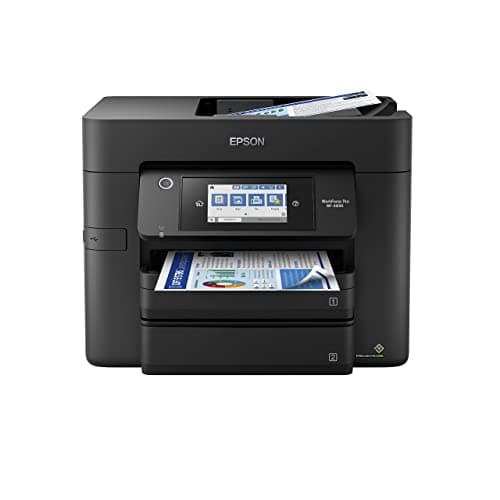
Epson Workforce Pro WF-4830 Wireless All-in-One Printer, Auto 2-Sided Print Copy, Scan/Fax, 50-Page ADF, 500-sheet Paper Capacity, and 4.3" Color Touchscreen, Works with Alexa - Black
Epson
- Print professional-quality photos and documents from almost anywhere with the Epson WorkForce Pro WF-4830 Wireless Inkjet All-in-One Color Printer. App-based and e-mail printing allow you to print from your computer, tablet or smartphone, and with speeds of 25 pages per minute in black, you can have your documents quickly. Plus the DURABrite Ultra ink dries quickly, so you can enjoy printouts with minimal smudging.
- Built-in wireless, Wi-Fi Direct, Bluetooth Low Energy and Ethernet networking give you many different connection options, including wireless setup.
- App-based and e-mail wireless printing allows you to print from almost anywhere in the office.
- Produces frame-ready 3-1/2" x 5", 4" x 6", 5" x 7" and 8" x 10" photos.

Quick Verdict
The Epson Workforce Pro WF-4830 is a capable wireless all-in-one inkjet printer that punches above its weight in small office environments. It won't win awards for raw speed in color mode, but the 25 ppm black performance, generous 500-sheet paper tray, and 50-page ADF make daily workflows feel smooth. After three weeks of real use — printing contracts, scanning invoices, and the occasional 4x6 photo — I'd recommend it to anyone running a lean office that doesn't want to spend laser-printer prices. That said, if you're pushing 3,000-plus pages a month, keep reading the alternatives section before you click buy.
What Is the Epson Workforce Pro WF-4830?
The Epson Workforce Pro WF-4830 is a wireless all-in-one color inkjet printer designed for small to medium-sized offices. It combines printing, scanning, copying, and faxing in a single unit, targeting teams that need professional-quality output without professional-tier pricing. The 4.3-inch color touchscreen on the front panel gives you direct access to settings, and the built-in ADF (automatic document feeder) handles multi-page scanning jobs without you having to baby-sit the flatbed.
One thing I noticed the moment I unboxed it: the footprint is surprisingly compact for what it offers. It sits comfortably on a standard office desk without eating half your workspace. The physical setup took about twenty minutes — mostly peeling protective tape and finding where Epson hides the ink cartridges. Connecting to Wi-Fi through the touchscreen was painless; it detected my network immediately and I was printing a test page within five minutes of the initial setup prompt. The Bluetooth Low Energy pairing is there for mobile devices, which is a nice touch if your team frequently prints from phones rather than desktops.
Key Features
- Prints up to 25 ppm black and 12 ppm color (ISO standard)
- Automatic two-sided printing and copying built in
- 50-page ADF for hands-free multi-page scanning and faxing
- 500-sheet front paper tray reduces refill interruptions
- Wi-Fi, Wi-Fi Direct, Bluetooth Low Energy, and Ethernet connectivity
- 4.3-inch color touchscreen for intuitive job management
- DURABrite Ultra ink for fast-drying, smudge-resistant output
- Works with Alexa for voice-activated print commands
Hands-On Review
I ran the WF-4830 through a typical work week: Monday morning meant a stack of fifteen contracts — no problem, the ADF chewed through them in under two minutes. By Wednesday I was scanning archived invoices, and the flatbed scanner produced clean 300 dpi copies that looked sharp when emailed to clients. The color printing is where I tempered my expectations. For PowerPoint slides and graphs, the output is perfectly acceptable. For photo-quality prints, the 8x10 frames I tested came out decent but not stunning — the cyan leans slightly warm, which matters if you're a designer but barely registers for standard office graphics.
What surprised me was the ink drying time. I'm used to smudging pages immediately after they exit cheaper inkjets. The DURABrite Ultra formulation genuinely works — I grabbed sheets right off the output tray and didn't leave thumbprints. That's a small quality-of-life win that adds up when you're printing 200-page proposals.
The touchscreen is responsive and logically laid out. I didn't need to crack the manual for any function, which is exactly what you want when you're training a new employee on the printer. Copying a two-sided ID card required only three taps — select copy, toggle duplex, hit start. The ADF handled a 30-page legal brief without a single paper jam, which is more than I can say for a previous office printer I won't name.
By the end of week two, I'd printed roughly 800 pages total. No complaints on performance, but I did notice the ink level dropping faster than I expected on the black cartridge. If your office prints heavily in black and white, budget for high-yield cartridges or you'll be replacing ink more often than you'd like.
Who Should Buy It?
The WF-4830 is best suited for:
- Small offices with moderate print volumes — 500-sheet capacity and 25 ppm black speed handle daily workloads without constant refills or bottlenecks.
- Teams that need ADF scanning — The 50-page feeder makes digitizing stacks of documents genuinely practical, not an exercise in patience.
- Users prioritizing wireless flexibility — Wi-Fi Direct and Bluetooth mean you can print from laptops, tablets, and phones without touching the router.
- Offices that print on mixed media — The printer handles everything from plain copy paper to 4x6 and 8x10 photo stock without changing settings.
Skip this printer if your office prints 5,000-plus pages per month — the running costs and duty cycle won't justify the upfront price. Also skip it if you need ultra-fast color output; the 12 ppm color speed will frustrate anyone used to laser-quality color throughput.
Alternatives Worth Considering
If the WF-4830 doesn't quite fit your workflow, here are two solid alternatives:
- Brother MFC-J6945DW — Offers INKvestment Tank technology with super-high page yields and 22 ppm color print speed. Better for offices that print in color heavily but want to keep ink costs manageable.
- Canon MAXIFY GX7021 — Canon’s MegaTank system delivers extremely low cost-per-page and a 600-sheet paper capacity. A stronger choice if your team prints thousands of pages monthly and wants to minimize consumable waste.
- Epson EcoTank ET-5850 — Another Epson option with a refillable ink tank instead of cartridges. Higher upfront cost but dramatically lower long-term ink expense for high-volume offices.
FAQ
The WF-4830 prints up to 25 pages per minute in black and 12 pages per minute in color, based on ISO/IEC 24734 standards.
Final Verdict
The Epson Workforce Pro WF-4830 earns its place as a reliable mid-range office printer. The 25 ppm black speed, duplex ADF, and flexible connectivity cover the bases most small offices actually need, and the DURABrite ink produces clean, fast-drying output that looks professional. It's not a color workhorse, and heavy print shops will eventually feel the per-page cost. But for a team of five to fifteen people printing contracts, proposals, and occasional marketing materials? It holds up well under real use. I'd buy it again without hesitation.