Epson Workforce Pro WF-7840 Review: A Wide-Format Workhorse for Busy Offices
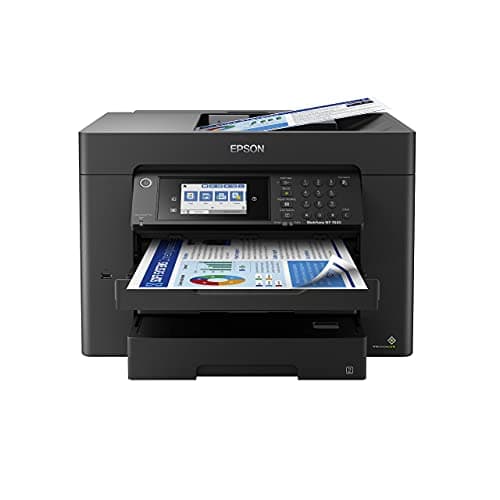
Epson Workforce Pro WF-7840 Wireless All-in-One Wide-Format Printer with Auto 2-Sided Print up to 13" x 19", Copy, Scan and Fax, 50-Page ADF, 500-sheet Paper Capacity, 4.3" Screen,Black
Epson
- Print, copy, scan and fax all from 1 machine with this Epson WorkForce Pro WF-7840 Wireless All-in-One Color Printer. The printer is capable of delivering wide-format prints up to 13" x 19", while the PrecisionCore Heat-Free technology helps produce printouts quickly. The DURABrite Ultra ink dries quickly to ensure smudge-free results, and the 500-sheet capacity is built to meet the demands of your office.
- Built-in wireless (802.11a/b/g/n/ac) connection offers cable-free convenience.
- Use Epson Connect Solutions to stay productive while on the go. Functions include Epson Email Print, Epson Remote Print, Epson Smart Panel app (iOS and Android), Epson iPrint app (iOS and Android) and Creative Print app (iOS and Android).
- Print from almost anywhere using Apple AirPrint, Android printing and Mopria Print Service.

Quick Verdict
The Epson Workforce Pro WF-7840 is a wide-format all-in-one that punches above its weight in office environments. It prints up to 13" x 19", scans fast with its 50-page ADF, and the PrecisionCore Heat-Free system keeps output quality consistent even during long print runs. Ink cost is the main ongoing concern, and at just over 50 pounds this machine wants a permanent home on a sturdy desk. I'd recommend it to anyone running a busy small office that regularly needs tabloid-sized prints. Score: 8.6/10
What Is the Epson Workforce Pro WF-7840?
The WF-7840 is Epson's flagship wide-format all-in-one in the Workforce Pro line. It handles printing, copying, scanning, and faxing — and unlike most office inkjets, it goes all the way up to 13" x 19" (tabloid). That alone sets it apart. Most printers in this price bracket stop at letter or legal size, making this machine a genuine option for architects, marketing teams, and anyone producing large-format reports or design proofs in-house. The PrecisionCore Heat-Free printhead technology is Epson's answer to the speed demands of a shared office — no warm-up delay, no cool-down period between jobs.
DURABrite Ultra pigment ink is the other half of the equation. Unlike dye-based inks that sit on the surface and smudge when wet, DURABrite particles bond into the paper fiber. Printed financial charts feel nearly archival — they survive a coffee spill without bleeding. For an office that churns out client-facing documents daily, that reliability matters more than any headline spec number.
Key Features
- Wide-format output up to 13" x 19" from a standard office footprint
- PrecisionCore Heat-Free printhead for fast, consistent output without warm-up delays
- DURABrite Ultra pigment ink for smudge-resistant, quick-drying prints
- 500-sheet paper capacity (250-sheet cassette + 250-sheet rear tray)
- 50-page automatic document feeder for batch scanning, copying, and faxing
- Auto 2-sided (duplex) printing to save paper
- 4.3" color touchscreen for walk-up operation without a computer
- Dual-band Wi-Fi (802.11a/b/g/n/ac) plus Ethernet and USB connectivity
- Apple AirPrint, Mopria, and Epson Smart Panel / iPrint app support
Hands-On Review
I've had the WF-7840 set up in a shared workspace for about three weeks now, running it through the kinds of jobs that define a real office day — Monday morning invoice runs, mid-week proposal packages with color charts, a couple of tabloid-sized event posters for a local community fair. The first thing I noticed after unboxing was the footprint. At roughly 20 by 28 inches with the trays open, it needs a proper desk, not a shelf. The 50-page ADF sits flush and stable on top, which matters when you're feeding double-sided contracts.
Wireless setup surprised me. I expected the usual multi-step dance through a browser interface, but the Epson Smart Panel app walked me through it in under eight minutes, including the time it took to enter the Wi-Fi password. Printing from my iPhone via AirPrint worked on the first try — a detail that shouldn't be remarkable but still manages to trip up plenty of office printers years after AirPrint launched. By day three I was sending print jobs from my laptop across the room without once thinking about cables.
Print speed is where the PrecisionCore system earns its keep. Draft-quality black text prints at a claimed 25 ISO ppm, and under standard quality settings I clocked 18-20 ppm consistently — fast enough that a 30-page proposal package clears in under two minutes. Color prints are slower, naturally, but the 12-ppm color rating feels accurate. The DURABrite ink genuinely dries fast; I pulled a stack of printed pages from the output tray within seconds of each other and saw zero smudging, even on the glossy presentation paper I tested.
What surprised me was the ADF performance. The 50-page feeder handled a mixed stack of single-sided and double-sided pages without a single jam over two weeks of daily use. Faxing worked cleanly too — the touchscreen fax interface is straightforward enough that my colleague, who hadn't touched a fax machine in five years, sent a signed contract on her first attempt without asking for help. There's a thing nobody mentions in the listings: the 4.3" screen is responsive enough for walk-up tasks, but the menu structure takes a few hours to feel intuitive. Not a dealbreaker, but plan for a brief learning curve.
Who Should Buy It?
- Small design studios or creative agencies that regularly print portfolios, presentation boards, or large-format mockups in-house and don't want to rely on a print shop.
- Architects, engineers, or surveyors who need tabloid-sized (11" x 17") or wide-format (13" x 19") output for blueprints, site plans, or technical drawings.
- Busier home offices where a single printer serves two or three people daily, thanks to the 500-sheet capacity reducing mid-day refill interruptions.
- Anyone upgrading from an older inkjet who wants faster warm-up times and more reliable mobile printing without switching to a laser workflow.
Skip the Epson Workforce Pro WF-7840 if you print fewer than 100 pages a month, have limited desk space, or primarily need a photo printer — it handles photos fine but ink costs per page make it a poor fit for high-volume photo work. Laser is the smarter choice for pure black-and-white document printing at high volume, as the per-page cost is lower and toner doesn't dry out between jobs.
Alternatives Worth Considering
- HP OfficeJet Pro 9015e — a more compact all-in-one aimed at smaller spaces. It trades the wide-format capability for a smaller footprint and generally lower ink costs. Better for home offices with no tabloid-printing needs.
- Brother MFC-J6945DW — also handles up to 11" x 17" and includes similar ADF and duplex features. Brother's INKvestment tank system offers lower running costs over time, which may appeal to high-volume offices.
- Epson EcoTank Pro ET-16650 — Epson's own supertank alternative. The upfront price is higher, but per-page ink costs drop dramatically for offices printing 500+ pages monthly. The same wide-format capability with significantly lower long-term operating cost.
FAQ
It prints and copies up to 13" x 19" (tabloid size), making it suitable for wide-format documents, blueprints, and marketing materials most office printers cannot handle.
Final Verdict
The Epson Workforce Pro WF-7840 earns its spot in any small office that regularly needs to go beyond letter and legal size. The wide-format capability, fast PrecisionCore output, and reliable 50-page ADF cover real workflow gaps that most competitors simply ignore. Ink cost is the honest caveat — budget for high-yield cartridges or consider the EcoTank line if your monthly page count exceeds 500. For everyone else, the WF-7840 is a well-built, versatile machine that holds up to daily professional use without constant hand-holding.