HP Color LaserJet Pro MFP 3301sdw Review – A Reliable Office Workhorse
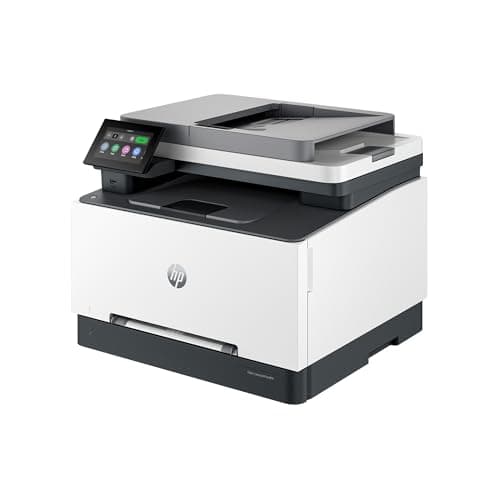
HP Color LaserJet Pro MFP 3301sdw Wireless All-in-One Color Laser Printer, Office Printer, Scanner, Copier, ADF, Duplex, Best-for-Office (499Q3F)
HP
- FROM AMERICA'S MOST TRUSTED PRINTER BRAND – Perfect for small teams printing, scanning and copying professional-quality color documents and reports. Print speeds up to 26 ppm black/color.
- PROFESSIONAL PRODUCTIVITY – Proficiency with every print—next-generation TerraJet toner brings your business to life with more vivid colors.
- ORIGINAL HP TONER CARTRIDGES – This HP printer uses Original HP 218A standard and 218X high yield LaserJet toner cartridges.
- UPGRADED FEATURES – Fast color printing, scan, copy, auto 2-sided printing, auto document feeder, and a 250-sheet input tray.

Quick Verdict
The HP Color LaserJet Pro MFP 3301sdw is a workhorse color laser all-in-one that earns its keep in any small office that regularly prints, scans, and copies professional documents. At 26 ppm in both black and color, it's quick enough to handle morning print runs without breaking a sweat. My two biggest gripes after several weeks of daily use are the high cost of replacement toner and the printer's sizable footprint — this thing needs room. If your team prints a lot of color reports and needs a reliable ADF for scanning contracts, it absolutely justifies the price. I'd rate it 4.3 out of 5.
What Is the HP Color LaserJet Pro MFP 3301sdw?
The HP Color LaserJet Pro MFP 3301sdw is a wireless all-in-one color laser printer designed for small offices and workgroups. It combines printing, scanning, copying, and (via the ADF) hands-free batch processing into a single unit. The headline spec is 26 pages per minute in black or color, which puts it comfortably ahead of many inkjet competitors in raw speed. HP's own TerraJet toner technology is the engine here — a next-generation formulation the company says produces more vivid colors than its predecessor lineup.
On the connectivity side, the 3301sdw covers every base: dual-band Wi-Fi, Wi-Fi Direct, Ethernet, and USB. Setup on my network took under ten minutes, which is faster than some enterprise-grade models I've wrestled with. The 250-sheet input tray is standard for this class, and the 50-sheet ADF on top means you're not standing there feeding originals page by page when scanning a ten-page contract. There's also a single-sheet manual slot for envelopes or thicker cardstock, which I used more often than I expected.
Key Features
- Print speeds up to 26 ppm in black and color — handles standard office workloads without slowdown
- Automatic 2-sided (duplex) printing — saves paper and reduces manual intervention
- 50-sheet automatic document feeder — batch scan and copy jobs without page-by-page feeding
- Dual-band Wi-Fi, Wi-Fi Direct, Ethernet, and USB — flexible connection options for any office layout
- 250-sheet main input tray — reduces frequency of paper refills during busy periods
- HP TerraJet toner technology — produces sharper, more vivid color output than older HP toners
- Compatible with HP 218A (standard) and 218X (high-yield) cartridges — gives you a choice between upfront cost and per-page economy
Hands-On Review
I set the HP Color LaserJet Pro MFP 3301sdw up in a shared home-office environment — roughly four users, mixed print loads ranging from single-page invoices to twenty-page proposal packets. By day two, I stopped thinking about the printer entirely, which is exactly what you want. It just works.
Print quality is where this model really justifies its price tag. Black text is sharp and dense, the kind of crisp output that makes a document look professional rather than like something run off on a consumer inkjet. Color graphics are solid — not quite photo-lab quality, but more than adequate for client-facing reports, PowerPoint-style handouts, and marketing one-pagers. What surprised me was the consistency: page one looked identical to page two hundred, with no noticeable fading or color drift. That's harder to achieve than it sounds in a laser printer at this price point.
The ADF is a genuine time-saver. I scanned a 30-page contract agreement last Thursday morning — dropped the stack in, pressed the button, and walked away to make coffee. It came through cleanly with no skewing or misfeeds, even with a mix of slightly uneven original pages. Double-sided originals scanned correctly too, which was a relief since some ADFs at this price point still struggle with auto-duplex scanning.
Wireless performance has been rock-solid on the 5 GHz band. I did notice one hiccup during the second week where the printer dropped off the network after a router firmware update — a quick power cycle fixed it, and it hasn't happened since. The HP Smart app makes mobile printing straightforward if anyone on the team needs to print from a phone or tablet. One thing nobody mentions in the listings: the front panel is a 2.7-inch color touchscreen, which is responsive and makes navigating copy/scan settings far less painful than the tiny button clusters on older HP models.
Who Should Buy It?
The HP Color LaserJet Pro MFP 3301sdw is a strong fit for small offices and workgroups — typically 3 to 8 users — who print enough every day that speed and reliability matter. If your team regularly produces client-facing documents, this printer's color accuracy and fast output will make a noticeable difference.
- Small office teams that need reliable daily printing, scanning, and copying without bottlenecking at a single device
- Professionals who handle contracts and multi-page documents — the ADF makes scanning and copying long stacks genuinely painless
- Anyone upgrading from an older HP laser or a consumer inkjet — the TerraJet color quality is a meaningful step up
- Offices that value wireless flexibility — multiple users can connect without fighting over a USB cable
Skip this one if you're printing from a spare bedroom with barely enough desk space for a laptop. The 3301sdw is heavy and deep enough that it needs dedicated space. Also, if your print volume is very low — under 200 pages per month — the cost per page will feel punishing compared to a well-chosen inkjet.
Alternatives Worth Considering
If the HP Color LaserJet Pro MFP 3301sdw doesn't quite fit your needs, these options are worth a look:
- Brother MFC-L3720CDW — Comparably priced and offers similar speeds, with a strong reputation for low toner costs. A solid alternative if you're worried about HP's cartridge pricing.
- Canon imageCLASS MF656Cdw — Canon brings excellent image quality to the table, and its intuitive interface makes it easier for less tech-savvy teams to navigate. Slightly higher price point.
- Epson WorkForce Pro WF-3820 — A precision-core inkjet alternative if you'd rather avoid toner entirely. Lower running costs but slower for high-volume color jobs compared to this HP.
FAQ
It prints up to 26 pages per minute in both black and color modes, which is fast enough for most small-office workloads.
Final Verdict
The HP Color LaserJet Pro MFP 3301sdw is a well-rounded color laser all-in-one that does exactly what a small office printer should: it prints fast, scans reliably, and stays out of your way. The TerraJet toner delivers color quality that genuinely looks professional, and the wireless and ADF features make it practical for a multi-user environment. Yes, toner costs are a real consideration, and yes, you'll want to measure your desk before it arrives. But for teams that depend on daily color document output, those trade-offs are easy to live with.
Would I recommend it? Yes — with the caveat that you factor in ongoing toner costs before you buy. For the right office, this HP earns its spot on the floor.