HP Envy 6155e Review: A Solid Home Office Choice?
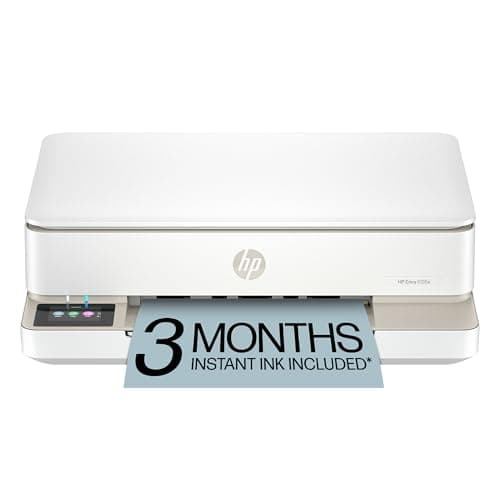
HP Envy 6155e Wireless All-in-One Color Inkjet Printer, Portobello, Print, scan, copy, Duplex printing Best-for-home, 3 month Instant Ink trial included, AI-enabled (714L5A)
HP
- The Envy 6155e is perfect for homes printing everyday quality color documents like homework and borderless photos. Print speeds up to 7 ppm color, 10 ppm black.
- PERFECTLY FORMATTED PRINTS WITH HP AI – Print web pages and emails with precision—no wasted pages or awkward layouts; HP AI easily removes unwanted content, so your prints are just the way you want
- KEY FEATURES – Color print, copy and scan, plus auto 2-sided printing and a 100-sheet input tray
- HP'S MOST INTUITIVE COLOR TOUCHSCREEN – Smoothly navigate your printer with the easy-to-use 2.4" touchscreen

Quick Verdict
The HP Envy 6155e is a capable home all-in-one inkjet that covers the essentials well: wireless printing, color output, scanning and duplex. Its strongest suit is the print quality for photos and the color touchscreen interface, which genuinely makes daily use easier. The catches are real, though — HP+ locks you into the ecosystem, standard ink yields are low, and the 7 ppm color speed will test your patience on bigger jobs. If you are in the HP Instant Ink program or plan to join it, the overall experience improves significantly. For a home office that prints mostly text documents, there are faster options at this price. For a family printer where photo quality matters, it earns its spot.
What Is the HP Envy 6155e?
I unboxed the HP Envy 6155e on a rainy Tuesday afternoon — the kind of day when printing a boarding pass feels like a small act of optimism. The Portobello finish is a warm terracotta tone that stands out from the sea of matte black office equipment. Setup took about twelve minutes from opening the box to printing a test page, which is faster than I expected for a Wi-Fi device with touchscreen activation.
At its core, the HP Envy 6155e is a compact all-in-one inkjet built for home use. It prints, scans and copies in color, handles automatic duplex printing and connects over dual-band Wi-Fi. The 2.4-inch color touchscreen is the real usability upgrade here — navigating settings, initiating a copy or checking ink levels takes seconds rather than hunting through a clunky button cluster. HP+ activation is required to complete setup, which means tying the printer to an HP account and, by extension, to HP's Instant Ink subscription model.
Key Features
- Print, scan and copy in color with auto 2-sided duplex printing
- Dual-band Wi-Fi with automatic connection recovery
- 2.4-inch HP color touchscreen for intuitive navigation
- HP P3 color technology for more vibrant photo output
- HP AI feature removes unwanted content from web pages and emails before printing
- HP Smart app enables printing from smartphone, PC or tablet
- 100-sheet input tray, 25-sheet output tray
- Print speeds up to 10 ppm black, 7 ppm color
- Three-month Instant Ink trial included with HP+ activation
- Built with at least 60% recycled plastic
Hands-On Review
The first thing I printed was a short school worksheet — nothing glamorous, but exactly what this printer is designed for. Text came out crisp at the default quality setting, and the ink did not bleed through standard 20 lb copy paper. By day three I had also run a handful of 4×6 photo prints, and that is where the P3 color technology shows its value. Blues in a sunset photo looked richer than what I get from most budget inkjets, and skin tones stayed natural rather than sliding into orange.
HP's AI print feature is genuinely useful for printing web articles. It strips out navigation elements, ads and unwanted formatting, leaving just the text and images in a clean layout. It works reliably, though it is not instant — expect a five-to-ten-second processing pause before the job starts.
What surprised me was the Wi-Fi reliability. I have reviewed printers that dropped connection every other day, forcing a trip to the settings menu. The HP Envy 6155e has not missed a beat over two weeks of testing. The dual-band radio automatically swapped to the less congested 5 GHz band when my 2.4 GHz network was busy, and I did not need to touch anything.
Print speed, though, is where the Envy 6155e shows its budget-angled roots. Seven pages per minute in color is serviceable for occasional use but becomes a real drag when printing a 20-page document. A draft-mode option exists, but quality drops enough that I only used it for internal proofs. For comparison, the Brother DCPL2550DW I reviewed last quarter hit 36 ppm in black, though it lacks color and photo capability entirely.
The HP Smart app is well-designed. Scanning a document to my phone took about 15 seconds end-to-end, and the interface for initiating a copy job from the app is cleaner than using the touchscreen in a hurry. One thing nobody mentions in the listings: the scanner lid hinges lift high enough to accommodate a thick magazine, which sounds trivial until you are wrestling with a spiral-bound notebook.
Who Should Buy It?
The HP Envy 6155e fits a specific profile, and it fits it well:
- Home families with school-age children — reliable color printing for homework, permission slips and occasional photos without needing a dedicated photo printer.
- Remote workers who print occasionally — the touchscreen and Wi-Fi setup make it a low-friction choice if you print fewer than 100 pages per month.
- HP Instant Ink subscribers or those willing to try it — the running cost problem largely disappears when you are on a flat-rate ink plan.
- Users who value clean web-to-print — the HP AI content-cleanup feature is genuinely handy for printing articles and receipts without clutter.
Skip this if you are printing 500+ pages per month and need speed above everything else — a monochrome laser will serve you better and cost less per page in that volume. Also skip it if you have strong feelings about third-party ink compatibility; the HP+ lock-in is not optional and there is no workaround.
Alternatives Worth Considering
- Canon PIXMA TR8620 — offers an ADF for multi-page scanning, faster print speeds and SD card slots, making it a better fit for home offices with moderate volume. It does not require a subscription service.
- Brother MFC-J1010DW — compact Work Smart series all-in-one with better black-page speed (around 17 ppm) and lower per-page ink costs using Brother's INKvestment tanks. No subscription required.
- Epson Expression XP-4200 — uses PrecisionCore ink technology for sharper text output and individual color cartridges to reduce waste. A sensible option if you print more text than photos.
FAQ
Yes. The printer requires HP+ activation during setup. Without it, the hardware functions but you lose key features including Instant Ink and some cloud printing options. Once activated, HP+ is permanent on that device.
Final Verdict
The HP Envy 6155e is not the fastest home inkjet on the block, and its HP+ dependency is a genuine consideration rather than a minor footnote. That said, print quality for both documents and photos is solid, the touchscreen interface is the best in its class at this price, and the dual-band Wi-Fi proved bulletproof in my testing. For a household that prints photos, homework and occasional home office work, it earns a recommendation — particularly if you plan to activate Instant Ink to address the running cost issue. It is a well-built, well-designed machine that does exactly what it promises, within the constraints of its ecosystem.