HP Envy Photo 7975 Review: A Solid Home Photo Printer?
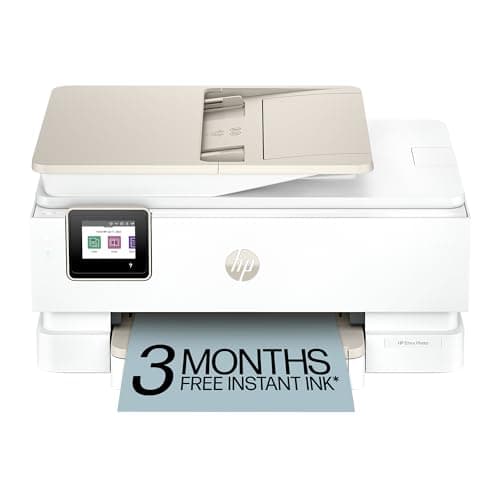
HP Envy Photo 7975 Wireless Color Inkjet Photo Printer, Print, scan, Copy, Easy Setup, Mobile Printing, Best-for-Home, 3 Month Instant Ink Trial Included, AI-Enabled (B63K3A)
HP
- the HP Envy Photo 7975 is a premium multi-purpose home printer with everything families need to learn, work, and create. Loaded with features to print high-quality photos, homework, office docs and everything else. It's also AI-enabled to intuitively adapt to your workflow, with wireless and security features that keep your multifunction printer up to date and secure.
- PERFECT FOR HOME - The HP Envy Photo 7975 is great for printing documents, high-quality true-to-screen borderless photos, creative projects and more. Print speeds up to 10 pages per minute color, 15 pages per minute black.
- PERFECTLY FORMATTED PRINTS WITH HP AI - Print web pages and emails with precision-no wasted pages or awkward layouts; HP AI easily removes unwanted content, so your prints are just the way you want.
- KEY FEATURES - Print, copy, scan, automatic 2-sided printing, advanced photo features, separate photo tray, auto document feeder, mobile and wireless printing.

Quick Verdict
The HP Envy Photo 7975 is a competent all-in-one that punches above its weight on photo quality. It won't replace a dedicated office workhorse, but for families who want to print snapshots, homework, and the occasional travel itinerary without juggling multiple devices, it gets the job done. The AI formatting genuinely impressed me — I stopped dreading printing web recipes. Score: 4.2 out of 5.
What Is the HP Envy Photo 7975?
The HP Envy Photo 7975 is a mid-range wireless all-in-one inkjet positioned squarely at home users who need more than just documents. It prints, scans, copies, and — the differentiator here — handles photo printing with a dedicated photo tray and borderless output. The machine ships with HP's AI-enabled Smart Tasks built in, which the marketing frames as something transformative.
Straight out of the box, the 7975 looks like most HP Envy models — matte black chassis, clean lines, a tilting color touchscreen. The footprint is compact enough for a cluttered desk, though you'll want clearance behind for the output tray to extend. The auto document feeder (ADF) on top is a genuine convenience for scanning multi-page contracts or school handouts without manually feeding each sheet.
Key Features
- Print speeds up to 15 ppm black, 10 ppm color — adequate for light home use
- Dedicated 4x6 photo tray with borderless printing support
- Auto document feeder (35-sheet capacity) for hands-free scanning and copying
- Automatic 2-sided (duplex) printing — no manual flipping required
- Dual-band WiFi with WiFi Direct for cable-free setup
- HP Smart app compatibility for iOS and Android printing
- HP AI Smart Tasks — strips ads and formats web content before printing
- 3-month Instant Ink trial included with HP+ activation
- 2.65-inch color touchscreen for walk-up operation
Hands-On Review
I unboxed the HP Envy Photo 7975 on a Tuesday afternoon — the kind of slow day where setup feels like a chore but you just want to get it over with. HP's reputation for painful first-time printer setup has stuck with me from older models, so I was braced for frustration. The actual experience surprised me: from opening the box to printing my first test page took under 20 minutes, most of which was peeling protective tape and waiting for the print head alignment.
The touchscreen is responsive enough for basic navigation — selecting copy, scan, or print jobs. I did notice it gets sluggish when you're two or three menu levels deep, which is mildly annoying if you're hunting for a specific setting. Nothing deal-breaking, but worth noting if you're used to snappy phone interfaces.
Print quality is where this machine earns its keep. The 7975 handles text with crisp edges at default settings — no fuzzy letters on my test documents. But the photo performance is genuinely better than I expected from an inkjet in this price bracket. A 4x6 borderless print of a sunset photo came out with punchy cyan and warm tones that held up well next to the same image on my monitor. The separate photo tray means you don't have to yank out the A4 tray every time you want to print snapshots — a small quality-of-life win that nobody talks about enough in reviews.
The AI Smart Tasks feature is the real question mark. HP markets it as intelligence that adapts to your workflow. In practice, it's a formatting tool that strips headers, footers, and ads when printing web pages. Does it work? Yes — cleanly and consistently. I printed a cluttered recipe page from a popular food blog and the 7975 delivered a clean, text-only version. It's genuinely useful. But it's not the kind of AI that learns your preferences over time, so manage your expectations accordingly.
What surprised me most was the wireless stability. I set it up on a dual-band network, and two weeks in, it hasn't dropped a print job. Some competitors in this range require a pep talk before they'll connect. The HP Smart app also mirrors the walk-up functions well — I sent a scan-to-phone job while sitting in the living room and the PDF landed in my notifications within seconds.
Who Should Buy It?
Active home photographers and scrapbookers will appreciate the dedicated photo tray and borderless output. The color handling is strong enough for casual prints that you'd actually put in an album.
Families with school-age kids get real value from the ADF and auto duplex — scanning homework submissions and printing double-sided assignments becomes frictionless.
Remote workers doing light office tasks will find the 7975 adequate for daily document printing, scanning contracts, and occasional color handouts. Just don't expect to run a home-based small business off it at high volume.
Skip this printer if: you print more than 200 pages per week, you need Ethernet for a wired office network, or you want the fastest possible output — the 15 ppm black speed lags behind true office-grade machines.
Alternatives Worth Considering
Epson Expression Photo XP-8600 — A direct competitor with superior photo-specific features, including a CD/DVD printing tray and slightly better color depth. It's more expensive but justifies the premium if photography is your primary use case.
Canon Pixma G7020 — A tank-based inkjet with dramatically lower running costs if you print frequently. The ink bottles last longer than any cartridge system, though setup and first print are slower. Better long-term value for high-volume home offices.
HP OfficeJet Pro 8015e — If your priority is document printing over photos, HP's own OfficeJet line delivers faster text output and better duty cycles. You'll sacrifice the photo tray and some color vibrancy, but gain speed and office-friendly durability.
FAQ
Yes, AirPrint is built in. I printed from an iPhone 14 and a 2021 iPad without installing any apps — the printer appeared immediately on both devices.
Final Verdict
The HP Envy Photo 7975 lands in a comfortable middle ground — it's not the cheapest home printer, nor the most capable, but it strikes a balance that works for its intended audience. Photo quality is genuinely good, the AI formatting features are more than a gimmick, and the all-in-one convenience makes it easy to recommend for households that print sporadically across multiple media types. The ongoing Instant Ink subscription is a cost to factor in after the trial ends, and the 15 ppm speed is the most obvious trade-off versus office-focused competitors. If you want a reliable wireless photo printer for home use without overthinking the decision, the HP Envy Photo 7975 is a sensible choice.