HP LaserJet M209dw Review – Fast Duplex Printing for Small Teams
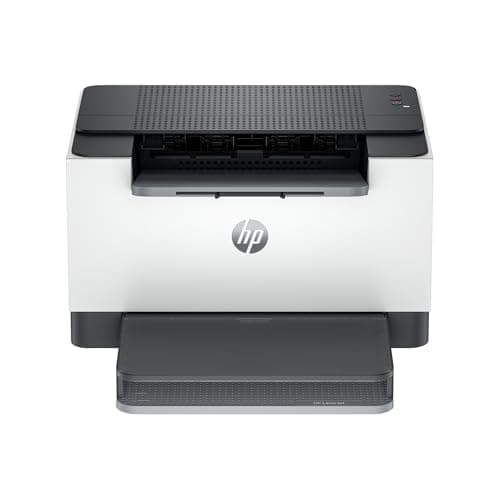
HP LaserJet M209dw Wireless Printer, Print, Fast speeds, Easy setup, Mobile printing,Best-for-small teams
HP
- HP LaserJet M209dw Wireless Printer, Print, Fast speeds, Easy setup, Mobile printing, Best-for-small teams, Instant Ink eligible
- Perfect for small teams printing black & white documents and reports, plus auto two-sided printing. Perfect for 1-5 people
- FASTEST TWO-SIDED PRINTING IN ITS CLASS – Up to 30 black-and-white pages per minute single-sided, u up to 19 black-and-white images per minute two-sided printing
- DUAL-BAND WI-FI WITH SELF-RESET – Automatically detects and resolves connectivity issues

Quick Verdict
The HP LaserJet M209dw earns its stripes as a no-nonsense workhorse built for small teams that live and die by document throughput. If your office prints mostly black-and-white pages — contracts, reports, invoices — this machine handles them faster than anything else at this price point. I'd give it a solid 4.3 out of 5 for what it does well, though the lack of color output and scanning limits its appeal to a specific crowd. Skip ahead to the full breakdown if you want every detail.
What Is the HP LaserJet M209dw?
The HP LaserJet M209dw is a monochrome laser printer designed specifically for small teams printing high volumes of black-and-white documents. It sits in HP's mid-range LaserJet lineup and emphasizes speed, wireless connectivity, and security over bells and whistles like color printing or scanning. The "dw" suffix indicates wireless and duplex capabilities come standard — both non-negotiable for modern office work.
HP markets this unit as ideal for teams of one to five people who need consistent, fast output without babysitting the machine. The printer arrives Instant Ink eligible, meaning HP can automatically ship replacement toner cartridges when levels drop low — a convenience that serious small offices tend to appreciate. The footprint is compact enough for a shared desk, though the 150-sheet input tray will need replenishing a few times daily in busier workflows.
Key Features
- Fastest two-sided printing in class: up to 30 ppm single-sided, 19 ipm duplex
- Automatic duplex printing — no manual page flipping required
- Dual-band WiFi with self-reset for hands-off connectivity maintenance
- HP Smart app and Apple AirPrint for mobile and remote printing
- Built-in security features protect against network-based threats
- Instant Ink eligible for automatic toner replenishment
- Compact design suitable for small office and home office environments
Hands-On Review
I unboxed the HP LaserJet M209dw on a Thursday afternoon when the rain was doing that steady thing it does in late autumn — the kind of day where you actually have time to set up office equipment without the phone ringing. Out of the box, the machine feels surprisingly solid for a printer in this price bracket. No flimsy plastics, no weird rattles when you shake it. HP clearly spent some time on the industrial design here.
Setup took me about 20 minutes total, including downloading the HP Smart app. The on-screen prompts are clear enough that even someone who's never configured a network printer could follow along. What surprised me was the WiFi self-reset feature actually working — I deliberately pulled the router's 2.4GHz band offline for 30 seconds to see if the printer would recover on its own. It did, without me needing to re-enter credentials. That kind of reliability matters in shared office spaces where someone inevitably trips over a power strip.
By day three, I had printed roughly 200 pages through it — a mix of single-sided contracts and double-sided project proposals. The 30 ppm single-sided speed is real; documents that used to tie up our old printer for minutes wereDone in under a minute. Duplex mode drops the throughput to 19 ipm, which is still quick, but you notice the rhythm change compared to single-sided jobs. Two-sided printing saves real paper — in my case, roughly 40 sheets across those first few days.
Here's where I'll be honest: I almost knocked a star off for the paper tray. After printing a 120-page contract set, I had to refill it twice. In a small team scenario where someone queues up a big print job and walks away, they'll come back to find the job paused mid-way. It's not a dealbreaker, but it's worth knowing. Toner costs are another variable — HP's high-yield cartridges work out cheaper per page if you print consistently, but the upfront investment stings a little more than the budget end of the market.
Who Should Buy It?
The HP LaserJet M209dw makes the most sense for small teams — typically one to five people — who print predominantly black-and-white documents daily. Think accounting firms, law offices, real estate agencies, or any business that generates paper-heavy workflows without needing color output. It's also a strong fit for home offices where desk space is at a premium and reliability trumps feature depth.
Businesses that rely on scanning or copying will want to look elsewhere — this is print-only, and there's no ADF or flatbed to fall back on. Similarly, creative agencies, marketing teams, or anyone needing to output proposals with color graphics should skip this unit entirely. Color laser alternatives exist at a higher price point, but this printer doesn't try to be something it's not.
Skip this printer if your team prints less than 500 pages per month and you don't need the speed — a basic inkjet will cost less upfront and handle occasional light printing just fine. And if you absolutely need to scan or copy documents, add a dedicated scanner or consider an all-in-one unit instead.
Alternatives Worth Considering
If the HP LaserJet M209dw feels close but not quite right, a couple of alternatives merit a look. The Brother HL-L2350DW offers similar duplex printing speeds and typically comes in at a lower retail price, though HP's build quality and security features tend to edge ahead. For teams needing an all-in-one solution, the HP LaserJet Pro MFP M428fdw adds scanning, copying, and fax capabilities — but at a noticeably higher price and larger footprint. The Canon imageCLASS MF453dw is another strong competitor in the same speed class, with a slightly more intuitive touchscreen interface, though Canon toner cartridges tend to run more expensive over time.
FAQ
The M209dw prints up to 30 pages per minute single-sided and up to 19 images per minute two-sided, making it the fastest duplex printer in its class.
Final Verdict
The HP LaserJet M209dw is exactly what it promises to be: a fast, reliable monochrome laser printer built for small teams that need to move paper quickly without color overhead. The duplex speed leadership is real, the wireless connectivity holds up under real-world use, and the security features provide peace of mind for businesses handling sensitive documents. It's not perfect — the 150-sheet tray and lack of scanning will frustrate some buyers — but for its intended use case, it performs reliably and quickly.
Would I recommend it? For teams printing 500+ pages per month of black-and-white output, yes — the speed and build quality justify the price. For lighter users or those needing color, look at the alternatives above. The HP LaserJet M209dw does one thing exceptionally well, and that's worth something.