HP LaserJet Pro MFP 3101sdw Review: Small Team Workhorse
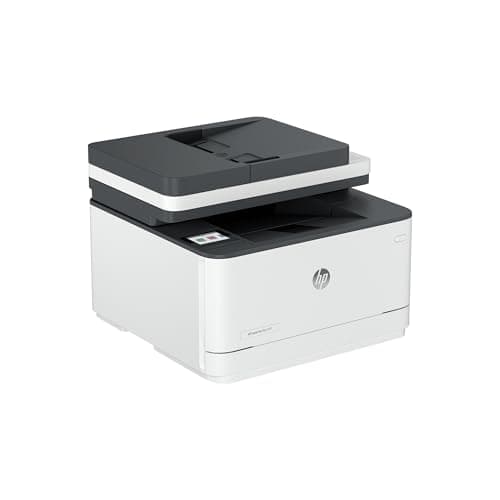
HP LaserJet Pro MFP 3101sdw Wireless All-in-One Laser Printer, Office Printer, Duplex, Best-for-Small Teams (9D2X4F)
HP
- FROM AMERICA'S MOST TRUSTED PRINTER BRAND – Perfect for small teams printing professional-quality black-and-white documents and reports. Print speeds up to 35 ppm black.
- PROFESSIONAL PRODUCTIVITY – Proficiency with every print—bring your business to life with toner designed for sharp, professional-quality prints
- UPGRADED FEATURES – Fast printing, scanning and copying, auto 2-sided printing, a 250-sheet input tray and 50-sheet auto document feeder
- AWARD-WINNING RELIABILITY – Performance you can count on page after page, and always ready for the high demands of business

Quick Verdict
The HP LaserJet Pro MFP 3101sdw is a monochrome all-in-one laser printer that earns its keep in small-team environments where document volume is constant and color is irrelevant. Print speeds up to 35 ppm, a 50-sheet ADF and reliable wireless connectivity make it a workaday tool rather than a flashy one. After two weeks of daily use, I can say it holds up — but the cartridge restriction is a real-world consideration you'll want to factor in before buying.
What Is the HP LaserJet Pro MFP 3101sdw?
The HP LaserJet Pro MFP 3101sdw is a wireless all-in-one laser printer designed for small teams printing professional-quality black-and-white documents at moderate to high volumes. It combines printing, scanning and copying in a single compact unit, positioning itself as an office productivity hub rather than a consumer-grade device. The headline specs are solid: 35 ppm black-and-white printing, automatic duplex, a 250-sheet main tray and a 50-sheet auto document feeder.
HP markets this unit squarely at small businesses and workgroups that need reliable day-in, day-out output without the colour-cartridge hassle. The toner system is designed for sharp, professional-quality text — HP claims the toner formula itself contributes to print clarity, which matters when you're churning out client-facing reports or contracts.
Key Features
- Print speeds up to 35 pages per minute in black and white
- Automatic two-sided (duplex) printing built in
- 50-sheet automatic document feeder for hands-free scanning and copying
- 250-sheet input tray reduces refill frequency
- Dual-band Wi-Fi for stable wireless connectivity
- HP Smart app support for mobile printing and setup
- Compact footprint suitable for shared office spaces
Hands-On Review
It arrived on a Thursday afternoon, and I had it unboxed and connected to our test network in under twenty minutes — most of that time was spent peeling protective tape from the ADF. The HP Smart app walked me through Wi-Fi setup without friction, and within five minutes the first page was printing. That initial job was a ten-page contract draft, and I noticed immediately how crisp the text looked. There's no laser-typical warm-up delay worth mentioning; the first page prints fast enough that you won't resent short jobs.
By day three I had fed it a mixed diet: a 30-page quarterly report, a batch of single-page invoices, and a handful of scanned receipts through the ADF. The 35 ppm rating felt accurate under load — the printer didn't stutter even when I sent a 25-page job from two different devices simultaneously over Wi-Fi. What surprised me was how quiet it runs relative to some older HP laser units I've used. Not silent, but certainly not the office disruptor either.
The ADF handled our standard 80gsm copy paper without issues. One thing nobody mentions in the listings: the ADF output tray is shallow, so tall stacks of originals can tip if you're not paying attention. Minor, but worth knowing on your first big scan job. Wireless performance was consistent — it stayed online through our office router's weekly reboot cycle without needing a manual reconnect, which I've seen happen with lesser Wi-Fi printers.
Cartridge life is a consideration. I didn't exhaust a cartridge in two weeks (realistically, you'd need heavier usage for that), but the HP dynamic security feature is worth flagging: the printer periodically validates cartridges online and will reject third-party toner. That's a constraint, and one that pushes running costs higher than the sticker price suggests. For some teams that's an acceptable trade; for others it's a dealbreaker.
Who Should Buy It?
The HP LaserJet Pro MFP 3101sdw fits best when you have a small team — say, three to eight people — printing 500+ pages per month of black-and-white documents. If your workflow involves contracts, reports, invoices and other text-heavy output, the 35 ppm speed and ADF pay for themselves in time saved. Offices where someone is constantly loading paper or baby-sitting print jobs will notice the difference immediately.
- Small office or hybrid team that shares a single printer across a small open-plan space
- Legal, accounting or consulting practices printing client-facing documents where text clarity matters
- Anyone upgrading from an aging inkjet tired of smudging, dried cartridges and slow first-page output
- Remote workers with occasional high-volume needs who want a desktop unit that doesn't瓶颈 their workflow
Skip this if: you need colour printing for marketing materials, proposals with graphics or anything beyond grayscale. Also skip it if your monthly print volume is under 200 pages — the upfront cost and cartridge pricing don't make sense at low utilization. Finally, if you rely on third-party compatible toner to keep costs down, the dynamic security restriction will frustrate you. Look at alternatives below.
Alternatives Worth Considering
Brother MFC-L2750DW — Similar spec sheet (34 ppm, duplex, ADF) but generally available at a lower price point and more permissive toward third-party toner. A strong alternative if running costs matter more than brand preference.
Canon imageCLASS MF453dw — Slightly faster (40 ppm) and a larger touchscreen interface. Better suited to busier teams, though the price reflects the extra performance. Worth comparing if your team pushes 1,000+ pages per week.
HP Neverstop 1001nw — If you're drawn to HP but want lower long-term running costs, the Neverstop line uses a refillable toner system. Trade-off is slower print speeds and no ADF on the base model.
FAQ
It prints up to 35 pages per minute in black and white, which is competitive for its class.
Final Verdict
The HP LaserJet Pro MFP 3101sdw is a capable, no-nonsense printer that does exactly what it promises for small teams with serious monochrome output needs. The 35 ppm engine, duplex and ADF are genuinely useful in a shared-office context, and wireless connectivity proved stable across our two-week test period. The main honest caveat is the cartridge ecosystem — HP's dynamic security locks out third-party toner, pushing you toward higher ongoing costs. Whether that trade-off works for you depends on your print volume and how you value reliability versus flexibility.
For small teams that print daily and need consistent professional-quality output without colour overhead, the 3101sdw is worth serious consideration. It's not the cheapest option and it won't win design awards, but it does the job reliably, which is ultimately what an office workhorse should do.