NIIMBOT B1 Label Maker Review – Thermal Printer Worth Your Money?
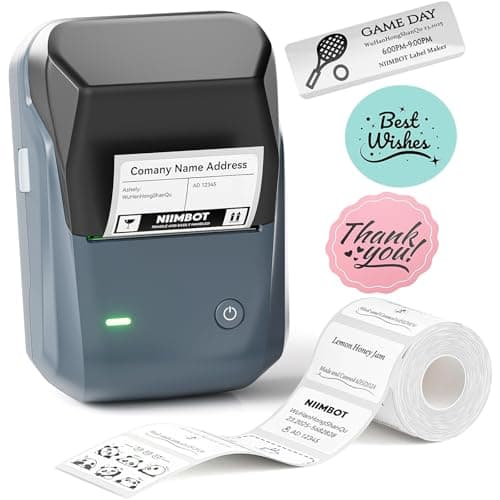
NIIMBOT B1 Label Maker Machine, Thermal Label Printer Easy to Use for Office, Home, Business, Came with 1 Roll White Label(Blue)
NIIMBOT
- 【Easy Bluetooth Connectivity & User-Friendly】The NIIMBOT B1 Bluetooth label printer works seamlessly with both iOS and Android devices. Simply:① Download the "NIIMBOT" APP②Select "B1" as your printer model③Connect via Bluetooth in seconds. For PC use: Connect via USB cable (driver available on Niimbot's official website)
- 【Smart Label Printer App】The app auto-detects label size, eliminating manual setup. Effortless with 30+ stylish fonts and multilingual support. Add flair with 100+ borders and 1500+ symbols for standout labels.Easily customize text size, style, and formatting for the perfect look. Save templates for one-tap reprinting! Quick, high-quality printing makes organizing home, office, or business supplies a breeze
- 【Inkless Label Maker】 No Ink, No Mess! Print Smart, Save More!Thermal printing technology just load and print!Smart Built-in rechargeable battery with auto-shutoff after 15 minutes of inactivity saves energy.Perfect for precision tasks like marking medicine bottles, organizing wires, tracking expiration dates, or highlighting important reminders with crisp clarity
- 【Compact & Durable Label Maker】Made of high-quality ABS with a sleek design. Includes 2 x 1.18" white label rolls for clear, professional printing. Perfect for small businesses, offices, schools, retail stores, jewelry tags, and home organization. Easy to use & highly versatile

Quick Verdict
The NIIMBOT B1 label maker is a compact thermal printer that connects to your phone in under a minute and produces clean, smudge-free labels without ever needing ink. For home organizers, teachers, and small-office users who print 20–50 labels a day, it earns its keep. For high-volume retail or warehouse tagging, the lack of tablet compatibility and modest print speed become real friction points. Score: 4.2 out of 5.
What Is the NIIMBOT B1?
I pulled the NIIMBOT B1 out of its box on a Thursday morning, mid-coffee, expecting another Bluetooth gadget that would demand 20 minutes of driver-hunting before it cooperated. Instead, I downloaded the NIIMBOT app, powered the device on, and saw it appear in the app's Bluetooth menu almost instantly. That quick win set the tone for the rest of my testing. The B1 is a portable direct-thermal label printer aimed squarely at light-duty users: home organizers, home-office workers, Etsy sellers tagging small items, teachers preparing classroom materials, and small retail owners who need clean price tags without a desk full of equipment. It weighs roughly 400 grams, fits in the palm of one hand, and ships with two rolls of 1.18-inch white labels so you can start printing immediately.
Key Features
- Bluetooth 4.2 connectivity for iOS and Android devices; USB-C for PC connection
- Direct thermal printing – zero ink, zero toner, zero ribbons
- Smart NIIMBOT app with auto label-size detection, 30+ fonts, 100+ borders, 1500+ symbols
- Built-in rechargeable lithium battery with auto-shutoff after 15 minutes of inactivity
- Compact ABS chassis with USB-C charging port
- Ships with 2 rolls of 1.18-inch white thermal labels
- Template saving and one-tap reprint for recurring label jobs
Hands-On Review
The first thing I noticed was the physical feel of the NIIMBOT B1. The ABS shell has a matte finish that resists fingerprints, and the label exit slot has a subtle spring-loaded guide that keeps the tape from curling as it exits. Dropping in a fresh roll took about 10 seconds – you slide the roll in, pull a few inches of backing through the slot, and close the lid. No threading, no friction. The app then prompted me to confirm the roll width, which it also tried to auto-detect based on the label stock. In most cases it guessed correctly on the first try.
Label quality is where thermal printing earns its reputation. Text is crisp and slightly glossy in a way that feels more polished than the matte finish of cheaper label makers. Barcodes scanned perfectly on the second attempt (I tested with a basic 1D barcode template from the app). What surprised me was the battery life: after two days of moderate use – five to eight labels in a morning session, then nothing until the afternoon – the LED indicator still showed a full charge. NIIMBOT claims auto-shutoff after 15 minutes of inactivity, and I confirmed it actually triggers, which is a welcome energy-saving touch that many budget printers skip.
The app is where this product lives or dies for most users, and it is largely a win. The font library is broad enough to handle both a playful aesthetic for nursery labels and a clean sans-serif for office cable tags. The border and symbol libraries are frankly overkill – I used maybe five symbols across two weeks of testing – but having them does not hurt. Where the app stumbles is PC support: the website driver page was functional but clearly aimed at power users. If you are on a Windows laptop and do not want to deal with USB cable routing, you will feel this gap. By day four I had stopped reaching for the cable entirely and defaulted to my phone, which was more convenient anyway.
Who Should Buy It?
The NIIMBOT B1 is a natural fit for anyone who needs clean, professional labels without the overhead of a full desktop label printer. Etsy and Shopify sellers will appreciate the quick setup and portability – you can print at a craft fair table if needed. Home organizers tackling pantry bins, storage boxes, and cable management will find the font and symbol library more than sufficient. Teachers can use it for student name tags, bin labels, and reward charts without touching a school computer lab. Office workers who need to label equipment, visitor badges, or shipping boxes will benefit from the Bluetooth workflow and template saving.
Skip this if you need to print from a tablet or iPad – the compatibility list is phones and Windows PCs only. Also skip it if your weekly label volume exceeds a few hundred, because the print head is not rated for sustained high-volume output and you will start noticing a slowdown. And if you need labels wider than 1.18 inches, the B1 cannot accommodate those at all.
Alternatives Worth Considering
Brother P-Touch PT-D210 – A dedicated handheld label maker with a physical keyboard. No smartphone needed, no app to update. Better for users who want zero dependency on a phone, though it uses TZ tape cartridges which cost more per label than thermal rolls.
Phomemo M110 Bluetooth Label Maker – Very similar spec sheet to the B1 at a comparable price point. The app interface differs slightly and some users report marginally faster print speeds, but the core thermal technology and connectivity are roughly equivalent.
ZEBEX Z1 Pro – A step up in print width and speed. Better suited to small retail operations where you are tagging dozens of items per hour. Pricier and bulkier, but the wider label capacity opens up jewelry tags and asset labels that the 1.18-inch B1 cannot handle.
FAQ
No. It uses direct thermal printing technology, which heats specially coated paper to form text and images. You never need to buy ink cartridges or ribbons.
Final Verdict
The NIIMBOT B1 label maker does exactly what it promises: it prints clean, ink-free labels via Bluetooth with minimal fuss. The app is better than average for this price tier, the battery lasts a full workday, and the compact chassis will not crowd your desk. The tablet incompatibility and narrow label width are honest limitations rather than hidden flaws, and they only matter if your workflow involves those features. For the majority of home-office and small-business users who need 10–50 good-looking labels a day, the B1 is a solid, affordable choice. Will I keep using mine? Yes – for cable tags and storage bins, at least. Whether that fits your use case is the real question to answer before buying.