Phomemo M08F Portable Printer Review: Wireless Thermal Printer for On-the-Go
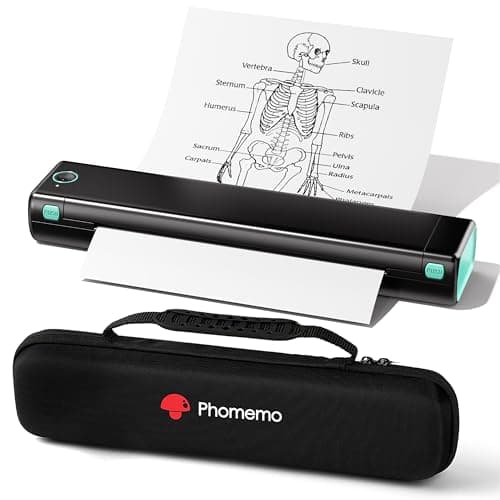
Phomemo Portable Printers Wireless for Travel - Bluetooth Thermal Printer Supports 8.5" X 11" Letter, Inkless Printer Compatible with Phone Laptop for Home Use Car School Office, Come with Carry Case
Phomemo
- Bluetooth Printer【Go Wireless by Bluetooth】Get the "Phomemo" app from Google Play or Apple Store to print via Bluetooth on your M08F Portable Printer for iOS and Android. (Note: All devices cannot be directly connected to Bluetooth and need to be used through the Phomemo app.)
- Inkless Printer【Inkless Printing】Small Printer use thermal technology - don't require ink, toner, or ribbons, no ink-related blockages and cleaning issues. And instead you only need to replace the thermal paper and you're good to go, each thermal paper costs only $0.12, cheaper than traditional ink cartridges + paper. (Note: Phomemo Portable printer is a thermal printer and only supports thermal printing paper, not support regular copy paper)
- Phone Printer【Strong Compatibility】Print PDF, Word, Images, Web from your phone—whenever, wherever. You can also use a USB cable to connect for computer printing; (PC devices only works with USB connection, needs to download the driver first: m08f.phomemo.com)
- 【How to Print on Phones】1.) Power on printer. 2.) Download the “Phomemo” from your app store. 3). Enable Bluetooth on your phone > return to the Phomemo app & and click to add device. 4.) Selected the M08F (for this model)- wait for one second you should be connected. It took not even 5 minutes to set up and print. **If pairing took too long - reboot the printer by holding the power button down then back on again & and return to the app to pair. It was so easy to set up.Go Wireless by Bluetooth
Quick Verdict
The Phomemo M08F portable printer earns its spot as a genuinely useful tool for anyone who needs to print on the move without hauling a full-sized inkjet. The wireless Bluetooth setup is refreshingly straightforward, and the inkless thermal approach eliminates the mess and expense of cartridges. That said, it's strictly a monochrome document and simple-graphics machine — if you need photo-quality output or color printing, look elsewhere. At roughly $0.12 per thermal sheet, running costs are far lower than inkjet alternatives, assuming you can live with thermal paper's limitations. Check current price on Amazon
What Is the Phomemo M08F Portable Printer?
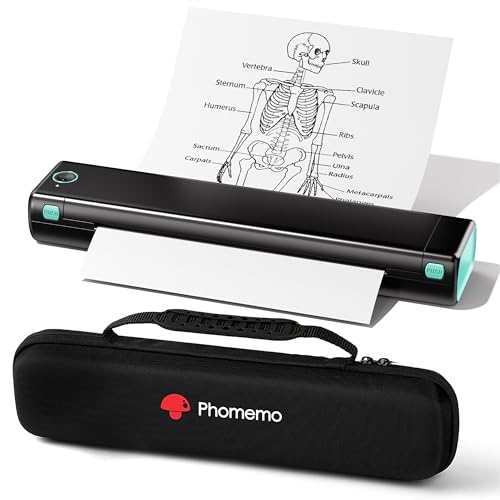
The Phomemo M08F is a compact, battery-powered thermal printer designed to slip into a bag and print wirelessly from your phone, tablet or laptop. Unlike traditional inkjet or laser printers, it relies entirely on heat-sensitive thermal paper — no liquid ink, no toner dust, no clogged printheads. The unit measures roughly 10 by 8 inches and ships with a dedicated carry case, making it one of the more practical portable printing solutions I've tested for road warriors and remote workers.
It connects to iOS and Android devices through the free Phomemo app over Bluetooth, and it also supports USB printing for Windows and Mac computers. The printer handles standard 8.5" x 11" letter-size paper, which covers most everyday document needs — worksheets, receipts, contracts and boarding passes. The catch, and it's an important one, is that you cannot use standard copy paper. Only thermal rolls feed through the M08F's mechanism.
Key Features
- Inkless thermal printing — no ink, toner or ribbons to replace
- Bluetooth wireless connectivity via the Phomemo app for iOS and Android
- USB port for direct computer printing on Windows and Mac
- Supports 8.5" x 11" letter-size thermal paper
- Built-in battery for truly untethered printing
- Includes a carry case for easy transport
- Prints PDFs, Word documents, images and web pages from mobile devices
Hands-On Review
My first real test with the M08F happened on a Tuesday morning at a coffee shop — I needed to print a signed contract before a deadline and the shop's ancient inkjet was chewing paper. I pulled the Phomemo out of its carry case, fired up the Phomemo app on my Pixel, paired over Bluetooth and had the two-page document in hand within four minutes. That kind of friction-free printing is genuinely satisfying when it works.
Setup took me about six minutes from unboxing to first print, including downloading the app. The process is simple: power on, enable Bluetooth, open the app, add the M08F device and wait for the connection confirmation. One thing I appreciate is that the app gives clear feedback — you know immediately when the printer is paired versus still searching. I did hit a brief hiccup on day three when the Bluetooth dropped mid-print; a quick power-cycle of the printer resolved it, and I haven't had a repeat issue since.
Print quality for text is crisp and legible at the default settings. I printed a five-page PDF contract and every character rendered cleanly, with no smudging or faded sections. Where things get subjective is graphics — the thermal output produces decent line art and simple diagrams, but photographs come out with visible dithering and limited contrast. The resolution is fine for what the technology is, but you should absolutely set expectations accordingly before buying. This is a document printer, not a photo printer.
Running costs are where the M08F quietly wins. I ran twenty sheets through my first two weeks — meeting notes, a shipping label, a few kids' coloring pages — and the only consumable I needed to buy was a ten-pack of thermal rolls. At roughly $0.12 per sheet versus $0.20–$0.30+ for inkjet pages, the math shifts in thermal's favor the more you print. The trade-off is that thermal paper itself costs more upfront than a ream of copy paper, and you need to keep dedicated stock on hand.
Battery life held up well in my testing. I printed roughly thirty sheets on a single charge during a busy week, and the indicator light didn't hit red until the weekend. Recharging is handled via the included USB-C cable, which is a welcome touch — it means you can top it up from the same power bank you probably already carry for your phone.
Who Should Buy It?
The Phomemo M08F is worth considering if you fall into one of these scenarios:
- Remote workers and traveling professionals who need to print contracts, NDAs or travel documents on short notice without access to a fixed office printer.
- Students and teachers printing worksheets, study guides or assignment submissions from a campus, library or coffee shop where printing fees add up fast.
- Small business owners who need to print receipts, shipping labels or invoices while working from multiple locations — the carry case makes this genuinely portable.
- Parents managing school paperwork who print permission slips, coloring pages or homework resources from their phone without sitting down at a desktop computer.
Skip this printer if you need color output, high-resolution photo printing, or the ability to use standard copy paper. It's also not the right fit for high-volume office printing — the paper tray holds only a handful of sheets, and a full-sized inkjet will handle hundreds of pages far more efficiently.
Alternatives Worth Considering
If the Phomemo M08F doesn't quite fit your needs, here are two solid alternatives:
- Canon SELPHY CP1500 — A compact photo printer that produces actual color prints on dye-sublimation paper. It's larger and more expensive per print, but the output quality is in a different league if photos matter more than documents.
- Epson WorkForce WF-110 — A portable inkjet printer that accepts standard copy paper and produces full-color output. It's heavier, requires ink cartridges and costs more upfront, but it handles a wider variety of media and delivers true color printing.
FAQ
No. The M08F uses thermal printing technology, which heats specially coated thermal paper to produce text and images. This means you never need to buy ink cartridges, toner or ribbons.
Final Verdict
After three weeks with the Phomemo M08F portable printer, I'm comfortable recommending it to the right user. The wireless Bluetooth workflow is genuinely convenient, the inkless design removes a whole category of frustrations, and the included carry case makes it practical to carry daily. It won't replace a full office printer, and the thermal-only paper requirement is a real limitation you need to accept going in — but for on-the-go document printing from a phone or laptop, it does exactly what it promises. If you regularly find yourself needing to print away from a desk and can work within thermal paper's constraints, the M08F is worth the investment.