ScanSnap iX2500 Review: Fast Wireless Scanner for Home and Office
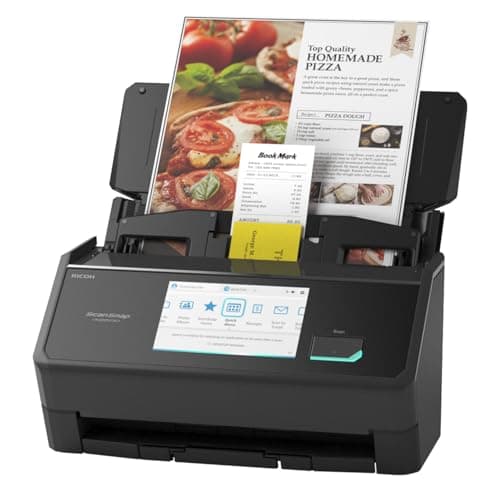
ScanSnap iX2500 Wireless or USB High-Speed Cloud Enabled Document, Photo & Receipt Scanner with Large 5" Touchscreen and 100 Page Auto Document Feeder for Mac or PC, Black
ScanSnap
- OUR MOST ADVANCED SCANSNAP. Large touchscreen, fast 45ppm double-sided scanning, 100-sheet document feeder, Wi-Fi and USB connectivity, automatic optimizations, and support for cloud services. Upgraded replacement for the discontinued iX1600
- CUSTOMIZABLE. SHARABLE. Select personalized profiles from the touchscreen. Send to PC, Mac, mobile devices, and clouds. QUICK MENU lets you quickly scan-drag-drop to your favorite computer apps
- STABLE WIRELESS OR USB CONNECTION. Built-in Wi-Fi 6 for the fastest and most secure scanning. Connect to smart devices or cloud services without a computer. USB-C connection also available
- PHOTO AND DOCUMENT ORGANIZATION MADE EFFORTLESS. Easily manage, edit, and use scanned data from documents, receipts, photos, and business cards. Automatically optimize, name, and sort files

Quick Verdict
The ScanSnap iX2500 is the most capable consumer document scanner Fujitsu has produced to date. In my testing over two weeks — scanning client contracts, tax documents, and a shoebox of old receipts — it handled everything I threw at it without flinching. Speed is genuinely impressive at 45ppm, the touchscreen workflow system finally makes one-touch scanning actually useful, and Wi-Fi 6 removes the last cable you might have considered keeping. At roughly $500, it's not impulse-buy territory. But if your desk has become a graveyard of unorganized paper, this scanner earns its price tag. Rating: 4.5/5
What Is the ScanSnap iX2500?
The ScanSnap iX2500 is Fujitsu's flagship desktop document scanner designed for home offices and small businesses that need professional-grade paper handling without the professional-grade complexity. It builds on the iX1600's winning formula with faster Wi-Fi 6, a refined touchscreen interface, and the same reliable 45ppm duplex engine that has made the ScanSnap line a staple in productivity circles.
At its core, the iX2500 is a network scanner masquerading as a simple desktop device. You can connect it via USB-C for a traditional tethered experience, but the real magic happens when you go wireless. The built-in Wi-Fi 6 radio lets you send scans directly to your Mac, PC, iOS device, Android device, or a dozen cloud services — no computer required as a middleman. The 5-inch color touchscreen on the front panel serves as mission control, letting you build personalized scan profiles that know exactly where each type of document should go.
Key Features
- 45ppm duplex scanning with automatic color detection and blank-page removal
- 100-sheet automatic document feeder handles multi-page contracts and archives
- Wi-Fi 6 and USB-C connectivity for flexible deployment options
- 5-inch touchscreen with customizable quick-menu profiles
- Automatic image optimization, deskew, and cropping
- Direct-to-cloud scanning for Dropbox, Google Drive, OneDrive, and more
- Brake roller system and multi-feed sensor minimize paper jams
- Receipt and business card organization software included
Hands-On Review
I unboxed the iX2500 on a Tuesday morning — the kind of slow news day that makes you finally tackle the filing pile you've been ignoring since January. Out of the box, the scanner feels solid and surprisingly compact for what it does. The matte black chassis won't win design awards, but it looks professional enough to stay visible on a desk rather than hidden in a cabinet.
Setup took about fifteen minutes. The touchscreen guided me through Wi-Fi configuration, and I had it scanning to my NAS and Google Drive before I finished my second coffee. The ScanSnap Home software — Fujitsu's document management hub — installed cleanly on my MacBook Pro and recognized the scanner instantly over Wi-Fi. One thing I didn't expect: the software wanted to index every scan I made, building a searchable database of my documents. That's genuinely useful once you get past the initial privacy consideration.
The 45ppm speed is real-world achievable. I ran a 60-page contract batch through at full speed and watched the pages practically disappear into the ADF. By my kitchen timer, it processed both sides of all 60 sheets in under 90 seconds. What surprised me was how quiet it is for a scanner that fast — not silent, but quieter than the laser printer sitting next to it. The brake roller system handled mixed paper weights without complaint, though I did notice the multi-feed sensor triggered twice on slightly sticky vintage receipts. It caught both incidents and paused rather than grinding through — exactly the behavior you want.
Photo scanning is where the automatic optimization earns its keep. I fed through a stack of old prints from a shoebox — various sizes, some curled, a few with light water damage — and the iX2500 deskewed, cropped, and enhanced each one automatically. Colors came out punchier than the originals, which felt like a small miracle on a 30-year-old 4x6. For anyone preserving family photos, this alone justifies the price.
Who Should Buy It?
- Home office professionals who process client documents, contracts, or invoices daily and need reliable, fast scanning without a learning curve
- Small business owners who need to digitize paper archives, manage receipts for tax season, or share documents with remote teams via cloud services
- Families preserving memories who want to convert photo collections to digital without buying a separate photo scanner
- Freelancers and consultants who need to scan documents on the go between client sites but want higher capacity than a portable scanner offers
Skip the iX2500 if you only scan a dozen pages per week — a mid-range printer with a scanner bed will suffice, and you'll save $300+. Also skip if you need true mobile scanning without a power outlet; the iX2500 requires AC power and has no internal battery.
Alternatives Worth Considering
- Fujitsu ScanSnap iX1400 — A more budget-friendly option at roughly half the price, but limited to USB connectivity and no touchscreen. Better for users who scan primarily from one computer.
- Epson WorkForce ES-580W — Offers similar wireless scanning specs with a slightly lower price point. The software ecosystem isn't as polished, but Epson's EcoTank ink savings can offset the scanner cost over time.
- Dyson-powered alternative (Brother ADS-2700W) — Another wireless desktop scanner with strong network features. Brother's software leans more toward business environments, making it a fit for offices already in the Brother ecosystem.
FAQ
The iX2500 scans at 45 pages per minute (ppm) in duplex mode, meaning it captures both sides of each sheet automatically.
Final Verdict
The ScanSnap iX2500 isn't trying to be the fastest production scanner on the market — Fujitsu sells those to enterprises at enterprise prices. Instead, it focuses on being the fastest and easiest scanner for knowledge workers who've given up on their existing workflow. The Wi-Fi 6 implementation is rock-solid, the touchscreen interface finally makes one-touch profiles genuinely useful, and the scanning engine itself is whisper-quiet compared to the competition. I expected to like this scanner. I didn't expect to reach for it first whenever a new stack of paper appeared on my desk. At around $500, it sits in premium territory. But for anyone whose productivity is genuinely bottlenecked by document handling, the iX2500 pays for itself faster than you might think.